
-
SYSTEM SEARCH
System Scanners Online:
Username: Guest
>> System Scan?
>> The Universe >
Incoming Message:
Due to system limitations searching with words of 3 or less characters will not return results. For instance; Doctor Who. This will not return results as the system is trying to search for both Doctor AND Who in which Who will not be found as it's a 3 character word. To find Doctor Who; you'd search for either Doctor or "Doctor Who".
Search Tips:
For specific searches; enclose your search with quotes. Example: "Doctor Who" or "Addams Family".
Search the Community
Showing results for tags 'sf_l1'.
Found 5 results
-
Version 1.2
1248 downloads
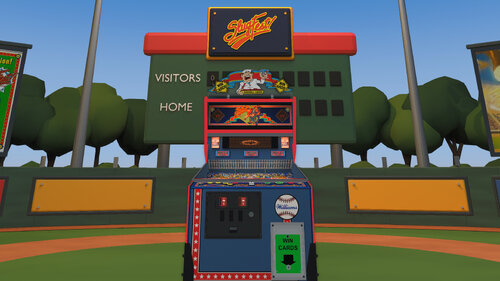
Welcome to SlugFest, a pitch-and-bat baseball game, play ball! Lore: SlugFest was Williams’ final pitch-and-bat baseball game, with only 1,559 machines produced. SlugFest introduced Williams’ first dot-matrix display (DMD). An animated heckler taunted players, who silenced him by launching a ball into the upper balcony. Cabinets could also dispense real baseball cards as prizes. How to play: SlugFest plays like baseball. Press a pitch button to throw a pitch. Then, press the bat button as the pitch arrives to swing and hit the ball toward scoring targets, while avoiding targets marked OUT. Target hits move your runners around the bases, and each runner who reaches home scores one run. Your goal is to score as many runs as possible. Requirements and Setup Steps: VPX - 10.8 VPinMAME - 3.6 or newer ROM: sf_l1 Card_images: Put the baseball card folder in the same folder as your table. (e.g. Tables folder). Included are 2 camera _cabinet.ini and _desktop.ini view files. To use either one, rename the ini file to match the file name of the VPX table. In other words, remove _desktop or _cabinet from the ini file. Features: Updated physics; animated bat, home-run ramp, and pitching cover. Baked lighting, GI, flashers, glowing inserts, and reflective metal. Updated images and graphics. Including hand-traced runners and playfield art. Positional mechanical and rolling sound. One and two-player, four pitch types, pinch hitting, stealing bases, and Throw Out Runner/Boo. Desktop and cabinet camera ini files. Baseball field environment can be enabled and activates automatically for VR. Included are 100 embedded baseball cards, randomly selected when card awards are dispensed and shown one at a time with smooth fades. (The on-table card display can be disabled.) DOF features now integrated. Credits: SlugFest integration and tuning by DancingCan. Physics and mechanical-sound systems are adapted from VPW Example Table 1.7 Roccodimarco, Tab, and Destruk — previous SlugFest work. VPin Workshop (VPW) — Example Rom and Table 1.7. nFozzy and Rothbauerw — physics foundations. iaakki, wrd1972, and apophis — Target Bouncer. Fleep — mechanical sounds. nFozzy — ramp-rolling sounds. Visual Pinball, VPinMAME, and VPX Lightmapper teams — development tools. My Work: This is the first VPX table I’ve ever made, building on the work of earlier creators and tables. I had a blast putting everything together. Let me know what you think! I’m open to feedback. I hope you enjoy playing it as much as I enjoyed making it. Controls: Start: 1 = Start a one-player game. 2 = Start a two-player game. Batter controls (both modes): Right flipper = Swing the bat. Left MagnaSave = Pinch Hit. Right MagnaSave = Steal Base. One-player pitching: Left flipper = Pitch; the game chooses the pitch type. Two-player pitching: Left-flipper pitching is disabled. Up arrow = Fastball. Down arrow = Curveball. Left arrow = Changeup. Right arrow = Screwball. Pitcher: F = Throw Out Runner/Boo, depending on the game state. Flipper and MagnaSave buttons follow your VPX assignments. Table Customization: To customize the table, open the script, edit the lines below, save, and restart. These line numbers apply to the 1.0 production release. Cabinet — line 190: Cabinet = 1 1 = Focused playfield. 2 = Full cabinet without the ballpark. 3 = Full cabinet with the ballpark. Pitch Buttons and Controls — lines 317–339. Const LeftFlipperPitchIn2P 1 = random pitch. Solo behavior stays unchanged. 0 = disabled Customize 2nd Player pitch buttons by changing the lines below (default shown): Const PitchKeyFast = 200 ' Up arrow Const PitchKeyCurve = 208 ' Down arrow Const PitchKeyChangeup = 203 ' Left arrow Const PitchKeyScrew = 205 ' Right arrow For more examples refer to https://www.vpforums.org/Tutorials/KeyCodes.html WinCardsOnTable — line 121: Const WinCardsOnTable = 1 1 = Show the WIN CARDS sign, awarded card images, and their shadows on the right plastic. 0 = Hide those visuals. Card awards, dispenser operation, card stock, and scoring remain active with either setting. Apron — line 99: Const Apron = 1 1 = Show the apron artwork. 0 = Hide the apron artwork. Fence — line 128: Const Fence = 1 1 = Show the front playfield fence. 0 = Hide it, with matching shadows and reflections adjusted automatically. Lockdown bar — line 108: Const Lockbar = 1 1 = Show the lockdown bar. 0 = Hide the lockdown bar. BatOnlyAtPitch — line 313: Const BatOnlyAtPitch = 1 1 = Allow swings only while a pitch is in flight. 0 = Allow free swings. Selects the presentation outside VR. For VR, edit line 191: If RenderingMode = 2 Then Cabinet = 3 Change the final 3 to 2 for the cabinet without the ballpark. Leave RenderingMode = 2 unchanged. Baseball Card Customization Want to put your own cards in the lineup? Use portrait PNG, JPG, or JPEG artwork with a 5:7 aspect ratio. Baseball-card source folder — line 322: Const WinCardRelativeFolder = "card_images" This identifies the source artwork folder used when building the embedded card set. Example 1 — line 325: WinCardFileNames(0) = "Albert Belle — 1992 Donruss.jpg" corresponds to WinCard_001. Example 2 — line 326: WinCardFileNames(1) = "Andy Benes — 1989 Topps USA Baseball.jpg" corresponds to WinCard_002. To swap artwork, replace the corresponding images in VPX’s Image Manager while keeping their existing names, such as WinCard_001 and WinCard_002, then save the table. Changing the folder or catalog filenames alone won’t replace the displayed cards. --------------------------- Changelog: 1.0 - VPX Release - DancingCan 1.1 - Pitch button fixes 1.2 - DOF -
 View File SlugFest (Williams 1991) Welcome to SlugFest, a pitch-and-bat baseball game, play ball! Lore: SlugFest was Williams’ final pitch-and-bat baseball game, with only 1,559 machines produced. SlugFest introduced Williams’ first dot-matrix display (DMD). An animated heckler taunted players, who silenced him by launching a ball into the upper balcony. Cabinets could also dispense real baseball cards as prizes. How to play: SlugFest plays like baseball. Press a pitch button to throw a pitch. Then, press the bat button as the pitch arrives to swing and hit the ball toward scoring targets, while avoiding targets marked OUT. Target hits move your runners around the bases, and each runner who reaches home scores one run. Your goal is to score as many runs as possible. Requirements and Setup Steps: VPX - 10.8 VPinMAME - 3.6 or newer ROM: sf_l1 Card_images: Put the baseball card folder in the same folder as your table. (e.g. Tables folder). Included are 2 camera _cabinet.ini and _desktop.ini view files. To use either one, rename the ini file to match the file name of the VPX table. In other words, remove _desktop or _cabinet from the ini file. Features: Updated physics; animated bat, home-run ramp, and pitching cover. Baked lighting, GI, flashers, glowing inserts, and reflective metal. Updated images and graphics. Including hand-traced runners and playfield art. Positional mechanical and rolling sound. One and two-player, four pitch types, pinch hitting, stealing bases, and Throw Out Runner/Boo. Desktop and cabinet camera ini files. Baseball field environment can be enabled and activates automatically for VR. Included are 100 embedded baseball cards, randomly selected when card awards are dispensed and shown one at a time with smooth fades. (The on-table card display can be disabled.) DOF features now integrated. Credits: SlugFest integration and tuning by DancingCan. Physics and mechanical-sound systems are adapted from VPW Example Table 1.7 Roccodimarco, Tab, and Destruk — previous SlugFest work. VPin Workshop (VPW) — Example Rom and Table 1.7. nFozzy and Rothbauerw — physics foundations. iaakki, wrd1972, and apophis — Target Bouncer. Fleep — mechanical sounds. nFozzy — ramp-rolling sounds. Visual Pinball, VPinMAME, and VPX Lightmapper teams — development tools. My Work: This is the first VPX table I’ve ever made, building on the work of earlier creators and tables. I had a blast putting everything together. Let me know what you think! I’m open to feedback. I hope you enjoy playing it as much as I enjoyed making it. Controls: Start: 1 = Start a one-player game. 2 = Start a two-player game. Batter controls (both modes): Right flipper = Swing the bat. Left MagnaSave = Pinch Hit. Right MagnaSave = Steal Base. One-player pitching: Left flipper = Pitch; the game chooses the pitch type. Two-player pitching: Left-flipper pitching is disabled. Up arrow = Fastball. Down arrow = Curveball. Left arrow = Changeup. Right arrow = Screwball. Pitcher: F = Throw Out Runner/Boo, depending on the game state. Flipper and MagnaSave buttons follow your VPX assignments. Table Customization: To customize the table, open the script, edit the lines below, save, and restart. These line numbers apply to the 1.0 production release. Cabinet — line 190: Cabinet = 1 1 = Focused playfield. 2 = Full cabinet without the ballpark. 3 = Full cabinet with the ballpark. Pitch Buttons and Controls — lines 317–339. Const LeftFlipperPitchIn2P 1 = random pitch. Solo behavior stays unchanged. 0 = disabled Customize 2nd Player pitch buttons by changing the lines below (default shown): Const PitchKeyFast = 200 ' Up arrow Const PitchKeyCurve = 208 ' Down arrow Const PitchKeyChangeup = 203 ' Left arrow Const PitchKeyScrew = 205 ' Right arrow For more examples refer to https://www.vpforums.org/Tutorials/KeyCodes.html WinCardsOnTable — line 121: Const WinCardsOnTable = 1 1 = Show the WIN CARDS sign, awarded card images, and their shadows on the right plastic. 0 = Hide those visuals. Card awards, dispenser operation, card stock, and scoring remain active with either setting. Apron — line 99: Const Apron = 1 1 = Show the apron artwork. 0 = Hide the apron artwork. Fence — line 128: Const Fence = 1 1 = Show the front playfield fence. 0 = Hide it, with matching shadows and reflections adjusted automatically. Lockdown bar — line 108: Const Lockbar = 1 1 = Show the lockdown bar. 0 = Hide the lockdown bar. BatOnlyAtPitch — line 313: Const BatOnlyAtPitch = 1 1 = Allow swings only while a pitch is in flight. 0 = Allow free swings. Selects the presentation outside VR. For VR, edit line 191: If RenderingMode = 2 Then Cabinet = 3 Change the final 3 to 2 for the cabinet without the ballpark. Leave RenderingMode = 2 unchanged. Baseball Card Customization Want to put your own cards in the lineup? Use portrait PNG, JPG, or JPEG artwork with a 5:7 aspect ratio. Baseball-card source folder — line 322: Const WinCardRelativeFolder = "card_images" This identifies the source artwork folder used when building the embedded card set. Example 1 — line 325: WinCardFileNames(0) = "Albert Belle — 1992 Donruss.jpg" corresponds to WinCard_001. Example 2 — line 326: WinCardFileNames(1) = "Andy Benes — 1989 Topps USA Baseball.jpg" corresponds to WinCard_002. To swap artwork, replace the corresponding images in VPX’s Image Manager while keeping their existing names, such as WinCard_001 and WinCard_002, then save the table. Changing the folder or catalog filenames alone won’t replace the displayed cards. --------------------------- Changelog: 1.0 - VPX Release - DancingCan 1.1 - Pitch button fixes 1.2 - DOF Submitter DancingCan Submitted 10/11/26 Category VPX - Pinball Tables VPX Standalone No
 -
b2s.thumb.png.3101489baae9c1450dd44e5a01473a6c.png)
Version 1.0.0
588 downloads
SlugFest (Williams 1991) b2s + full dmd Custom high-res and high-detail images. Warm lighting on the backbox. high-res grill for two screen setups. Topper art on the full dmd. -

Version 1.0.0
168 downloads
SlugFest (Williams 1991) vpx wheels -

Version 1.0.0
49 downloads
SlugFest Instruction Card / Rules

