Jump to content

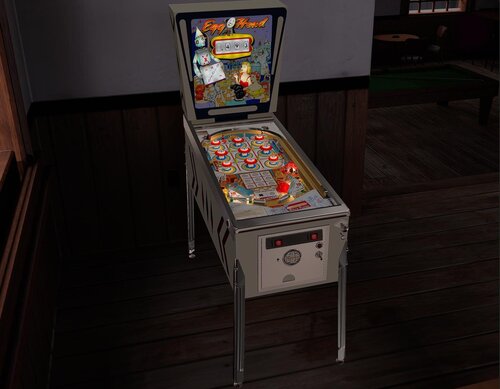
Egg Head (Gottlieb 1961) EMU v 2.1.1 Hybrid

  • Get Support
  • Create an account or sign in to download this
download_no_perm
4227 Views
1115 Downloads
5 From 10 reviews
133.38 MB File Size
None required ROM Name
EM Underdogs Created by
Roy Parker Artwork by
Loserman76, burger Scripting by
Gottlieb Manufacturer
1961 Year

5 Screenshots

By 1961 America was steeped in the atomic age as well as the space race. All things futuristic were king in this era. 

Here we have a scientist ( the Egg Head, which was a somewhat less than flattering term for brainy nerds) programming his radio controlled robot, Oxie, as it plays out the most unwinnable game ever devised - tic-tac-toe. The girls seem to be challenging Oxie which makes our egg head quite anxious! 

Another whimsical collaboration between the great Wayne Neyens and Roy Parker, Egg Head is yet another highly collectable wedgehead in the real pinball world.


EM Underdogs presents v2.1, originally created by the late great Loserman76 and modded by @teisen who decided it was time for a full rework. He pulled the EM Underdogs team in to really polish it up not just visually but with nFozzy physics and fleep sounds by @burger 


We left the table options available by holding the left flipper before game start as well as options in the F12 tweak menu. This is a manual ball lifter game so use your right magna key to lift the ball into the shooter lane. You can change this in the left flipper options. 

This has desktop scoring by default but another backdrop is available for those who prefer to use @hauntfreaks awesome directb2s. There is no VR added at this time. 
Now with VR!


We hope you enjoy this fun and colorful look back in pinball history!


Permission from ORIGINAL Author(s)?

Yes
written permission received.

Allow file to be included on a VPUniverse downloader app?

Yes

VPX Standalone

No
https://www.ipdb.org/machine.cgi?id=758
https://vpuniverse.com/files/file/16655-egg-head-gottlieb-1961-b2s/
Contact Author First.
10.8 required
Yes

What's New in Version 2.1.1   See changelog

Released

fix desktop stuff showing in cabinet mode

User Feedback

Recommended Comments


RabidUrko

Posted (edited)

The backglass link on the virtualspreadsheet site doesnt go to the backglass.

Was a bit quick there, its in losermans table download zip.

Edited by RabidUrko
Cliffy

Posted

26 minutes ago, RabidUrko said:

The backglass link on the virtualspreadsheet site doesnt go to the backglass.

Was a bit quick there, its in losermans table download zip.

The b2s link is up top where it says link to b2s. I do not maintain the spreadsheet and have never had to add one of our tables to it so not sue what to do there

  • Members
EMUnderdogs

Posted

37 minutes ago, RabidUrko said:

The backglass link on the virtualspreadsheet site doesnt go to the backglass.

Was a bit quick there, its in losermans table download zip.

I just checked at https://virtualpinballspreadsheet.github.io/games and hauntfreaks b2s is there. However they haven't scraped up our version of the table yet

RabidUrko

Posted (edited)

22 minutes ago, Cliffy said:

The b2s link is up top where it says link to b2s. I do not maintain the spreadsheet and have never had to add one of our tables to it so not sue what to do there

ahhh cheers for that, i usually just look on the VP spreadsheet.

Latest tables just seem to appear on the list.

Ill use links from here in future. (i always thought the spreadsheet was on the ball, and its easy to search on tables)

Edited by RabidUrko
RabidUrko

Posted (edited)

12 minutes ago, EMUnderdogs said:

I just checked at https://virtualpinballspreadsheet.github.io/games and hauntfreaks b2s is there. However they haven't scraped up our version of the table yet

The link doesnt go to Hauntfreaks b2s page for Egg Head though on the spreadsheet, even though it should.

Edited by RabidUrko
Cliffy

Posted

55 minutes ago, RabidUrko said:

The link doesn't go to Hauntfreaks b2s page for Egg Head though on the spreadsheet, even though it should.

I clicked on this backglass link and it goes to it

spreadsheetb2slink.jpg

RabidUrko

Posted (edited)

Thats weird when i click on that photo link for the b2s it goes to this.

Im not losing the plot i just retried several times, i dont know how its ok for you and not me though.

Not the end of the world, i admit.


Edited by RabidUrko
Cliffy

Posted

16 minutes ago, RabidUrko said:

Thats weird when i click on that photo link for the b2s it goes to this.

Im not losing the plot i just retried several times, i dont know how its ok for you and not me though.

Not the end of the world, i admit.

time to flush your browser cache? Weird!


RabidUrko

Posted (edited)

Just cleared 100% , still the same, wont try to lose sleep on it though lol

Ok someone else just tried for me and gets what i do in this video, im not going insane.


Edited by RabidUrko
clyde8000

Posted

Thanks EMU the table looks & plays great!

ddwall

Posted

What a challenging table looks and sounds great. Thank you. 

mikepmcs

Posted

Awesome! Thank you to all involved!!

  • Content Provider
ARMYAVIATION

Posted

@EMUnderdogs how did you get the GetHelp image to appear in the f12 menu.  I Cntrl F the script but didnt see a call for that image?  thanks


Cliffy

Posted

16 minutes ago, ARMYAVIATION said:

@EMUnderdogs how did you get the GetHelp image to appear in the f12 menu.  I Cntrl F the script but didnt see a call for that image?  thanks


Open the table in edit mode and look in Table Info. The trick is in there :)

pbplay4

Posted

Thank you!

tnkcmdr69

Posted

I'm getting a runtime error on line 2150. Type mismatch: 'cdbl'


Any suggestions on a fix for this?

Cliffy

Posted

5 hours ago, tnkcmdr69 said:

I'm getting a runtime error on line 2150. Type mismatch: 'cdbl'


Any suggestions on a fix for this?

Go to the vpinball\User folder and delete EggHead_61VPX.txt

It will create a new one on the next start of the game.

tnkcmdr69

Posted

On 3/30/2026 at 11:45 AM, Cliffy said:

Go to the vpinball\User folder and delete EggHead_61VPX.txt

It will create a new one on the next start of the game.

That worked! Thank you very much Sir!

Lroy

Posted

Thank you

htamas

Posted

Very nice update, thank you - however, how can I get rid of the rails in cabinet mode (no VR)?

jejevpuniverse

Posted

In cabinet mode, I often spend a lot of time deleting the display of the lockbar.
It's very annoying : please put an option to hide the lockbar, because the bottom of the apron is hidden.

For example, with this table, I update the element "lockdown" and make it invisible.
And I update the element VR_ApronWall001 and make side and top invisible.


Remark : thank you for your work. My comments are simply there to improve the table experience. 🙂

  • Members
EMUnderdogs

Posted

5 hours ago, jejevpuniverse said:

In cabinet mode, I often spend a lot of time deleting the display of the lockbar.
It's very annoying : please put an option to hide the lockbar, because the bottom of the apron is hidden.

For example, with this table, I update the element "lockdown" and make it invisible.
And I update the element VR_ApronWall001 and make side and top invisible.


Remark : thank you for your work. My comments are simply there to improve the table experience. 🙂

@htamas @jejevpuniverse

Ooops. Sorry about that. We should have double checked before pushing it up. Are you saying this happens on our other recent VR updates too?

We will get this fixed and updated again pronto. 

jejevpuniverse

Posted

2 hours ago, EMUnderdogs said:

@htamas @jejevpuniverse

Ooops. Sorry about that. We should have double checked before pushing it up. Are you saying this happens on our other recent VR updates too?

We will get this fixed and updated again pronto. 

I didn't realize you were paying attention to those details in cabinet mode. So it's not a feature, but a bug!

On the previous tables, I didn't see the problem : Mustang, Gigi, ElDoRado are all OK.
Thank you !

  • Members
EMUnderdogs

Posted

19 minutes ago, jejevpuniverse said:

I didn't realize you were paying attention to those details in cabinet mode. So it's not a feature, but a bug!

On the previous tables, I didn't see the problem : Mustang, Gigi, ElDoRado are all OK.
Thank you !

Not a bug, technically. We just forgot to add those items to the desktop collection and then do the script work to hide them in cabinet mode


Create an account or sign in to comment

You need to be a member in order to leave a comment

Create an account

Sign up for a new account in our community. It's easy!

Register a new account

Sign in

Already have an account? Sign in here.

Sign In Now
×
  • Create New...
