
Jump to content

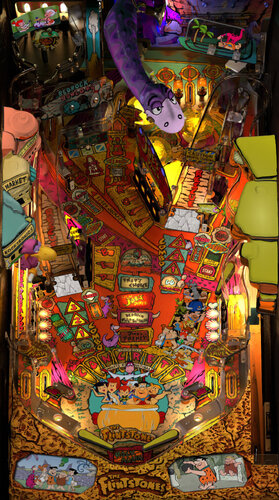
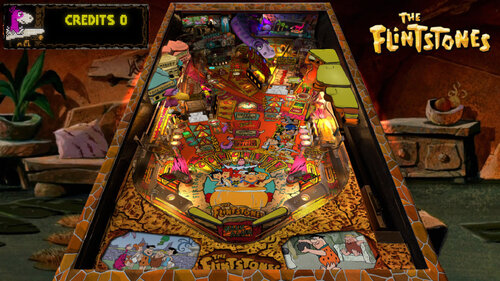
[VPURemix] The Flintstones Cartoon SE [Mod of G5K's v1.26]

  • Get Support
  • Create an account or sign in to download this
download_no_perm
18333 Views
4091 Downloads
5 From 18 reviews
225.25 MB File Size
fs_lx5 ROM Name
PinballLizard Created by
sourced Artwork by
Williams Manufacturer
1994 Year

3 Screenshots

YABBA DABBA DOO!


I'm a huge fan of the original Flintstones cartoon series that
ran from 1960-1966. Since the movie version of the table first came out
I was on a mission to modify it in the style of the series. This was
a bold move, because I knew nothing about the process and still know
very little.  I hope that you enjoy it.


This is a complete cartoon remix of the original table and nFozzy patch.


Thanks to G5K, 3rdAxis, DjRobX, Dark and LoadedWeapon for the source table and patch.
Truly amazing work folks, thank you!


* PLEASE NOTE THAT THIS MOD WAS POSTED BEFORE KNOWING ABOUT THE PATCH SYSTEM

    I hope that you all download and enjoy the origial table and thank the authors.


Suggested Add-Ons:  Altsound, Alternate PUP Overlays


Edited by PinballLizard
Final consolidated version

https://www.ipdb.org/machine.cgi?id=888
https://vpuniverse.com/files/file/20968-the-flintstones-williams-1994-cartoon-b2s-full-dmd/
Yes
10.7.2 or higher required
PinballLizard
G5K

What's New in Version Final   See changelog

Released

Consolidated Final Verson

User Feedback

Recommended Comments


jejevpuniverse

Posted

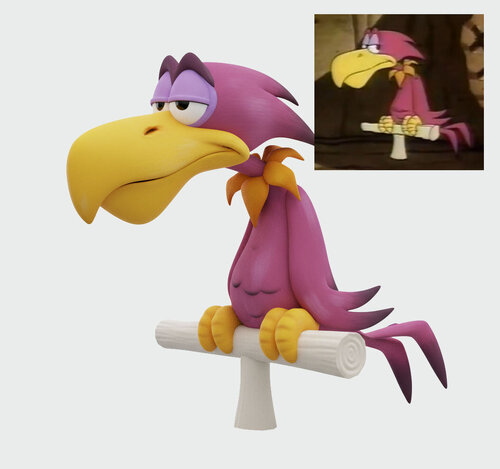
Great work with the bird.
FYI : you can check "Toy (never collidable)" in Physics option of Primitive001 for a better performance.

ddwall

Posted

I had installed your previous update the bird is a nice addition. this is one of my favorite tables. 

Thank you

Matteo

Posted

thank's the update :)

BobVanEss

Posted

The table looks great with all your improvements! Pup pack works great as well. Personally I enjoy your previous altsound you made in 2024 for this table as it includes the original cartoon theme songs that this current altsound seems to be missing.


PinballLizard

Posted

8 minutes ago, BobVanEss said:

The table looks great with all your improvements! Pup pack works great as well. Personally I enjoy your previous altsound you made in 2024 for this table as it includes the original cartoon theme songs that this current altsound seems to be missing.


Thanks!  I thought that was the one I included.  Must have been an earlier draft.  I'll add the link to the description.  

Cliffy

Posted

Nice final polish with the new dictabird @PinballLizard thanks!!


Now, one thing that's bothered me is the right and left building alignments. This has been a problem even before the @LoadedWeapon mod version so it's nothing that you did.

There are two identical "buildings" prims for each side. One normally lighted and one darkened (GI off). The GIoff prims are not aligned with the lighted prim but absolutely need to be.  Fortunately it's an easy fix.  Open in edit mode and in the properties  check layer 5 and layer 8. In layers filter box search building. Make sure all 4 buildings are checked. Use your mouse and double click BuildingL_giOFF, go to edit and click Lock. Now use your mouse to move the prim so it aligns with the left building prim. Done. Now do the same on the right side BuildingR_giOFF, unlock, align with mouse, done- SAVE.

Pics below show before, editor and after 

flinstones-bad-buildings.jpg

flinstones-buildings-gioff-move.jpg

flinstones cartoon se buildings-fix.jpg

PinballLizard

Posted

41 minutes ago, Cliffy said:

Nice final polish with the new dictabird @PinballLizard thanks!!


Now, one thing that's bothered me is the right and left building alignments. This has been a problem even before the @LoadedWeapon mod version so it's nothing that you did.

There are two identical "buildings" prims for each side. One normally lighted and one darkened (GI off). The GIoff prims are not aligned with the lighted prim but absolutely need to be.  Fortunately it's an easy fix.  Open in edit mode and in the properties  check layer 5 and layer 8. In layers filter box search building. Make sure all 4 buildings are checked. Use your mouse and double click BuildingL_giOFF, go to edit and click Lock. Now use your mouse to move the prim so it aligns with the left building prim. Done. Now do the same on the right side BuildingR_giOFF, unlock, align with mouse, done- SAVE.

Pics below show before, editor and after 

flinstones-bad-buildings.jpg

flinstones-buildings-gioff-move.jpg

flinstones cartoon se buildings-fix.jpg

Good catch. Thanks.

scoobie1

Posted

This looks great, can't wait to try it out!

Redwings13

Posted

When I load the table, it disappears after about 5-10 seconds 

PinballLizard

Posted

19 minutes ago, Redwings13 said:

When I load the table, it disappears after about 5-10 seconds 

That's odd.  What version of vpx are do you have?

World-of-Virtual-pinball

Posted

playing in cabinet mode game crashed/ exited to desktop after i lost the 1st ball, i was videoing so managed to grab the error

image.thumb.png.93bef4850042c4f3f731fbc703a12272.png

Redwings13

Posted

24 minutes ago, PinballLizard said:

That's odd.  What version of vpx are do you have?

Problem is fixed. Earlier today i downloaded the new aviator color DMD serum and it wouldn’t work, the author suggested I install a newer dmdext that made that color dmd work, but when I installed this new flintstones table it made it crash I believe because of the rom. I went back to old dmdext and flintstones now plays. Something with that dmdext must not be right.   Sorry for the confusion.

PinballLizard

Posted

48 minutes ago, World-of-Virtual-pinball said:

playing in cabinet mode game crashed/ exited to desktop after i lost the 1st ball, i was videoing so managed to grab the error

image.thumb.png.93bef4850042c4f3f731fbc703a12272.png

I can not replicate the error on my end, but from what I've researched, you can try changing line 535
Change "IsEmpty" to "Is Nothing" (without quotes).
*Don't save the table unless it works.

ksandersbna

Posted

Really looking forward to trying this out later! I had just added the TV pup pack to the original table when I saw this. This is going to be an excellent theme!


Question: What do I do with Cartoon Bird 3D.zip that is in the download? I have everything else setup.


Thank you for all the work on this!


PinballLizard

Posted

2 hours ago, ksandersbna said:

Question: What do I do with Cartoon Bird 3D.zip that is in the download? I have everything else setup.


Nothing.  It's already in the table.  I included it for anybody that can use it.

mrtr32

Posted (edited)

22 hours ago, World-of-Virtual-pinball said:

playing in cabinet mode game crashed/ exited to desktop after i lost the 1st ball, i was videoing so managed to grab the error

image.thumb.png.93bef4850042c4f3f731fbc703a12272.png

I'm getting this error after the BuildingL_giOFF and BuildingR_giOFF aligments mentioned by Cliffy.

Edited by mrtr32
Cliffy

Posted

58 minutes ago, mrtr32 said:

I'm getting this error after the BuildingL_giOFF and BuildingR_giOFF aligments mentioned by Cliffy.

moving the prims won't cause any errors. Did you edit with vpx 10.8.0? If edited and then saved with 10.7.4 or 10.8.1 that might create a problem

mrtr32

Posted (edited)

1 hour ago, Cliffy said:

moving the prims won't cause any errors. Did you edit with vpx 10.8.0? If edited and then saved with 10.7.4 or 10.8.1 that might create a problem

I'm with a stable version of VPX 10.8.0.


Tested the table a lot before moving the gioff parts without any errors.

Juste after the change I get the Line 536 error at the end of game.

Verry strange because the change have nothing to do with the error.

It seems to be a VPX issue so I'm running over 1000 tables with vpx 10.8.0 without any issues.🤔


Can you give a picture of the position tab for the BuildingL_giOFF and BuildingR_giOFF?

Edited by mrtr32
Cliffy

Posted

28 minutes ago, mrtr32 said:

I'm with a stable version of VPX 10.8.0.


Tested the table a lot before moving the gioff parts without any errors.

Juste after the change I get the Line 536 error at the end of game.

Verry strange because the change have nothing to do with the error.

It seems to be a VPX issue so I'm running over 1000 tables with vpx 10.8.0 without any issues.🤔


Can you give a picture of the position tab for the BuildingL_giOFF and BuildingR_giOFF?


building-left.jpg

building-right.jpg

CCS4George

Posted

The page shows it was updated 8 hours ago. Did something really change?

htamas

Posted

According the the description, the update was the addition of the altsound.csv file and some other changes.

PinballLizard

Posted

10 hours ago, CCS4George said:

The page shows it was updated 8 hours ago. Did something really change?

No, just organized it better without a lot of extra development files to avoid any confusion. Those files can be requested for anyone the can use them for modding.

r2z2

Posted

Thank you, this table and theme deserve the love.  Awesome job

mrtr32

Posted (edited)

20 hours ago, Cliffy said:


building-left.jpg

building-right.jpg

Thanks Cliffy !

I replaced the X and Y positions only with your values without success, the error is always present.

Edited by mrtr32
Lotso

Posted

Thanks @PinballLizard, This is one of my favorite tables. I really like the mods you made. Looks awesome!💯


Create an account or sign in to comment

You need to be a member in order to leave a comment

Create an account

Sign up for a new account in our community. It's easy!

Register a new account

Sign in

Already have an account? Sign in here.

Sign In Now
×
  • Create New...