Jump to content

Ice Fever (Gottleib, 1985)

  • Get Support
  • Create an account or sign in to download this
download_no_perm
13277 Views
2937 Downloads
5 From 6 reviews
165.06 MB File Size
icefever ROM Name
Endeemillr, Armyaviation, Wildman (b2s) Created by
Endeemillr, Armyaviation, Wildman (b2s) Artwork by
Endeemillr, Armyaviation, Scutters(flex) Scripting by
Gottlieb Manufacturer
1985 Year

9 Screenshots

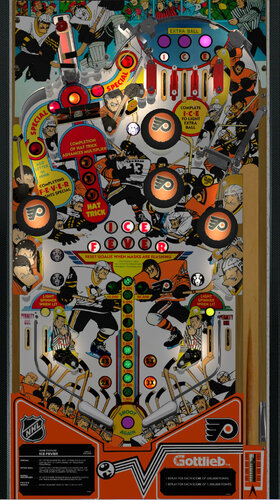
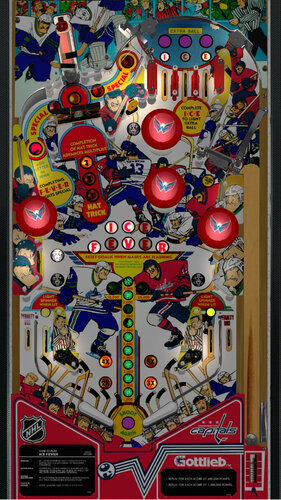
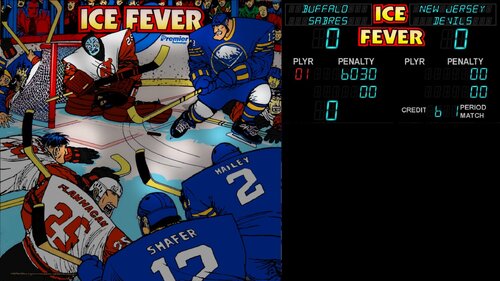
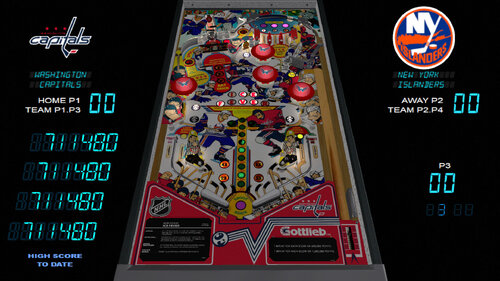
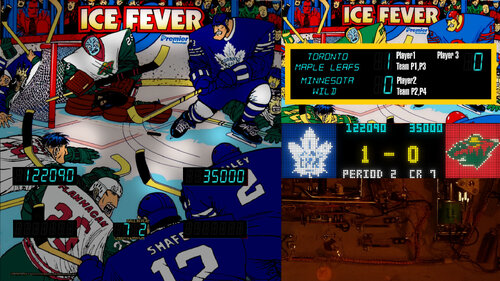
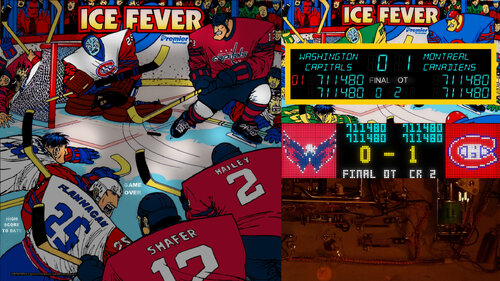
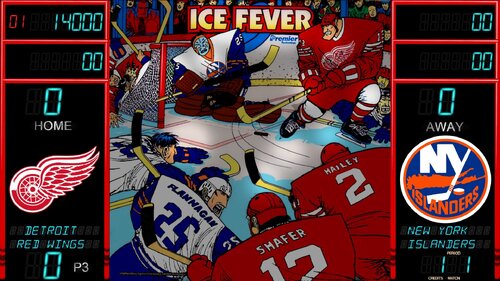
This is a major update to my modification allowing players to change team uniforms on the playfield, backglass, and now desktop and DMD!


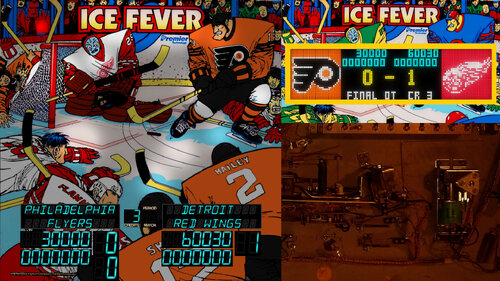
Why would you play a hockey game and not see the score?  Not in the millions of points, but in goals scored? In the spirit of Gridiron, a number of EM baseball games, and Flipper Football, I added a feature to allow players to play for both points and goals scored.  While I was at it, I gave overlooked attention to desktop view and the third backglass screen (which I don't have at home) with multiple new backglasses!  While I don't have a third DMD screen, I have a "real" DMD in the form of a ZeDMD which prompted my to learn the dark mysteries of FlexDMD and produced one for goals, points, and team logos.  I can't thank scutters enough for feedback and putting my script back together after I horribly mangled some of his earlier work.  Tie game? Of course not. Points are used to break ties in "Overtime."

For solo players, I added scripting to generate opponent scored based on performance from the previous 9 balls played. Option switchable in script. 

Another switchable option is to score one goal at a time for every hit, or allow multiples based on how many drop targets fell.


A nvram file is included because the dip switches need to be changed to track current players correctly. You can instead open up the dip menu with f6. I changed the option text to indicate which should be selected.
 
This is a modification of Armyaviation's Ice Fever that allows selecting home and away teams from all 32 NHL franchises. Hold down left magnasave to change away team with left/right flippers, and hold down the right magnasave to change home team.  Holding down either or both magnasaves and pressing the launch button advances team selection by an entire division.   You can hold down both magnasaves to change both teams at once. Teams are arranged by division and then alphabetical by city.
 
Thanks to Armyaviation for allowing to modify his table. I never could have done it from scratch!. Also thanks to Wildman for letting me use his backglass as a starting point.  His original backglass still works with this table.  The included backglasses all show the team uniform changes and the scores and other backglass stuff. There is a "Classic" Version, mostly like Wildman's Backglass, a "City LED" version which simulates an alphanumeric display showing team names/cities, and a Widescreen version, specifically formatted for 16:9 screens that includes team logos.
 

Edited by endeemillr
update

Contact Author First.
v10.7 required
No

User Feedback

Recommended Comments


GHOSTfaceKILLr74

Posted

Great work Endeemillr!

I have the Habs vs Leafs artwork on it and it looks awesome!!!

  • Content Provider
ARMYAVIATION

Posted

Misunderstanding..


GGPinball

Posted

Love this idea and love the fact I can play as my devils! One small issue I noticed. When using the wide screen backglass, if you hit the pop bumper on the left  side of the table, the home team on the back glass changes to the default original team. You can cycle through to get back, but I figured this isn't suppose to happen. 

marie

Posted

Having all teams in one table? Insane! Thanks!

tmpc

Posted

Very nice, thanks.

endeemillr

Posted

I think I fixed the disappearing team problem and submitted a new file for downloading. Please pm me if any other errors pop up. 

GGPinball

Posted

17 hours ago, endeemillr said:

I think I fixed the disappearing team problem and submitted a new file for downloading. Please pm me if any other errors pop up. 

2.1 seems to have fixed this. Teams aren't changing anymore. Thank you!

endeemillr

Posted

On 10/22/2022 at 2:42 PM, GGPinball said:

Love this idea and love the fact I can play as my devils! One small issue I noticed. When using the wide screen backglass, if you hit the pop bumper on the left  side of the table, the home team on the back glass changes to the default original team. You can cycle through to get back, but I figured this isn't suppose to happen. 

In the script I found DOF commands from the bumpers that matched snippet numbers in the backglass. I don't know why dof would affect backglasses, but that's what was happening. After renumbering, there doesn't appear to be any more dof issues. 

iwantpinball

Posted

all DMD boxes are behind the backglass and I have to ALT+TAB to get them to come in front.  Any fix for this?

endeemillr

Posted

On 10/25/2022 at 8:37 PM, iwantpinall said:

all DMD boxes are behind the backglass and I have to ALT+TAB to get them to come in front.  Any fix for this?

I finally figured out how to make proper backglasses that can do everything I want, no longer relying on DMDExt. I updated the file to 2.2 pending approval.

Ice

Posted

Great stuff!

i had some trouble with the backglass, but i probably didn't read good enough. I put in the old one and it works fine. 

This table gives me a better pov for depth, a better ball and the ssf is very nice. Thank you :)

Cliffy

Posted

My goodness this table and glass are absolutely BRILLIANT! Great (and hard!) work endeemillr!

KRAKEN

Posted

What a great idea being able to change teams.  Well done! 

mikepmcs

Posted

Thank you so much!

tazzz013

Posted

Love looks of the screen shots!  I am getting these 2 errors when trying to run table. any help would be great

error1.png

error2.png

VIRGILIO

Posted

First of all, thanks for the work...
I get an error, Line: 1158
Types do not match: b

Line 1158: Altpts= a/9 + b/9 + x/9 + d/9 + e/9 + f/9 + h/9 + i/9 + j/9


Thanks

apinbalwiz

Posted

1 hour ago, GordonJames said:

Screenshot 2024-04-16 154130.png


36 minutes ago, VIRGILIO said:

First of all, thanks for the work...
I get an error, Line: 1158
Types do not match: b

Line 1158: Altpts= a/9 + b/9 + x/9 + d/9 + e/9 + f/9 + h/9 + i/9 + j/9


Thanks

I'm getting the same errors.  In script under options if you turn off AIplayer2 the error clears so you can at least play the table.  I'm guessing the AI has to be configured somehow.

endeemillr

Posted

Thanks for the feedback. Had to deal with new variables being written for the first time. Fixed and re-uploaded. I actually had originally prevented this error, but when I kept having the data erased, I removed it and it worked. Silly scripting! All better now.

apinbalwiz

Posted

56 minutes ago, endeemillr said:

Thanks for the feedback. Had to deal with new variables being written for the first time. Fixed and re-uploaded. I actually had originally prevented this error, but when I kept having the data erased, I removed it and it worked. Silly scripting! All better now.

You did a great job with this, thank you!

scutters

Posted

15 hours ago, tazzz013 said:

Love looks of the screen shots!  I am getting these 2 errors when trying to run table. any help would be great

error1.png

error2.png


Make sure you have the latest flexdmd version installed and registered - V1.9.1 at this time, https://github.com/vbousquet/flexdmd/releases/tag/1.9.1

tazzz013

Posted (edited)

6 hours ago, scutters said:


Make sure you have the latest flexdmd version installed and registered - V1.9.1 at this time, https://github.com/vbousquet/flexdmd/releases/tag/1.9.1

Thank you for the reply.  Now working fine!  Great table!


Edited by tazzz013
Shmacks

Posted

Thank you for the table mod!  I've been playing Blackhawks v. Blues 😀🏒

KiwiBri

Posted

@endeemillr Thanks for sharing!!


Just in time for the Playoffs!!🎉

Cadash24

Posted

Love the table first of all. It's spectacular. I am only slightly confused about where I should put the color dmd on the backglass but Ill follow the photo best I can.


More importantly I assume when we officially know Salt Lake's new team we will change the Coyotoes to that yes? Poor Coyotes....


Anyway Lets Go Rangers...


Create an account or sign in to comment

You need to be a member in order to leave a comment

Create an account

Sign up for a new account in our community. It's easy!

Register a new account

Sign in

Already have an account? Sign in here.

Sign In Now
×
  • Create New...