Jump to content
  • Download Now!

    big_trouble.jpg


Pinball Frontend Downloads

Sub Category  

Pinball Frontend Downloads

No files in this category yet.

  1. All
  2. A
  3. B
  4. C
  5. D
  6. E
  7. F
  8. G
  9. H
  10. I
  11. J
  12. K
  13. L
  14. M
  15. N
  16. O
  17. P
  18. Q
  19. R
  20. S
  21. T
  22. U
  23. V
  24. W
  25. X
  26. Y
  27. Z
  28. #

Files From Subcategories

  1. Star Trek 25th Anniversary(Data East 1991)(Loading Animation)

    Fullscreen 1080p loading animation for Data East's 1991 Star Trek 25th Anniversary table. This is a 30 second looping video with sound. One in a series of unified "Liquid Transition" animations. If you like the style and want to make a request, look me up and find my thread on r/virtualpinball. Music copyright Paramout probably? I dunno.
     
    NOTE: It's been brought to my attention that those using transparency basically lose most of the enterprise as it flies by. I will resolve in the coming days and update.

    "U.S.S. Enterprise NCC-1701" (https://skfb.ly/o6p7Z) by riker446 is licensed under Creative Commons Attribution (http://creativecommons.org/licenses/by/4.0/).

    105 downloads

       (0 reviews)

    0 comments

    Updated

  2. Speed Racer (Original 2018) clear wheel logos 4K

    Logo taken from backglass, upscaled and restored for high resolution and cleaned up, optimized for 4K/2K frontends
    Download the 4K version if you use a frontend like PinballX or Pinup Popper on a 4K monitor, or the regular version if you have a 1440p resolution or less. Logos are optimized for each resolution since the internal downscaling/upscaling of the frontends might introduce unwanted artifacts, moiree or aliasing effects. 

    35 downloads

       (0 reviews)

    0 comments

    Updated

  3. Special Force Girls (Bally 1986) clear wheel logo 4K

    Logo taken from backglass, upscaled and restored for high resolution and cleaned up, optimized for 2K/4K frontends
    Providing files optimized for 1440p cabinet mode in PinballX and maximum available resolution. 
    PinballX is using 70% of the respective screen width for the logo display at a 1.66 aspect ratio, so the provided optimized version is set at 1008px max width / 605px max height to avoid internal downscaling/upscaling of the frontend that might introduce unwanted artifacts, moiree or aliasing effects. 

    DOWNLOAD ALL LOGOS (2000+) at this link: https://mega.nz/folder/22pRyY6K#t9cVLDbWaIlyDflG_QVTjw

    2 downloads

       (0 reviews)

    0 comments

    Submitted

  4. Special Force (Bally 1986) clear wheel logo 4K

    Logo taken from backglass, upscaled and restored for high resolution and cleaned up, optimized for 2K/4K frontends
    Providing files optimized for 1440p cabinet mode in PinballX and maximum available resolution. 
    PinballX is using 70% of the respective screen width for the logo display at a 1.66 aspect ratio, so the provided optimized version is set at 1008px max width / 605px max height to avoid internal downscaling/upscaling of the frontend that might introduce unwanted artifacts, moiree or aliasing effects. 

    DOWNLOAD ALL LOGOS (2000+) at this link: https://mega.nz/folder/22pRyY6K#t9cVLDbWaIlyDflG_QVTjw

    6 downloads

       (0 reviews)

    0 comments

    Submitted

  5. Speakeasy 4 (Bally 1982) clear wheel logo 4K

    Logo taken from backglass, upscaled and restored for high resolution and cleaned up, optimized for 2K/4K frontends
    Providing files optimized for 1440p cabinet mode in PinballX and maximum available resolution. 
    PinballX is using 70% of the respective screen width for the logo display at a 1.66 aspect ratio, so the provided optimized version is set at 1008px max width / 605px max height to avoid internal downscaling/upscaling of the frontend that might introduce unwanted artifacts, moiree or aliasing effects. 

    DOWNLOAD ALL LOGOS (2000+) at this link: https://mega.nz/folder/22pRyY6K#t9cVLDbWaIlyDflG_QVTjw

    5 downloads

       (0 reviews)

    0 comments

    Submitted

  6. Speakeasy (Playmatic 1977) clear wheel logo 4K

    Logo taken from backglass, upscaled and restored for high resolution and cleaned up, optimized for 2K/4K frontends
    Providing files optimized for 1440p cabinet mode in PinballX and maximum available resolution. 
    PinballX is using 70% of the respective screen width for the logo display at a 1.66 aspect ratio, so the provided optimized version is set at 1008px max width / 605px max height to avoid internal downscaling/upscaling of the frontend that might introduce unwanted artifacts, moiree or aliasing effects. 

    DOWNLOAD ALL LOGOS (2000+) at this link: https://mega.nz/folder/22pRyY6K#t9cVLDbWaIlyDflG_QVTjw

    4 downloads

       (0 reviews)

    0 comments

    Submitted

  7. Speed Test (Taito do Brasil 1982) clear wheel logo 4K

    Logo taken from backglass, upscaled and restored for high resolution and cleaned up, optimized for 2K/4K frontends
    Providing files optimized for 1440p cabinet mode in PinballX and maximum available resolution. 
    PinballX is using 70% of the respective screen width for the logo display at a 1.66 aspect ratio, so the provided optimized version is set at 1008px max width / 605px max height to avoid internal downscaling/upscaling of the frontend that might introduce unwanted artifacts, moiree or aliasing effects. 

    DOWNLOAD ALL LOGOS (2000+) at this link: https://mega.nz/folder/22pRyY6K#t9cVLDbWaIlyDflG_QVTjw

    2 downloads

       (0 reviews)

    0 comments

    Submitted

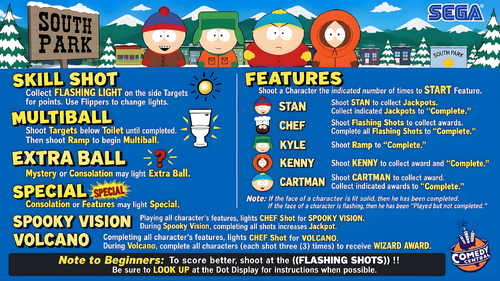
  8. South Park Front End AUDIO & LAUNCH .mp3's

    I couldn't decide, so I uploaded them all, you can decide for yourself! Enjoy!
    South Park AUDIO .mp3 South Park AUDIO LIVE.mp3 South Park LAUNCH CARTMAN 1.mp3 South Park LAUNCH CARTMAN 2.mp3 South Park LAUNCH CHEF.mp3 South Park LAUNCH KENNY.mp3 South Park LAUNCH MR HANKEY.mp3

    122 downloads

       (0 reviews)

    1 comment

    Submitted

  9. Super Mario Bros (Gottlieb 1992)_Bigus(MOD)- Rules/How to play

    Super Mario Bros (Gottlieb 1992)_Bigus(MOD)3.0 This is a much needed rules and how to play screen you can add to your popper media in the "HELP" area and use it on your DMD when you need some help. 

    38 downloads

       (1 review)

    1 comment

    Submitted

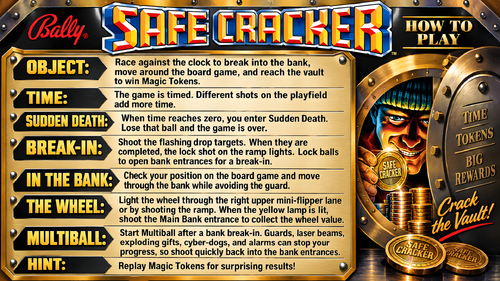
  10. Safe Cracker (Bally 1996) clear wheel logos 4K

    Logo taken from backglass, upscaled and restored for high resolution and cleaned up, optimized for 2K/4K frontends
    Providing files optimized for 1440p cabinet mode in PinballX and maximum available resolution. 
    PinballX is using 70% of the respective screen width for the logo display at a 1.66 aspect ratio, so the provided optimized version is set at 1008px max width / 605px max height to avoid internal downscaling/upscaling of the frontend that might introduce unwanted artifacts, moiree or aliasing effects. 

    DOWNLOAD ALL LOGOS (2000+) at this link: https://mega.nz/folder/22pRyY6K#t9cVLDbWaIlyDflG_QVTjw

    12 downloads

       (0 reviews)

    0 comments

    Submitted

  11. San Francisco (Williams 1964) clear wheel logo 4K

    Logo taken from backglass, upscaled and restored for high resolution and cleaned up, optimized for 2K/4K frontends
    Providing files optimized for 1440p cabinet mode in PinballX and maximum available resolution. 
    PinballX is using 70% of the respective screen width for the logo display at a 1.66 aspect ratio, so the provided optimized version is set at 1008px max width / 605px max height to avoid internal downscaling/upscaling of the frontend that might introduce unwanted artifacts, moiree or aliasing effects. 

    DOWNLOAD ALL LOGOS (2000+) at this link: https://mega.nz/folder/22pRyY6K#t9cVLDbWaIlyDflG_QVTjw

    2 downloads

       (0 reviews)

    0 comments

    Submitted

  12. Satin Doll (Williams 1975) clear wheel logos 4K

    Logo taken from backglass, upscaled and restored for high resolution and cleaned up, optimized for 2K/4K frontends
    Providing files optimized for 1440p cabinet mode in PinballX and maximum available resolution. 
    PinballX is using 70% of the respective screen width for the logo display at a 1.66 aspect ratio, so the provided optimized version is set at 1008px max width / 605px max height to avoid internal downscaling/upscaling of the frontend that might introduce unwanted artifacts, moiree or aliasing effects. 

    DOWNLOAD ALL LOGOS (2000+) at this link: https://mega.nz/folder/22pRyY6K#t9cVLDbWaIlyDflG_QVTjw

    3 downloads

       (0 reviews)

    0 comments

    Submitted

  13. Saloon (Taito do Brasil 1978) clear wheel logo 4K

    Logo taken from backglass, upscaled and restored for high resolution and cleaned up, optimized for 2K/4K frontends
    Providing files optimized for 1440p cabinet mode in PinballX and maximum available resolution. 
    PinballX is using 70% of the respective screen width for the logo display at a 1.66 aspect ratio, so the provided optimized version is set at 1008px max width / 605px max height to avoid internal downscaling/upscaling of the frontend that might introduce unwanted artifacts, moiree or aliasing effects. 

    DOWNLOAD ALL LOGOS (2000+) at this link: https://mega.nz/folder/22pRyY6K#t9cVLDbWaIlyDflG_QVTjw

    5 downloads

       (0 reviews)

    0 comments

    Submitted

  14. Sands of the Aton (Original 2023) clear wheel logos 4K

    Logo taken from backglass, upscaled and restored for high resolution and cleaned up, optimized for 2K/4K frontends
    Providing files optimized for 1440p cabinet mode in PinballX and maximum available resolution. 
    PinballX is using 70% of the respective screen width for the logo display at a 1.66 aspect ratio, so the provided optimized version is set at 1008px max width / 605px max height to avoid internal downscaling/upscaling of the frontend that might introduce unwanted artifacts, moiree or aliasing effects. 

    DOWNLOAD ALL LOGOS (2000+) at this link: https://mega.nz/folder/22pRyY6K#t9cVLDbWaIlyDflG_QVTjw

    8 downloads

       (0 reviews)

    0 comments

    Submitted

  15. Star Wars (Data East 1992) - Vpx Video Instruction (French audio)

    Bonjour à tous
    Voici une nouvelle traduction audio française des instructions vidéo de KONGEDAM du groupe (LAURENT EGAPEL, GARGA SURQUES, THIERRY DELOMIER et PATRICE SALERNO).
    La Vingt-quatrième publication est « Star Wars (Data East 1992) ».
    Aux vues du nombre de vidéo on a besoin de renfort !!
    Si vous souhaiter nous aider pour les traductions contacter moi en Message privé
    Le process est assez simple je génère un fichier texte de la traduction française « brute » de la vidéo.
    Vous corrigez dans le fichier texte les anomalies de traduction de l’I.A et je renvois la traduction corrigée dans Clidéo pour génération de la vidéo traduite.
    En plus cela vous permet d’avoir la vidéo traduite d’une table que vous affectionné non encore traitée.
     
    Hello everyone
    Here is a new French audio translation of the KONGEDAM video instructions from the group (LAURENT EGAPEL, GARGA SURQUES, THIERRY DELOMIER, and PATRICE SALERNO).
    The Twenty-fourth release is « Star Wars (Data East 1992) ».
    Given the number of videos, we need reinforcements!
    If you'd like to help with translations, contact me via private message.
    The process is quite simple: I generate a text file of the "raw" French translation of the video.
    You correct any AI translation errors in the text file, and I send the corrected translation back to Clideo to generate the translated video.
    In addition, this allows you to have a translated video of a table you like that hasn't been processed yet.

    16 downloads

       (0 reviews)

    0 comments

    Submitted

  16. ShangriLa (Williams 1967) clear wheel logo 4K

    Logo taken from flyer, upscaled and restored for high resolution and cleaned up, optimized for 4K/2K frontends
    Download the 4K version if you use a frontend like PinballX or Pinup Popper on a 4K monitor, or the regular version if you have a 1440p resolution or less. Logos are optimized for each resolution since the internal downscaling/upscaling of the frontends might introduce unwanted artifacts, moiree or aliasing effects. 

    21 downloads

       (0 reviews)

    0 comments

    Updated

  17. Silverball Mania (Bally 1978) clear wheel logos 4K

    Logo taken from backglass, upscaled and restored for high resolution and cleaned up, optimized for 2K/4K frontends
    Providing files optimized for 1440p cabinet mode in PinballX and maximum available resolution. 
    PinballX is using 70% of the respective screen width for the logo display at a 1.66 aspect ratio, so the provided optimized version is set at 1008px max width / 605px max height to avoid internal downscaling/upscaling of the frontend that might introduce unwanted artifacts, moiree or aliasing effects. 

    DOWNLOAD ALL LOGOS (2000+) at this link: https://mega.nz/folder/22pRyY6K#t9cVLDbWaIlyDflG_QVTjw

    10 downloads

       (0 reviews)

    0 comments

    Submitted

  18. Sharkey's Shootout (Stern 2000) clear wheel logo 4K

    Logo taken from backglass, upscaled and restored for high resolution and cleaned up, optimized for 2K/4K frontends
    Providing files optimized for 1440p cabinet mode in PinballX and maximum available resolution. 
    PinballX is using 70% of the respective screen width for the logo display at a 1.66 aspect ratio, so the provided optimized version is set at 1008px max width / 605px max height to avoid internal downscaling/upscaling of the frontend that might introduce unwanted artifacts, moiree or aliasing effects. 

    DOWNLOAD ALL LOGOS (2000+) at this link: https://mega.nz/folder/22pRyY6K#t9cVLDbWaIlyDflG_QVTjw

    6 downloads

       (0 reviews)

    0 comments

    Submitted

  19. Silver Slugger (Gottlieb 1990) clear wheel logo 4K

    Logo taken from backglass, upscaled and restored for high resolution and cleaned up, optimized for 2K/4K frontends
    Providing files optimized for 1440p cabinet mode in PinballX and maximum available resolution. 
    PinballX is using 70% of the respective screen width for the logo display at a 1.66 aspect ratio, so the provided optimized version is set at 1008px max width / 605px max height to avoid internal downscaling/upscaling of the frontend that might introduce unwanted artifacts, moiree or aliasing effects. 

    DOWNLOAD ALL LOGOS (2000+) at this link: https://mega.nz/folder/22pRyY6K#t9cVLDbWaIlyDflG_QVTjw

    6 downloads

       (0 reviews)

    0 comments

    Submitted

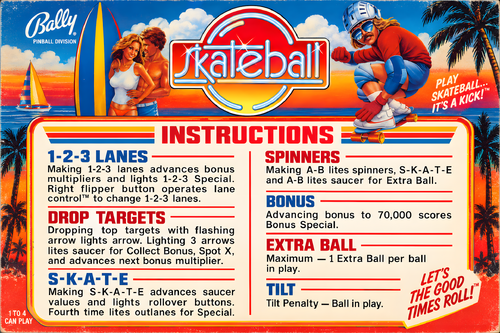
  20. Skateball (Bally 1980) clear wheel logos 4K

    Logo taken from backglass, upscaled and restored for high resolution and cleaned up, optimized for 2K/4K frontends
    Providing files optimized for 1440p cabinet mode in PinballX and maximum available resolution. 
    PinballX is using 70% of the respective screen width for the logo display at a 1.66 aspect ratio, so the provided optimized version is set at 1008px max width / 605px max height to avoid internal downscaling/upscaling of the frontend that might introduce unwanted artifacts, moiree or aliasing effects. 

    DOWNLOAD ALL LOGOS (2000+) at this link: https://mega.nz/folder/22pRyY6K#t9cVLDbWaIlyDflG_QVTjw

    7 downloads

       (0 reviews)

    0 comments

    Submitted

  21. Shaq Attaq (Gottlieb 1995) clear wheel logos 4K

    Logo taken from backglass, upscaled and restored for high resolution and cleaned up, optimized for 2K/4K frontends
    Providing files optimized for 1440p cabinet mode in PinballX and maximum available resolution. 
    PinballX is using 70% of the respective screen width for the logo display at a 1.66 aspect ratio, so the provided optimized version is set at 1008px max width / 605px max height to avoid internal downscaling/upscaling of the frontend that might introduce unwanted artifacts, moiree or aliasing effects. 

    DOWNLOAD ALL LOGOS (2000+) at this link: https://mega.nz/folder/22pRyY6K#t9cVLDbWaIlyDflG_QVTjw

    19 downloads

       (0 reviews)

    0 comments

    Submitted

  22. Smoots Pinball (JanduSoft 2023) Media Files & Cabinet Instructions

    Curb your enthusiasm, it's another episode of
    Let's Put Things On Cabinets That Were Never Meant To Be On Cabinets!
     
    Oh dear. How do I put this.
    Usually, the games featured in this series have something that immediately grabs me. Maybe it’s historical significance, a quirky mechanic, or simply enough charm to make me feel they deserve a place on a virtual pinball cabinet.
    This is not one of those times.
    Now, before anyone gets the wrong idea, Smoots Pinball was brought to my attention by user @iwantpinball, whose help with scripting and artwork for this release is hugely appreciated. Mentioning the game to me was not some grand declaration that it was a forgotten masterpiece; it was more a case of “hey, this odd little thing exists.” And, in fairness, odd little things are exactly the sort of rabbit hole this series tends to disappear into.
    That said... after spending some time with it, I have to admit the game itself really didn’t win me over.
     
    Warning: longish rant incoming.
     
    You’d be forgiven for not knowing what a Smoot is - I certainly didn’t. Think somewhere between Nintendo Miis and Funko Pops, without the charm of either, and you’re not far off the mark. These little customizable guys starred in a whole lineup of multiplayer sports games that were released on just about every platform imaginable and received consistently lukewarm reviews across the board. Not quite shovelware, but never exactly striving for greatness either.
     
    Now: It is a truth universally acknowledged that a gaming franchise in possession of dwindling ideas must be in want of a final cash grab. Which usually takes the form of either a kart racer or a pinball game.
    And so we arrive at Smoots Pinball, proudly continuing the series’ long-standing tradition of "Yeah, that'll do."
     
    The game features five tables themed around sports: baseball, summer games, tennis, golf - and of course that most popular sporting event of all: zombies. (And if you've ever seen Olympic-level zombieing, you know what I'm talking about.)
     
    Sadly, Smoots Pinball really doesn't have a lot to recommend it. Yes, tables are colorful, imaginative, and fit their themes nicely. There are neat little bits of animation, like the linesman's head turning to follow the ball on the tennis table. The simple controls and unlockables may make it accessible to children who are too young to get the hang of The Twilight Zone-level complexity. The goals for each table are telegraphed clearly by blinking arrows. The music is fine. But there's a persistent sense that the developers haven't actually spent much time around real pinball tables. 
     
    For starters: Four balls. That just feels wrong. Three balls? Sure. Five balls? Also common. But four? It constantly feels like one too many, or one too few. 
     
    Then there's the nudging. You don’t get directional nudges, just a single "nudge" button. That alone would be forgivable, but there are no tilt warnings, no sounds, no feedback whatsoever. Take it too far and the flippers just stop. Good luck figuring out where the limit is.
     
    The user interface somehow manages the impressive feat of being both too basic and awkward to use at the same time. More on that further below under "Quitting the game".
     
    And, of course, there’s no cabinet mode. A quick look at the Steam discussions pages suggests the developers' general approach is to release a game and then quietly move on. Given that the Smoots series has also been released on PlayStation 5, PlayStation 4, Xbox Series X/S, Xbox One, and Nintendo Switch, it's pretty clear that the PC version was never a priority, much less the virtual pinball niche market. And while you certainly can play the game in portrait mode, a significant part of the screen will be cut off to the left and right, so I decided to make it playable on the backglass screen.
     
    Sorry, folks. I did what I could to make this presentable on a cabinet, and I did pick up a few useful scripting tricks along the way (especially with resolutions and DMDExt) while I wrestled the game into submission.
    But I can’t blame you for giving this one a miss.
     
    Longish rant over. For now.
     
    This time, there are two AutoHotkey scripts included. The main one does the usual: It pushes the game window to the backglass screen, fills playfield and DMD with decorative images, launches the game, auto-skips the intro videos and maps the controls to standard cabinet buttons. Optionally, it offers support for analog nudging and plunger use via JoyToKey, and can also use DMDExt to mirror the score display on your DMD screen.
    The other script serves as a selection menu: You can pick the table you want to play, and the previous script launches much like it did before, but will continue to auto-select the desired table and auto-start a one player game. Once again, I am indebted to @iwantpinball for this part.
     
    Also included are a number of goodies:
    2 backglass images (4:3 and 16:9) a company logo 2 DMD images (one for the frontend, one as a filler image for the script) 5 instruction cards (depending on which script additions you're using) table audio (recorded directly from the game) a table image for your frontend and a filler image for the script (the same image, rotated differently for each purpose) a wheel image Most of these images were graciously provided by @iwantpinball.
     
    Share and enjoy!
     
    SOME MORE NOTES:
     
    Where to get it:
    Smoots Pinball is available on Steam. 
     
    How to run it:
    The game should run "out of the box" on current Windows systems, but being a Steam game, the Steam client will launch along with it and hang around in the background. If you don't mind that, fine.
    However, if you have an offline cabinet and want to run the game without the Steam client popping up:
    Download the Goldberg Emulator and extract the steam_api64.dll. Go to the game's SmootsPinball_Data\Plugins\x86_64 folder and rename or back up the original steam_api64.dll and replace it with the one from step 1. Create a simple Notepad text file in the same folder, name it steam_appid.txt and paste the game's Steam ID into it. You can find the ID number in the URL of the game's Steam Store website. Running the game's EXE file should now work without Steam. It should be noted that use of a Steam emulator can be a legally gray area. Check your local jurisdiction and make sure you own a legal copy of the game.
     
    Quitting the game: The hard and the easy way
    To leave the game, you usually have to navigate your way back to the main menu (using flippers for left/right and magnasave buttons for up/down). Then navigate to the rightmost menu and push up (magnasave/nudge left) to light up the little ball with the x in it in the top corner. That's the game's close button. And it will still ask you one more time if you really want to leave. For this reason, I mapped an extra key (Buy-In, or 2) as an insta-killswitch that will end the game from any place.
     
    Use of JoyToKey:
    As I said above, I’ve included optional support for JoyToKey, though I’m hesitant to recommend it in this case.
    First, the game only supports a single “nudge” key, so it doesn’t matter where you hit or shake the cabinet - the result is always the same. 
    Second, and more bizarrely, the game uses the same key for both nudging and the plunger. That means if your analog plunger has a bit of recoil when released, those extra triggered nudges can occasionally tilt the game before the ball has even left the shooter lane.
     
    AI use disclaimer:
    No AI was used in the creation of the artwork for this media pack.
    However, the launch selection menu script is mostly the result of me arguing with ChatGPT until it finally cooperated.
     
    Finally, here are two videos showing the game running on my cabinet.
     
    Here is the version without running the selector menu first: You get to pick your own table and select your number of players. I also demonstrate the analog nudge by kneeing my cabinet in the groin. The video also shows the tedious way you have to use the exit menu to quit the game. (Also note that on a 4:3 backglass, the menus will look a bit out of place until you get to the game proper, then everything looks fine.)
     
    And this is the version with the selector menu. It launches the table directly and starts a 1 player game. In this video you also get a better look at the DMD screen.


    10 downloads

       (0 reviews)

    0 comments

    Submitted

  23. Star Trek Enterprise Limited Edition (Stern 2012) - Vpx Video Instruction (French audio)

    Bonjour à tous
    Voici une nouvelle traduction audio française des instructions vidéo de KONGEDAM du groupe (LAURENT EGAPEL, GARGA SURQUES, THIERRY DELOMIER et PATRICE SALERNO).
    La Vingt-troisième publication est « Star Trek (Enterprise Limited Edition) (Stern 2012) ».
    Aux vues du nombre de vidéo on a besoin de renfort !!
    Si vous souhaiter nous aider pour les traductions contacter moi en Message privé
    Le process est assez simple je génère un fichier texte de la traduction française « brute » de la vidéo.
    Vous corrigez dans le fichier texte les anomalies de traduction de l’I.A et je renvois la traduction corrigée dans Clidéo pour génération de la vidéo traduite.
    En plus cela vous permet d’avoir la vidéo traduite d’une table que vous affectionné non encore traitée.
     
    Hello everyone
    Here is a new French audio translation of the KONGEDAM video instructions from the group (LAURENT EGAPEL, GARGA SURQUES, THIERRY DELOMIER, and PATRICE SALERNO).
    The Twenty-third release is « Star Trek (Enterprise Limited Edition) (Stern 2012) ».
    Given the number of videos, we need reinforcements!
    If you'd like to help with translations, contact me via private message.
    The process is quite simple: I generate a text file of the "raw" French translation of the video.
    You correct any AI translation errors in the text file, and I send the corrected translation back to Clideo to generate the translated video.
    In addition, this allows you to have a translated video of a table you like that hasn't been processed yet.

    18 downloads

       (0 reviews)

    0 comments

    Submitted

  24. Space Cadet (Maxis 1995) Media Files & Cabinet Instructions

    Houston,
    Let's Put Things On Cabinets That Were Never Meant To Be On Cabinets! 
     
    This is the big one, kids. The OG. The granddaddy of them all. It's 3D Pinball: Space Cadet, released by Microsoft in 1995 as part of their Plus! package and bundled with every Windows operating system afterwards, up to and including Windows XP in 2001.
    To call this game influential would be an understatement. It was in everyone's home, and everybody and their grandmother played it. For a lot of people, this was their first taste of virtual pinball. And the best part? It still runs on modern systems, so of course I had to give this one the special full cabinet treatment.
     
    Yeah, but… why?
    We’ve got an excellent VPX recreation by the venerable JP Salas. It got a fantastic overhaul in 2025 with @funkatron101’s Galaxy Edition. There are multiple high-quality mods out there. So why go back to the clunky old Windows version and put it on a cabinet?
    I can only answer that for myself: Because it’s there. Because I wanted to see if I could - which is kind of the entire point of this series.
    And because when someone steps up to the cab and says, “Hey… this reminds me of that game I used to play as a kid,” I want to be able to smile, say: “You mean this one?”, fire it up, and watch the nostalgia hit.
    And honestly? It deserves to be there. Out of respect. 
     
    So, today's included AutoHotKey script makes Space Cadet run on your cab: It rotates the playfield to portrait mode, lowers the resolution to 600x800, places filler images on the backglass and DMD screens, launches the game, covers up some of the Windows-specific interfaces and maps your cabinet buttons to the appropriate keys. Optionally, it offers support for analog nudge and plunger via JoyToKey, and DMDExt support for showing the score on your DMD screen.
     
    Brace yourselves for a space freighter full of goodies:
    4 backglass images (two in 4:3,  two in 16:9, featuring both original and AI reimagined art) 3 company logos (you pick: Maxis, Cinematronics or Microsoft) 2 DMD images (one for the frontend, one as a filler image for the script) 3 flyer images (shots of the Microsoft Plus! packaging, courtesy of Archive.org) a whopping 71 instruction cards (text taken from the offical rules document, fully illustrated in loving detail by myself, plus a few extra pages from an online strategy guide  - this may well be the most comprehensive guide to the game out there, and it should be usable for the VPX version as well!) launch audio (the classic wormhole sound effect) a promo video (a short vintage Microsoft Plus! TV ad) table audio (recorded from the game) 2 table images (one for your frontent, one to hide the game's Windows UI during startup) a wheel image (courtesy of the Launchbox Games Database)  
    As always, the script will need a bit of tweaking to fit your setup, but don’t worry - it’s heavily annotated. Give it a proper read-through before heading to the comments for help.
     
    I’m happy to assist where I can, but do try to meet me halfway first 😉
     
    Share and enjoy!
     
     
    SOME MORE NOTES:
     
    Where to get it:
    Space Cadet is no longer bundled with Windows, but it’s still easy to find online, either as part of old Windows ISOs or as a standalone download. Archive.org is probably your best starting point.
     
    How to run it:
    Amazingly, the game still runs without a hitch on modern Windows systems - or at least the later versions do. Some original Windows 95 builds floating around may not cooperate, so make sure you grab a working version and test it before wiring it up to the script.
    You may need to tweak the timing of a couple of Sleep commands in the script, depending on how quickly the game launches on your system:
    The first Sleep covers the time until the game’s “3D Pinball” splash screen disappears (after which the script’s loading overlay takes over) The second Sleep waits for the game to fully load before sending F4 to switch to fullscreen and remove the overlay.  
    A word about controls:
    The Coin button acts as Pause (F3). The menu bar is hidden by the script. The Start button pulls double duty: It restarts the game (F2) and acts as Enter for high score entry. The script assumes you're using the game's default controls. With a US keyboard layout, everything should work out of the box. On other layouts, the default / key for the right flipper may cause issues. If so, remap it in-game and adjust the script accordingly. (Details are in the script comments.)
     
    What I'm not completely happy with:
    The game always launches in windowed mode and needs to be switched to fullscreen (via F4) once it’s loaded. The script handles this and hides the transition behind an overlay image.
    That said, the game window will sometimes briefly pop in front of the overlay before going fullscreen. Not every time though, and I haven’t figured out why. If you crack that one, let me know.
     
    What's not working (yet):
    Right now, the setup is locked to single-player. 
    In theory, enabling more players should be as simple as having the script send: Alt+O → P → [1–4] 
    Feel free to experiment, and definitely let me know if you get it working 🙂

    AI use disclaimer:
    The alternate backglass was created with ChatGPT, using the original screenshot as a starting point. 
    Fun fact: AI is terrible at left and right hands. The Cadet’s thumbs-up hand kept switching sides like it was in a mirror universe. After about 30 iterations and corrections, this was the best result I could get. Hope you like it!
     
    Would you like to know more?™
    Absolute madman Timothy Peterson has created a YouTube playlist in which he shows how to beat every single mission the game has to offer. These videos have been invaluable to me in putting together the Instruction Cards, since the official rules document that came with the game does contain a handful of errors and unclear definitions, which have been corrected for this version.

    15 downloads

       (0 reviews)

    1 comment

    Updated

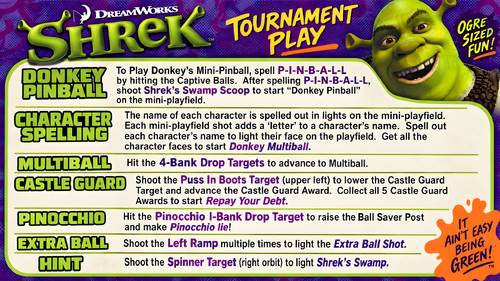
  25. Shrek (Stern 2008) - Vpx Video Instruction (French audio)

    Bonjour à tous
    Voici une nouvelle traduction audio française des instructions vidéo de KONGEDAM du groupe (LAURENT EGAPEL, GARGA SURQUES, THIERRY DELOMIER et PATRICE SALERNO).
    La Vingt-deuxième publication est « Shrek (Stern 2008) ».
    Aux vues du nombre de vidéo on a besoin de renfort !!
    Si vous souhaiter nous aider pour les traductions contacter moi en Message privé
    Le process est assez simple je génère un fichier texte de la traduction française « brute » de la vidéo.
    Vous corrigez dans le fichier texte les anomalies de traduction de l’I.A et je renvois la traduction corrigée dans Clidéo pour génération de la vidéo traduite.
    En plus cela vous permet d’avoir la vidéo traduite d’une table que vous affectionné non encore traitée.
     
    Hello everyone
    Here is a new French audio translation of the KONGEDAM video instructions from the group (LAURENT EGAPEL, GARGA SURQUES, THIERRY DELOMIER, and PATRICE SALERNO).
    The Twenty-second release is « Shrek (Stern 2008) ».
    Given the number of videos, we need reinforcements!
    If you'd like to help with translations, contact me via private message.
    The process is quite simple: I generate a text file of the "raw" French translation of the video.
    You correct any AI translation errors in the text file, and I send the corrected translation back to Clideo to generate the translated video.
    In addition, this allows you to have a translated video of a table you like that hasn't been processed yet.

    18 downloads

       (0 reviews)

    0 comments

    Submitted

×
  • Create New...