.thumb.png.de5c87bfcfd48bcb8bbf046bcfe11c33.png)
.thumb.png.66e511c7fb8b0c12b8c5611ca60cc43a.png)
.thumb.png.2ebd459dd79b8308cda76bdbb0cc81cf.png)
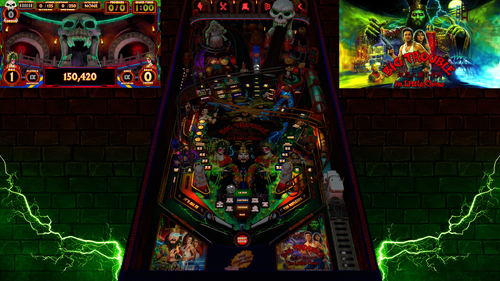
Big Trouble in Little China Pinball throws players into a fast-paced battle beneath the neon lights of Chinatown, where every shot pushes the story deeper into the chaos. Step into the boots of reckless trucker Jack Burton and rip through combos, ramps, and orbit shots as you chase the trail of the kidnapped green-eyed beauty. The ancient sorcerer Lo Pan lurks below the streets, waiting for the ritual that will break his curse. Stack modes, ignite multiballs, and hammer precision shots as the action escalates from alleyway showdowns to supernatural warfare. Only the boldest flippers will conquer the storms, defeat Lo Pan, and prove that fortune favors the fearless.
Table Features:
• Full Original layout and design, not a retheme or remake
• VR Room support
• Scorbit integration
• Fleep sounds
• Unique physics
• Selectable skill shots
• Pop-up scoops
• Diverters
• Pop-up ramp
• Secret passages
• Hidden mini playfield
• 3D model animations
• FullDMD with graphic animations and videos
• Pinup 2.0 FullDMD special effects
Game Modes
• 6 quests
• 5 multiballs
• 3 mini-wizard modes
• 1 final wizard mode
• Super Spinners
• Bash toy mode
• Midnight Madness
• Mystery rewards
• A minigame created by the super-talented Ayatollahofrock
F12 Menu Options
• Toggle Minigame on/off
• Toggle Midnight Madness on/off
• VR type selection
• Reset high scores (Hotkey 0)
• Toggle Hotkey reset on/off
• GPU/CPU performance settings for lower-end systems
Extras
• A fully animated instruction mode that actively demonstrates and explains the table rules and features.
• If the table is left idle, Jack Burton will step in and play the table himself.
• Optional Desktop backdrops for Desktop Users, but you must manually change them in the editor
• If you happen to get a ball stuck on the pop-up ramp, hold the plunger key to release.
Requirements: VPX 10.8 (64-bit) PinUP Player 1.5 or PinUP Player 2.0 Beta
There are two batch files included in this PuP-Pack.
Step 1: Run the batch file that matches your current PinUP Player version.
Step 2: Run the batch file that matches your screen setup.
(Both batch files must be run for the PuP-Pack to function correctly.)
If you want to take advantage of the new features and smoother operation available in PinUP Player 2.0, there are a few extra steps involved.
Please watch the setup tutorial video. It is very short and easy to follow and will walk you through the process.
We would love to hear your thoughts about the table in the comments section.
For technical support, please use the Support page by pressing the Support button. If needed, you may also ask in the comments section, but please avoid posting support requests in the review section.
If you enjoyed the table, please consider leaving a review or clicking the Like button—it helps others discover the project.
Have fun and enjoy! May the best players rise to the top of the Scorebit leaderboards.
Cheers!
Extra Thanks to ARMYUSDE for all the testing and feedback

User Feedback
You may only provide a review once you have downloaded the file.
There are no reviews to display.