Jump to content

Big Trouble in Little China (original)

  • Get Support
  • Create an account or sign in to download this
download_no_perm
31548 Views
12452 Downloads
4.9 From 51 reviews
2.89 GB File Size
BTILC ROM Name
ZandysArcade, MerlinRTP, JoePicasso Created by
ZandysArcade Artwork by
MerlinRTP Scripting by
Original Manufacturer
2026 Year

4 Screenshots

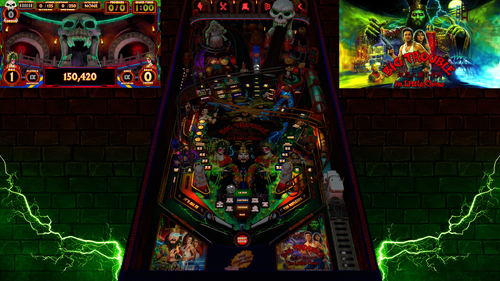
Big Trouble in Little China Pinball throws players into a fast-paced battle beneath the neon lights of Chinatown, where every shot pushes the story deeper into the chaos. Step into the boots of reckless trucker Jack Burton and rip through combos, ramps, and orbit shots as you chase the trail of the kidnapped green-eyed beauty. The ancient sorcerer Lo Pan lurks below the streets, waiting for the ritual that will break his curse. Stack modes, ignite multiballs, and hammer precision shots as the action escalates from alleyway showdowns to supernatural warfare. Only the boldest flippers will conquer the storms, defeat Lo Pan, and prove that fortune favors the fearless.


Table Features:

• Full Original layout and design, not a retheme or remake
• VR Room support
• Scorbit integration
• Fleep sounds
• Unique physics
• Selectable skill shots
• Pop-up scoops
• Diverters
• Pop-up ramp
• Secret passages
• Hidden mini playfield
• 3D model animations
• FullDMD with graphic animations and videos
• Pinup 2.0 FullDMD special effects


Game Modes

• 6 quests
• 5 multiballs
• 3 mini-wizard modes
• 1 final wizard mode
• Super Spinners
• Bash toy mode
• Midnight Madness
• Mystery rewards
• A minigame created by the super-talented Ayatollahofrock


F12 Menu Options

• Toggle Minigame on/off
• Toggle Midnight Madness on/off
• VR type selection
• Reset high scores (Hotkey 0)
• Toggle Hotkey reset on/off
• GPU/CPU performance settings for lower-end systems


Extras

• A fully animated instruction mode that actively demonstrates and explains the table rules and features.
• If the table is left idle, Jack Burton will step in and play the table himself.
• Optional Desktop backdrops for Desktop Users, but you must manually change them in the editor
• If you happen to get a ball stuck on the pop-up ramp, hold the plunger key to release.


Requirements: VPX 10.8 (64-bit) PinUP Player 1.5 or PinUP Player 2.0 Beta

There are two batch files included in this PuP-Pack.

Step 1: Run the batch file that matches your current PinUP Player version. 
Step 2: Run the batch file that matches your screen setup.

(Both batch files must be run for the PuP-Pack to function correctly.)

If you want to take advantage of the new features and smoother operation available in PinUP Player 2.0, there are a few extra steps involved.

Please watch the setup tutorial video. It is very short and easy to follow and will walk you through the process.


We would love to hear your thoughts about the table in the comments section.

For technical support, please use the Support page by pressing the Support button. If needed, you may also ask in the comments section, but please avoid posting support requests in the review section.

If you enjoyed the table, please consider leaving a review or clicking the Like button—it helps others discover the project.

Have fun and enjoy! May the best players rise to the top of the Scorebit leaderboards.


Cheers!


Extra Thanks to ARMYUSDE for all the testing and feedback


Permission from ORIGINAL Author(s)?

This is my own creation.

Allow file to be included on a VPUniverse downloader app?

Yes

VPX Standalone

No
Contact Author First.
10.8 required
Yes

What's New in Version 1.0.1   See changelog

Released

v1.0.1 Updates

Disable AutoPlay - Added to Tweak Menu

Disable Thunder - Added to Tweak Menu

New High Score BG Video

Scorbit Added

New Match Game - End of Game


v1.0.1 Fixes

Intro Song Updated (Less Compressed)

Stuck Ball Ramp

Fixed Set Locale 1033

Fixed DMD Text for Int'l Users

Lockbar Visible in VR

Fixed High Score screen broken in Multiplayer

Fixed Wildman Bash Hit Required locked at 10 now

Ball Search Mode - Should add missing ball

User Feedback

Recommended Comments


duck1156

Posted

Why am I getting this error can't figure it out

20260617_224247.jpg

tat71

Posted

On 6/17/2026 at 10:40 PM, KaosSinisterOne said:

I have this same exact issue. Its the Dungeon Mini Game. Selection freezes and it blows the crap outta my speakers. Basically the table becomes completly unresponsive excpet it makes blown out flipper noises etc without actally changing anything


I found a solution for the mini-games—well, at least it works for me now. You have to run the table with Vpx 10.8 x64 and not in OpenGL. That solved the problem, and now I can select the doors without any issues.

KaosSinisterOne

Posted

On 6/26/2026 at 2:45 PM, tat71 said:

I found a solution for the mini-games—well, at least it works for me now. You have to run the table with Vpx 10.8 x64 and not in OpenGL. That solved the problem, and now I can select the doors without any issues.

Thanks for the reply! I will give a shot later today!

Voorheesnightmare

Posted

hi i the script is locked and i cant get the pup tp show up , i used the bat but nothing ...... heeeeelp please 

KaosSinisterOne

Posted

On 6/26/2026 at 2:45 PM, tat71 said:

I found a solution for the mini-games—well, at least it works for me now. You have to run the table with Vpx 10.8 x64 and not in OpenGL. That solved the problem, and now I can select the doors without any issues.

Folow up on this as it did indeed fix my issue! Thanks so much for taking the time to respond

Dazza1973

Posted (edited)

Dof Sorted and working


I had v5304 I thought I had 5403 you need minimum of 5381 for this table to work properly.

Edited by Dazza1973
tat71

Posted

On 7/21/2026 at 3:27 PM, Dazza1973 said:

Dof Sorted and working


I had v5304 I thought I had 5403 you need minimum of 5381 for this table to work properly.

bonjour tu parles de quel version de logiciel merci


Dazza1973

Posted

On 8/3/2026 at 5:17 PM, tat71 said:

bonjour tu parles de quel version de logiciel merci


These Dof Config files that you generate based on hardware in you cabinet. Numbers maybe different


directoutputconfig30.ini

directoutputconfig40.ini

directoutputconfig41.ini

directoutputconfig51.ini

tablemappings.xml

directoutputshapes.png

directoutputshapes.xml

Mr_Explodey_Face

Posted

On 6/19/2026 at 12:06 PM, duck1156 said:

Why am I getting this error can't figure it out

20260617_224247.jpg


Hi mate,

I spent the last 2 hours trying to diagnose this.

In my case it was due to a Windows 11 update. If you run PinUpPlayer.exe and get the error on the page in the link below then just use the patch and follow the directions closely. Fixed it for me.

https://nailbuster.com/wikipinup/doku.php?id=win11-fix

workerboy

Posted

Thanks for the update!

Tikimaster

Posted

Thanks for the update.. have lot of fun..

braintez

Posted

Wow, didn't realize you were going to include the backbox and speaker rings with the new release!  Looks great!


Still my favorite table.  Plays great in VR on 10.8.1 so far.  The Dungeon Mini-Game was broken in v1.0 due to how the new pup add-on is coded (of course it can be disabled in F12).  Will comment back on if it's still an issue in this update.

stephdu34

Posted

superbe table mais j'ai un soucis. la taille de la police de caractère sur le Puppack a un soucis. trop grosse et mal centrée. je n'avais pas ce problème sur la version précédente. est-ce qu'il n'y a que chez moi ou d'autres personnes on le soucis? y a t'il une solution?

Great table, but I have an issue. There’s a problem with the font size in the PupPack—it’s too big and poorly centered. I didn't have this problem with the previous version. Is it just me, or are others experiencing this too? Is there a solution?

IMG_20260823_072903.jpg

IMG_20260823_073019.jpg

Rivermatty

Posted

New Version working great, love the Match feature, and thanks for the Disable AutoPlay - Added to Tweak Menu, I prefer it off myself but nice to have the choice.

Tikimaster

Posted (edited)

4 hours ago, stephdu34 said:

There’s a problem with the font size in the PupPack

Did you download the new pup pack BTILC-PuP-v1.01.zip ? Did you unblock the zip? Font sizes are normal here. (like before)

Edited by Tikimaster
BrandonLaw

Posted

Great update!  Anyone else getting odd draw distances in 3d?  Things just aren't 'flat' where they are supposed to be.  Exampes:  Backbox DMD border, some inserts, title in the middle of the PF.  It's making me woozy!

stephdu34

Posted

5 hours ago, Tikimaster said:

Did you download the new pup pack BTILC-PuP-v1.01.zip ? Did you unblock the zip? Font sizes are normal here. (like before)

Computers& Electronics


Yes the new puppack and yes unblock

rob046

Posted

I was excited to play this until I saw I needed pinup stuff. I play on desktop 4k so I can't even set my windows to 100% scaling & keep it usable. Oh well maybe someday there will be a better solution. Luckily most tables don't require it so there is still a ton to play!

  • Content Provider
Vpxpinballwizards

Posted

8 hours ago, rob046 said:

I was excited to play this until I saw I needed pinup stuff. I play on desktop 4k so I can't even set my windows to 100% scaling & keep it usable. Oh well maybe someday there will be a better solution. Luckily most tables don't require it so there is still a ton to play!

hundreds if not thousands have pinup running on desktop configurations. check the groups and certainly someone can help you configure it properly

rob046

Posted

6 minutes ago, Vpxpinballwizards said:

hundreds if not thousands have pinup running on desktop configurations. check the groups and certainly someone can help you configure it properly

Maybe eventually. It's the needing to set my 4k monitor scaling to 100% that kills me unless there is a way around that. 

Krobs

Posted (edited)

I'm getting balls stacking up in the shooter lane with v1.0.1, have no issues using v 1.0.   I downloaded both the new table & Pup v1.0.1.    I can cradle ball on the right flipper, after 30 sec i hear a sound, then a ball in the shooter lane appears.  

Edited by Krobs
eliory

Posted

Thanks for the udpate mate

Loafmeister

Posted

On 8/23/2026 at 8:17 PM, rob046 said:

Maybe eventually. It's the needing to set my 4k monitor scaling to 100% that kills me unless there is a way around that. 

There may be a better solution out there but in the meantime, isn't playing fun tables worth the hassle of prior to running VPX tables, setting your scaling to 100%, run table, enjoy, exit then set the scaling back to whatever you want?


scaling isn't a deal breaker for running this.  It's just means you have to go through an additional step before playing and after.

dentarr

Posted

I get a "File not Found" Error when I start the table. All other Tables work fine. Have latest Baller Installer running.


However here it states ROM Name: BTILC. Where can I get that rom? I dont think its in my collection.


Create an account or sign in to comment

You need to be a member in order to leave a comment

Create an account

Sign up for a new account in our community. It's easy!

Register a new account

Sign in

Already have an account? Sign in here.

Sign In Now
×
  • Create New...