Jump to content

Big Trouble in Little China (original)

  • Get Support
  • Create an account or sign in to download this
download_no_perm
17046 Views
7387 Downloads
5 From 42 reviews
1.58 GB File Size
BTILC ROM Name
ZandysArcade, MerlinRTP, JoePicasso Created by
ZandysArcade Artwork by
MerlinRTP Scripting by
Original Manufacturer
2026 Year

4 Screenshots

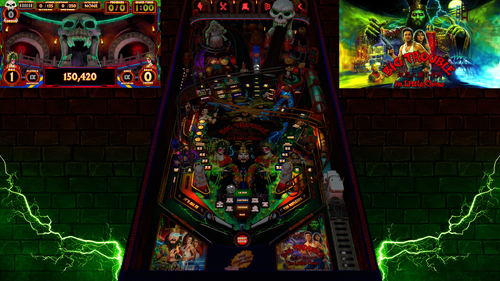
Big Trouble in Little China Pinball throws players into a fast-paced battle beneath the neon lights of Chinatown, where every shot pushes the story deeper into the chaos. Step into the boots of reckless trucker Jack Burton and rip through combos, ramps, and orbit shots as you chase the trail of the kidnapped green-eyed beauty. The ancient sorcerer Lo Pan lurks below the streets, waiting for the ritual that will break his curse. Stack modes, ignite multiballs, and hammer precision shots as the action escalates from alleyway showdowns to supernatural warfare. Only the boldest flippers will conquer the storms, defeat Lo Pan, and prove that fortune favors the fearless.


Table Features:

• Full Original layout and design, not a retheme or remake
• VR Room support
• Scorbit integration
• Fleep sounds
• Unique physics
• Selectable skill shots
• Pop-up scoops
• Diverters
• Pop-up ramp
• Secret passages
• Hidden mini playfield
• 3D model animations
• FullDMD with graphic animations and videos
• Pinup 2.0 FullDMD special effects


Game Modes

• 6 quests
• 5 multiballs
• 3 mini-wizard modes
• 1 final wizard mode
• Super Spinners
• Bash toy mode
• Midnight Madness
• Mystery rewards
• A minigame created by the super-talented Ayatollahofrock


F12 Menu Options

• Toggle Minigame on/off
• Toggle Midnight Madness on/off
• VR type selection
• Reset high scores (Hotkey 0)
• Toggle Hotkey reset on/off
• GPU/CPU performance settings for lower-end systems


Extras

• A fully animated instruction mode that actively demonstrates and explains the table rules and features.
• If the table is left idle, Jack Burton will step in and play the table himself.
• Optional Desktop backdrops for Desktop Users, but you must manually change them in the editor
• If you happen to get a ball stuck on the pop-up ramp, hold the plunger key to release.


Requirements: VPX 10.8 (64-bit) PinUP Player 1.5 or PinUP Player 2.0 Beta

There are two batch files included in this PuP-Pack.

Step 1: Run the batch file that matches your current PinUP Player version. 
Step 2: Run the batch file that matches your screen setup.

(Both batch files must be run for the PuP-Pack to function correctly.)

If you want to take advantage of the new features and smoother operation available in PinUP Player 2.0, there are a few extra steps involved.

Please watch the setup tutorial video. It is very short and easy to follow and will walk you through the process.


We would love to hear your thoughts about the table in the comments section.

For technical support, please use the Support page by pressing the Support button. If needed, you may also ask in the comments section, but please avoid posting support requests in the review section.

If you enjoyed the table, please consider leaving a review or clicking the Like button—it helps others discover the project.

Have fun and enjoy! May the best players rise to the top of the Scorebit leaderboards.


Cheers!


Extra Thanks to ARMYUSDE for all the testing and feedback


Permission from ORIGINAL Author(s)?

This is my own creation.

Allow file to be included on a VPUniverse downloader app?

Yes

VPX Standalone

No
Contact Author First.
10.8 required
Yes

User Feedback

Recommended Comments


txvepr

Posted

Here is what works on my machine. 

I have  a 3060 running 120hz 4K with optical HDMI cable. Ryzen 7 chip. SSD. Table seems to run great on Pinup 1.5. I did the update to 2.0, ran use 2.0 scripts, and set in game to use 2.0 from F12. Set Popper to use DirectX. 

Now, the callouts are all choppy, the score flyouts are stuttery and don't seem to disapear . Framerate around 85. Even with graphics set to Medium. 

Just wanted to note this here for anyone else wondering.


I set it back to 1.5 and will be just Fine playing this great table!

braintez

Posted

21 hours ago, Tikimaster said:

DT Users may use that Background Image and turn off the Backglass with pupPackEditor. (click on pic, right click, save as..)
Have fun!TroubleChinasmooth4k.thumb.jpg.f6aa1b2c8b80b76090ca1da8189128ee.jpg


Looks awesome!  I actually added a logo towards the middle-top and am using it as a backglass in VR.   Thanks for sharing this! 

qwerter18

Posted (edited)

So I was on Pup Edition 1.5.x something and table played.


Yesterday I installed latest Pup 2.0 Beta from April26.

(I just copied over the files, overwriting everything. I did not register anything new. but the Screens and positions still are correct)


For me the table still plays awsome, and as it shoud.


BUT:

It seems Pup 2.0 Beta messed up a lot of other PupPacks I have installed....

Some weird behaviour....

i.E. ACDC PupPack only plays the Intro screen... but the Video won't trigger.

With others, the screens seem to have swapped or text is missing.


Has anybody else here the same experience with Pup2.0? Coming from 1.5.x?

Maybe someone else installed Pup2.0 because of this BEAUTIFUL BTILC table here?

And some Tipps, what might cause the problem or an easy fix.

Edited by qwerter18
balilolo

Posted

to have the  PF Back leds working, i had to change the table configuration in dof config tool : copy the line 'PF back Effects MX HD'  to   'PF back Effects MX'

zert

Posted

6 hours ago, balilolo said:

to have the  PF Back leds working, i had to change the table configuration in dof config tool : copy the line 'PF back Effects MX HD'  to   'PF back Effects MX'

Could you explain further? I'm a beginner. If you have any pictures to show, that would be even better. Thanks.

  • Content Provider
JoePicasso

Posted

On 5/14/2026 at 1:42 AM, Autobott said:

Here's rules distilled from the script:

I. Core Objectives & Skill Shots
Skill Shot: At the start of each ball, the player is prompted to "Choose Skillshot". Using the flippers to select a target and plunging correctly awards points. Failing to hit the target triggers a "Skillshot Failed" callout.  
Ball Saver: A ball saver is active for the first 20 seconds of each ball. If a ball drains while the saver is active, it is returned to the plunger lane.  

II. Main Gameplay Modes
The game features six primary modes and several sub-modes based on the film's events:
Mode 1 (The Pillars): Standard progress mode.  
Mode 2 (Chaos): Round-based mode.  
Mode 3 (Wing Kong): Progress-based mode.  
Mode 4 (The Kidnapping): Rescue-themed mode.  
Mode 5 (White Tiger): Progress-based mode.  
Mode 6 (The Rescue): Final standard mode before Wizard phases.  

III. Multiballs & Mini-Games
Miao Yin Multiball: Started by completing requirements involving Lo Pan and the captive ball. Includes a "Hurry Up" mechanic.  
Super Spinner Mode: Triggered by hitting the bottom spinner 250 times (SS_REQ). During this mode, spinner values are significantly increased to 100,000 points per spin.  
Wildman Bash Mode: Triggered by hitting the top spinner 125 times (WM_REQ). This opens a door to the Wildman Bash toy. Hitting the Wildman target awards points and can lead to a "Wildman Jackpot".  
Sewer Mini-Playfield: Completing sewer targets opens access to the mini-playfield. Completing sewer tasks twice lights the Extra Ball.  

IV. Wizard Modes
Completing specific milestones lights the Wizard Modes:
Rain Mini-Wiz: First-tier wizard mode.  
Thunder Mini-Wiz: Second-tier wizard mode.  
Lightning Mini-Wiz: Third-tier wizard mode.  
Lo Pan Wizard Mode: The final wizard mode, requiring completion of the previous tiers. It features unique light sequences and an "Apocalypse Buildup" flasher effect.  

V. Scoring & Bonuses
Base Scoring: Ramps (100k), Orbits (150k), and Targets (25k).  
Jackpots: Base Jackpot starts at 750,000 points. Super Jackpots are valued at 5,000,000 points.  
Multipliers:
Playfield Multiplier: Can be increased up to 5X.  
Bonus Multiplier: Accumulated through lane completion and awarded during the End of Ball sequence.  
End of Ball Bonus: Tally based on Ramps, Orbits, Combos, Spinners, and Modes Completed multiplied by the Bonus Multiplier.  

VI. Special Features
Eddie Assist: A "Magna Save" style feature. If the player has saved "Eddie" credits (earned via shot counts), they can trigger an assist using the Magna Save buttons.  
Midnight Madness: An optional chaos mode that can trigger at midnight (or via settings), featuring high-intensity lighting and high-value scoring.  
Mystery Award: Lit via specific lane completions, awarding random bonuses such as "Add Multiplier," "Light Extra Ball," or "Instant Multiball". 

In case you havnt seen it in the media pack there is a gorgeous illsutrated version of the rules, although its in pdf format, here is what it looks like:fullrules.thumb.png.38334f00809257b4436ddb842941986e.png

Autobott

Posted

5 hours ago, JoePicasso said:

In case you havnt seen it in the media pack there is a gorgeous illsutrated version of the rules, although its in pdf format, here is what it looks like:fullrules.thumb.png.38334f00809257b4436ddb842941986e.png

lol I used VPin Studio to upload, didn't even look in there, DOH! :)

RossallB

Posted

Just a simple thank you, amazing table, theme,

pleasure to play. 

FRAQATTAQ

Posted

Terrific pinball. I just grateful what this community permanently creates.


One small thing. DOF works, but especially the left flippers seems not to work 100% correct. I have this problem with no other table. If I push the button, it looks like the signal is send two times. I get two selenoid signals. This is also visable because the lights on the lanes switch two times. If I hit the right flipper everything is acting normal.

doomeniko

Posted (edited)

I WAS BORN READY!!!!

BUT...

First time I reach 1,400,000,000+ at ball 3 with at least one extra ball in stock,  the table crashed without showing me any error and simply kicked me back to Pinup Popper. Sooooo frustrating. Anyone had this before? Anything I can do to prevent it in the future? I'm using VPX 10.8 Open GL with headtracking and a Kinect set up.

Edited by doomeniko
zert

Posted (edited)

merlinrtp, Please add the flashers, shaker, start button, and launch ball to the DOF 🙏


and are you sure  E140 for start buton ? The comments are incorrect in the table script.

Edited by zert
jestermgee

Posted (edited)

SO I have an issue where I cannot open the script in VPX, only for this table. The script button is greyed out. Checked I have latest VPX 10.8.0 and latest table version, file is not blocked. Any ideas?  

NVM: Issue is in menu "Table" it is "locked" so have to unlock. 


Another issue tho. I am running PUP 2.0 and I ahve run the 2 batch files for my 4 screen setup and the 2.0 pup version batch. I ahveb then launched the table, opened F12 settings and enabled the 2.0 version compatibility in there. Restarted the table but the PUP video on the DMD is playing terribly slow and gets worse as I play and the whole thing laags behind the game. I run a RTX 4070ti and have no other issues. If I run the batch filr in the PUP for 1.5 its fine and I can confirm my PUP version is 2.0, says in configurator I am on 2.0

Edited by jestermgee
Tikimaster

Posted

10 hours ago, jestermgee said:

Another issue

I try to answer, - but I do NOT have PinupPopper and auto-update things, I run player only.
What you can try is to tweak the usePuPDriver.ini
I guess you can do these settings inside Popper also:
 

[PINUP]
Driver=PinUPDisplayX2.exe
;Specify GPU Driver via 0=CPU 1=OPENGL 2=DX11
PUPVideoDriver=2

As you can see, you can try to run your pup with GL if dx11 does not work. Check your ini and add the lines for the GPU Driver, set it to 1 to try Opengl.. 

tlsaudio78

Posted

Super fun table but my Flipper solenoids aren't firing and other dof seems random. I downloaded everything again and put the dof gif in direct output folder but still not working

bonoscot

Posted

Do PUPPacks work in VR?


This has a VR Room but no Pup Pack Appears.....DOes it not do that in VR?


If it doesnt is it possible to play any table in VR with Pup Packs working?

CheesyMoon

Posted

Absolutely fantastic table.  Looks incredible and so much fun to play.  A massive thank you to everyone who worked on it.

  • Content Provider
Vpxpinballwizards

Posted

On 5/30/2026 at 3:59 PM, bonoscot said:

Do PUPPacks work in VR?


This has a VR Room but no Pup Pack Appears.....DOes it not do that in VR?


If it doesnt is it possible to play any table in VR with Pup Packs working?

pup pack works in VR.. something on your side isn't config properly. Find me in discord if you want help troubleshooting. MerlinRTP

AnTiBoDy

Posted (edited)

Fantastic table, and thank you for all the hard work. It really shows!

I have one small issue, and I hope someone can help me with it.

There is some text appearing in my PuP-Pack that doesn't belong there. How can I get rid of it?

Edit: FIXED :)


Btilcpup.jpg

Edited by AnTiBoDy
  • Administrators
Dazz

Posted

I'm not quite sure what the hell is going on with my setup... everything has been working fine for a long while. Finally decided to update some games, install popper 2.0.  All of a sudden I have no backglass and no DOF on this game. Any suggestions?

And... what do you mean by the posts above saying to download the new table from the DOF site? Are you talking about the DOF config for the game?

freakazoidman

Posted

On 6/4/2026 at 2:43 AM, Dazz said:

I'm not quite sure what the hell is going on with my setup... everything has been working fine for a long while. Finally decided to update some games, install popper 2.0.  All of a sudden I have no backglass and no DOF on this game. Any suggestions?


The no backglass thing happened to me too, out of nowhere. This is how I fixed it: 


Right-click anywhere on the backglass image to pull up the settings menu.

Locate the drop-down menu option for the Backglass.

Change it to Hidden.

Click Save Settings and restart the table for the changes to apply


Create an account or sign in to comment

You need to be a member in order to leave a comment

Create an account

Sign up for a new account in our community. It's easy!

Register a new account

Sign in

Already have an account? Sign in here.

Sign In Now
×
  • Create New...