(Stern2013)fulldmd.thumb.png.62f2a94721e3d883fd1d6745c96d193c.png)
About This File
Hello,
The script is now useless if you use Vpin Studio because it is integrated from version 4.3.0 
Here's a small, unpretentious script that generates frames from .b2s files or images (.png or .jpg) to center your 16:9 backglass instead of having black bars on the sides of the backglass.
Three frames are generated:
- One in "ambilight" style, which uses the pixels on the edge of the backglass to generate the frame. (see AC/DC screenshot)
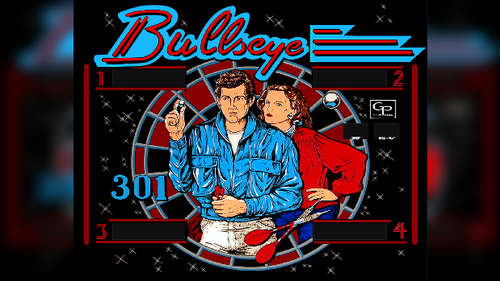
- One that creates a sort of blurred zoom of the backglass. (see 301 Bullseye screenshot)
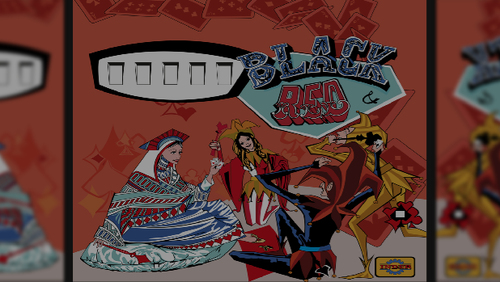
- One that creates a sort of blurred mirror reflection. (see Black & Red screenshot)
It's far from perfect and far from being as good as the Protomech frames I use whenever possible, but it provides a quick option when no frames exist while waiting to create a better one manually 
Usage:
- Put the .py file in an empty folder. - Place your .b2s and desired images in a "sources" folder at the same level as the .py file.
- Run the .py script.
- The frames are generated in the "frames" folder, with a subfolder for each variant.
Edited by Himura95
Precision that the script is now integrated into Vpin Studio 4.3.0

User Feedback
Create an account or sign in to leave a review
You need to be a member in order to leave a review
Create an account
Sign up for a new account in our community. It's easy!
Register a new accountSign in
Already have an account? Sign in here.
Sign In Now