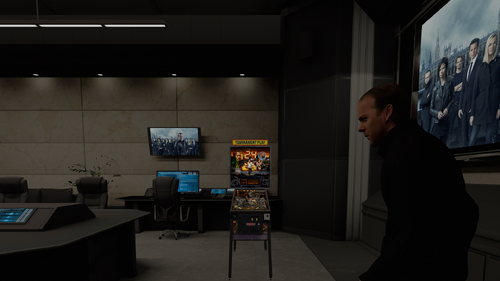
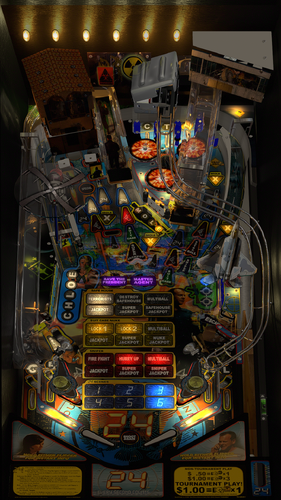
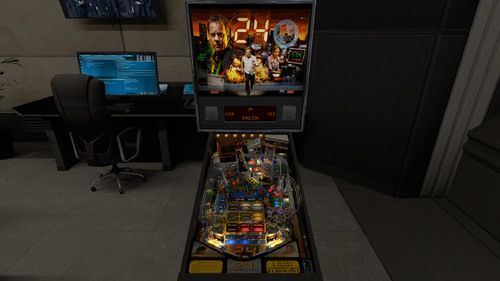
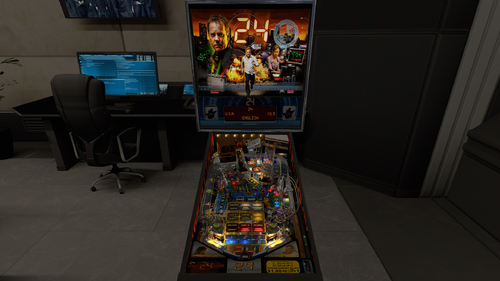
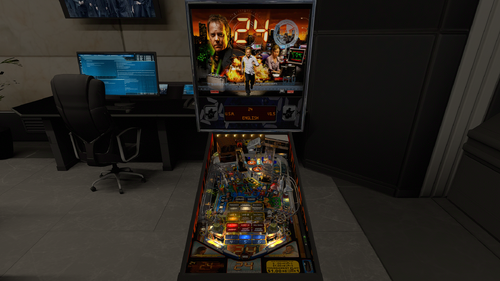
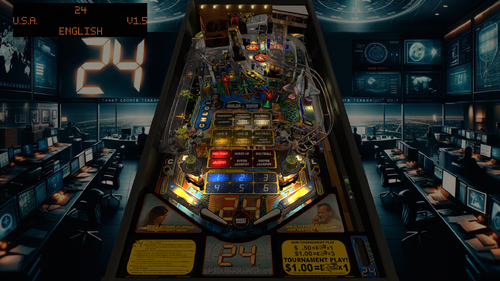
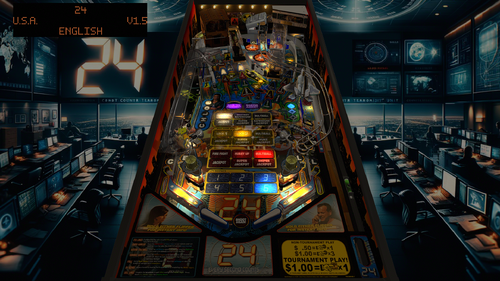
The following takes places between 6 A.M. and 7 A.M.!
I always had a soft spot for this one.
This is a great Steve Ritchie table that is very underrated.
Resources are very limited on this table, probably due to a low production number.
And most of the things we could find were in a poor quality as well.
So me and DaRdog pulled out the big guns by upscales and AI to make everything look as sharp as possible.
The result looks much better than I could possibly imagine.
In only 1 month this project got in the shape it is today.
Update v.2.4:
This is a big visual update and also has physics updates on the target mass and Slingshot Corrections.
Also an updated code on the Fleep sound package.
I baked the playfield shadows, sidewalls and custom blades, backpanel, all plastics, safehouse, sniper and all ramps.
And I have added new lightbulbs on the backpanel provided by the VLM Library.
In the end a very satisfying result and once again I raised the bar and I am a big step closer to forfilling my ambition to do a full VLM project in the future!
Update v.2.3:
I included an extra option for people suffering from issues with anaglyph 3d and headtracking.
A lot of options deal with reflections, like a new option to have the backglass reflect on the playfield wich will work in all formats.
When I have PWM plus refractions plus reflections enabled on the table people in VR will see black holes/blobs inside the lights.
So I added an extra ini file for VR to deal with all of this straight out of the box.
Just add it in and you are good to go!
These options will help taking those away but feel free to try them out when you like. I just disabled them inside that ini file for VR.
Support for the Legends Cabinets.
You can use the option to enable the Legends Cabinet setting to use the bigger sideblade option and a second ini file has been added to make it fit.
This ini file is only needed if you want to use this option.
I do ask in return to not see this being patched even when I release it as free to mod.
Feel free to reach out to me instead if you want extra art added (real art only available on a real table).
If somebody would ignore this I would be crushed...
VP9 - Original version by Freneticamnesic - 2014
VPX - Original version by 32assassin - 2019
VR version by DGrimmReaper - 2023
VR-Hybrid version by RobbyKingPin, DaRdog, DGRimmReaper, Themer, LoadedWeapon & Retro27 based on 32assassin's version - 2024/2026
This mod contains the following improvements:
- nFozzy/Rothbauerw physics,Fleep sound with a lot of custom sounds from VPW's Rollercoaster Tycoon and VPW Ambient Ball Shadows
- rothbauerw Standup and Drop Target codes
- Updated target mass and Slingshot Corrections
- Flupper Domes and 3D Inserts
- New Trough system that saves the balls
- More light tweaks to more modern standards based on VPW's settings
- Inlane speed limiters, code created by Wylte
- New ball image and scratches based on VPW's tables
- Updated PWM on flashers GI and Inserts, added 3D inserts and converted 1 pair of inserts to work with Flupper Domes
- Updated apron primitive from VPW's The Simpsons Party
- Small color and light corrections on the playfield texture
- Added insert decals from the Emperor Mod
- Added Instruction Cards provided by Carny Priest
- New GI
- Big uprez in the playfield using AI
- Removed a lot of timers to improve performance
- VPW Tweak Menu added to replace the old VPW Options UI
- Slingshots are solenoid driven, based on VPW's Spider-Man Classic
- Added a second flasher dome inside the safehouse and edited the safehouse primitive
- New code for the SolSniper sub and the entire sniper section
- New code for the SolSafehouse sub and the entire safehouse section
- Added more options for reflections
- Added a third VR room for Mixed Reality and added a new baked minimal room
- Created a new Jet plastic primitive, used and edited texture from Future Pinball version made by NitroNimbus
- Edited the old custom jet made by 32assassin
- Added new flipperbats from VPW's AC/DC, changed flippersizes and triggers to match and edited the texture
- Created a new backpanel and new backpanel lights
- Baked textures for the sidewalls, custom blades, backpanel, plastics, decals, ramps, safehouse, sniper and playfield shadows
- Blended shadows with the GI
- Support for DT, FS, FSS, MR, Legends Cabinets and VR
- Compatible with the Standalone player
Perfect pairing with backglass made by hauntfreaks.
Some assets and codes that have been used came from other creators:
VPW:
- Apron from The Simpsons Pinball Party.
- Slingshot solenoid codes from Spider-Man Classic.
- Flipperbats from AD/DC
hauntfreaks: Backglass texture from the b2s file
Who did what on this project?
RobbyKingPin:
- nFozzy/Rothbauerw physics,Fleep sound with a lot of custom sounds from VPW's Rollercoaster Tycoon and VPW Ambient Ball Shadows (Updated v.2.4)
- Rothbauerw Standup and Drop Target codes (Updated v.2.4)
- Flupper Domes and 3D Inserts
- New Trough system that saves the balls
- More light tweaks to more modern standards based on VPW's settings
- Inlane speed limiters, code created by Wylte
- New ball image and scratches based on VPW's tables
- Updated PWM on flashers GI and Inserts, added 3D inserts and converted 1 pair of inserts to work with Flupper Domes
- Updated apron primitive from VPW's The Simpsons Party
- Small color and light corrections on the playfield texture
- Added insert decals from the Emperor Mod
- Added Instruction Cards provided by Carny Priest
- New GI
- Updated Rubber Dampeners and Slingshot Corrections (Updated v.2.4)
- Removed a lot of timers to improve performance (Updated v.2.4)
- VPW Tweak Menu added to replace the old VPW Options UI (v.2.2)
- Slingshots are solenoid driven, based on VPW's Spider-Man Classic (v.2.2)
- Added a second flasher dome inside the safehouse and edited the safehouse primitive (v.2.2)
- Added more options for reflections (v.2.3)
- Added a third VR room for Mixed Reality and added a new baked minimal room (Updated v.2.4)
- Created a new Jet plastic primitive, used and edited texture from Future Pinball version made by NitroNimbus (v.2.3)
- Added new flipperbats from VPW's AC/DC, changed flippersizes and triggers to match and edited the texture (v.2.3)
- Created a new backpanel and new backpanel lights (Updated v.2.4)
- Baked textures for the sidewalls, custom blades, backpanel, plastics, decals, ramps, safehouse, sniper and playfield shadows (Updated v.2.4)
- Blended shadows with the GI (v.2.4)
DaRdog:
- Added VR Mega Room
- New cab art and apron art
- Big uprez in the playfield using AI (Updated v.2.3.1 by RKP)
DGrimmReaper:
- Added key, new flipperbuttons, startbutton, screws on the siderails and plunger and animated them.
- Re-aligned cabinet to prevent the apron being cut off (v.2.3)
Themer (v.2.2):
- Inverted VPM switch assignments 43 and 45 (both at the visibleLock and the 'Suitcase lock buttons'). Those switches were inverted
- New code for the SolSniper sub and the entire sniper section
- New code for the SolSafehouse sub and the entire safehouse section
- New VPM solenoid assignment 21 for the suitcase motor
- Removed the SuitRot property from the solSuitcase sub as this property is removed entirly
- New MotorSuitcase sub and new code for the entire suitcase section
LoadedWeapon (v.2.2):
- Created a custom sideblades primitive to fit on Legends Cabinets and provided a secondary ini file for the POV to match
Gravy (v.2.3):
- Edited the old custom jet made by 32assassin
Retro27 (v.2.4):
- Updated VR Cabinet using assets from DaRdog and improved textures
Special thanks to everybody involved during development and testing: H3RBSKIx, geradg, BountyBob, Smaug, MikeDASpike, DarthVito, passion4pins, Apophis, m.carter78, somatik, guus_8005, Studlygoorite, Sinizin, mason, Burger, kilonova, supergibson, chokeee
Shoutout to:
- Carny Priest for the instruction cards he gave us!
- passion4pins for the backdrop he created for desktop players
- freneticamnesic, Rascal, luvthatapex, Javier15, unclewilly, oooPLAYER1ooo, rom, zedonius, dark, ASOT, gtxjoe, ICPjuggla, 85vett, arngrim, 32assassin, DGrimmReaper, Emperor, NitroNimbus & Morttis for their work on previous versions
If I didn't mention anybody else in this development cycle I am unaware of this and just know that I still think you are awesome and also want to say you rock!
And basically everybody from VPW I didn't mention just for having me as part of the family, you all absolutely rock!⠀⠀
⠀⠀⠀⠀
When I missed a credit please send me a message to fix the credits, don't be rude to throw in 1 star reviews for making a human mistake.
Edited by RobbyKingPin
Updated text to update v.2.4

Recommended Comments
Create an account or sign in to comment
You need to be a member in order to leave a comment
Create an account
Sign up for a new account in our community. It's easy!
Register a new accountSign in
Already have an account? Sign in here.
Sign In Now