
First I would like to thank Loserman76 for the beautiful work... wherever he is playing pinball!
small changes were made only aesthetically
small improvements in the playfield, plastics, lighting,flippers position... I want to make it clear that the descriptions for the tables I'm sharing are "standard" for all, changes are made when there is a need for some adjustment.
version used, follow the link to the original table https://www.vpforums...&showfile=13248
Adjustments made:
- lighting and playfield lights
- adjust targets position and color
- new POV
- plastic contrast
- color adjustment and small touches (unfortunately we don't have good image quality from PF)
- adjust PF buttons color and animation
- new hole
- changing the upper arch to wire
- base bumpers color correction
- correction of spinners (correct animation)
- new yellow plastic guides
- red poles
- adjust erasers color
- adjustment of the slingshots right left next to the flippers
Description of Loserman76:
VPX conversion
Artwork done by GNance
others to thank: JPSalas, Pinuck, hauntfreaks, Borgdog, Arngrim
in addition to the "standard" keys (typically "1" to start game and "5" for coin), I've added "3" as another coin input and "4" for coin and auto-start game (like I recall the dime slots generally were) to simulate 3 coin slots
when game is not in progress, holding down left flipper for about 3-5 seconds will bring up the options menu. left flipper selects item, right flipper changes option.
I've also included shadows for the ball and flippers. If you want to turn them off look for these lines at the beginning of the script:
Const ShadowFlippersOn = true
Const ShadowBallOn = true
change to false if you want either of the shadows not showing on your tables
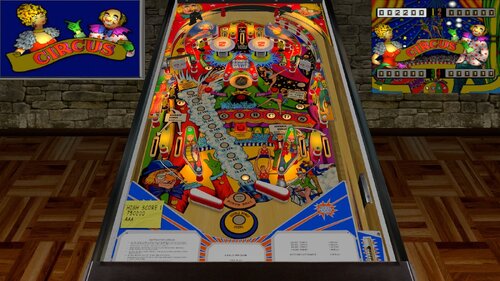
Circus (Zaccaria 1977)_Teisen_MOD
By
teisen
(
Find their other files
)
Submitted
Version 2.2 hybrid
Published
Updated
- Get Support Create an account or sign in to download this
11299
Views
2593
Downloads
5
From 11 reviews
84.38 MB
File Size
none
ROM Name
Loserman76, GNance, JPSalas, Pinuck, Hauntfreaks, Borgdog, Arngrim, Teisen
Created by
Zaccaria
Manufacturer
1977
Year
2 Screenshots
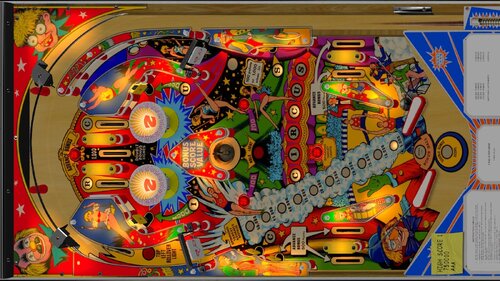
https://www.ipdb.org/machine.cgi?id=https://www.ipdb.org/machine.cgi?id=518
Yes
No
What's New in Version 2.0.0 See changelog
Released
- Playfield and Plastic art and color adjustments
- New Playfield inserts
- General lighting adjustments
- Flipper adjustments
- New Apron cards
- Adjustments and new metals
- Adjustments to various materials
- Bumper adjustments
- Spinners with animated arms
- Playfield holes
- Shadows
- adjustments to some sounds
- New Backdrop for Desktop mode (art provided by Cliffy, thank you friend!)
ATTENTION!!!
FOR THOSE WHO WILL PLAY IN FULL SCREEN MODE, YOU MUST DISABLE THE EMREELS AND DECALS FUNCTIONS IN THE VPX EDITOR SO THAT THE DESKTOP MODE LIGHTING DOES NOT INTERFERE WITH THE GAME.
https://drive.google.com/file/d/1aroYHOVRDN7ENfEDH0GLr_1wv_BORAV5/view?usp=sharing
 With version 2.0.0:
- Download

User Feedback
You may only provide a review once you have downloaded the file.