
Jump to content

Aerosmith (Pro) (Stern/Tribute 2017) V1.02.zip with VR

  • Get Support
  • Create an account or sign in to download this
download_no_perm
71720 Views
11176 Downloads
4.8 From 24 reviews
193.61 MB File Size
aerosmith ROM Name
allknowing2012 Created by
allknowing/EBIsLit Artwork by
allknowing Scripting by
Original Manufacturer
2017 Year

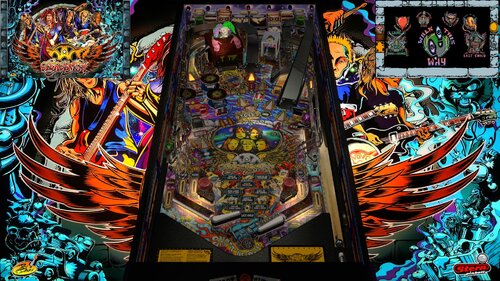
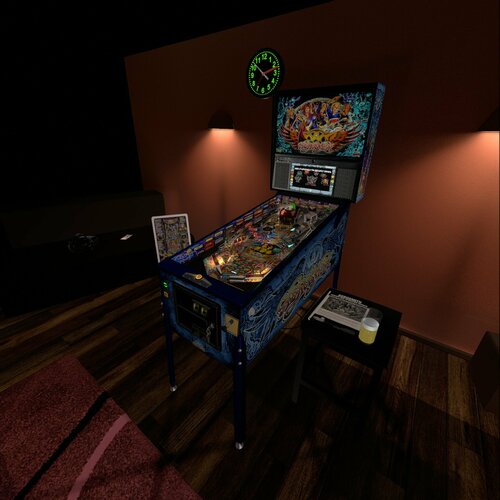
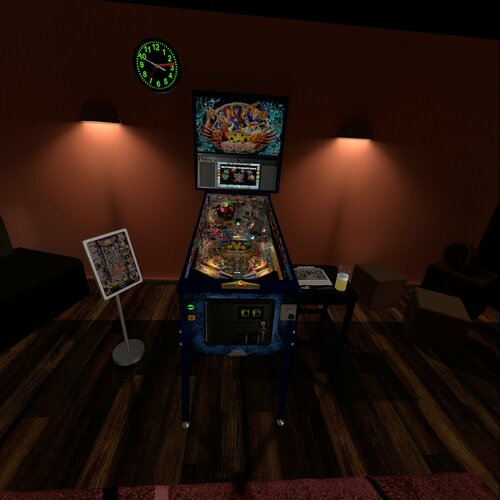
3 Screenshots

Aerosmith Pro 2017 (Stern/Tribute)
V 1.0 
By: Allknowing2012


Thanks to the folks of GOTG for providing a framework for the code.

Here is the much delayed release of my Aerosmith recreation. It includes much
of the rules that are out there but being a recreation it will NOT be an exact 
replication like a rom based game. 
 
Notes:
1) Copy vpx to your tables directory
2) Install the "aerosmith" pup-pack (located elsewhere) in to your PinUpSystem\PupVideos directory.
3) Run the batch file in the pup pack folder to match your hardware (Desktop, 2 screen etc)
4) Optionally run PinupPackEditor.exe to configure/reconfigure your screen layout (for ALL your pups)

This table uses the Apron/FULLDMD of PUP - be sure you have this display configured with 
your  PinUpPackEditor program!


5) Optionally disable/enable Scorbit High Score tracking. See Scorbit.io for details. (Line 127)


Extra:
There are options to use FlexDMD, Pup or neither. PUP use is highly advisable. (Line 131)

PuP Pack Location
https://mega.nz/file/ErxEHAQY#9G1aWoR0aDAAFfz_bK3XrCB0clRzn5n7sBwzd7FX6-8

FlexDMD
(Very minimal Flex implementation)
https://mega.nz/file/Bn5igJbA#Gz-IbiLlnK01SvYoeOUWZupVez2XjeS50H_SO9BPwvk
You WILL need to upload the music portion of the pup-pack
Copy the Music folder into your existing <drive>:\Visual Pinball\Music
(Note don't create Music\Music\Aerosmith - you want Music\Aerosmith

Any graphical improvements are encouraged and welcomed!


Daryl
allknowing2012

Edited by allknowing2012

https://www.ipdb.org/machine.cgi?id=6370
https://mega.nz/file/ErxEHAQY#9G1aWoR0aDAAFfz_bK3XrCB0clRzn5n7sBwzd7FX6-8
Contact Author First.
v10.7 required
Yes

What's New in Version 1.02 with VR   See changelog

Released

1.02 - VR Updates from MikeDaSpike

          - apron image update from drik333

Awaiting DOF updates..

A few known issues that will be addressed in an upcoming release...

- Todo after 2 player high score, score is not shown    
 - Todo Add callouts    
 - Todo no music after 1st ball    
 - Todo Nailbuster fixes..to PUP.zip (downscale the mp4 to reduce VLC memory issues)

User Feedback

Recommended Comments


  • Content Provider
allknowing2012

Posted

VR Update released .. waiting on some DOF updates .. and I am trying to track various updates from comments. None of which are "showstoppers". Remember .. this is not a 100% recreation like a ROM based game tries to be.

jaaba

Posted (edited)

A question: does the music really need to be copied onto Tables\Music, not to VisualPinball\Music as usually?

edit: nm, I did as instructed and everything worked great.

Truly a great achievement from you @allknowing2012, thank you!

Edited by jaaba
toady

Posted

I have had music quality issues with tables that use this type of pupdmd. This table, Iron Maiden LOTB lose their sound quality. Feels like Im missing my sub, but the backglass speakers dont sound as good either. Nothing like Metallica,AC/DC,TOMMY, etc.  Any ideas??

jdsabin1

Posted

In a 2 player game (might happen in a single player but didn't test that yet), the ball automatically gets plunged without having to do anything. Can this behavior be changed? It caught us of guard a few times when it happened. 


Thanks! 

coolball

Posted

Thanks for the update.

S0L1DxSNAKE

Posted

Thanks for the update!

Kato771

Posted

I'm getting errors trying to open the table

IMG_20230322_171851.jpg

palerider

Posted

@Kato771


I get that error because I run 10.71 and this variable is a setting only available in 10.72 and higher. I edit the script and get rid of that check for REnderingMode and just set VR_Room = True

Kato771

Posted

what script line number would I change vr room to true

scoobie1

Posted

Fun table! I finally played the real one in the wild and took some pics of the jester (on top of toy box). I'm not sure if these would be of use to anyone with blender skills, but allknowing mentioned he welcomed graphical updates. 

I don't have those skills, but if photos of that model are helpful, where should I upload them?

MikeDASpike

Posted (edited)

6 hours ago, Kato771 said:

what script line number would I change vr room to true

Vr room should be detected automaticlly.
It done on line 286 (its a feature from 10.7.2 and higher.
You can always add VR=True below that line

8 hours ago, palerider said:

@Kato771


I get that error because I run 10.71 and this variable is a setting only available in 10.72 and higher. I edit the script and get rid of that check for REnderingMode and just set VR_Room = True

VPX 10.7.3 is the latest released version of VPX. 
Vr room detection is done via script that was implemented within 10.7.2
You can either remove line 286 (and set vr_room to false) or update to the latest official release of VPX


BTW. For VR, I advise to set the PUPPack to option 1 to get the fullDMD into VR room. If using DMD, it will be to simple DMD (see VR room screenshots)
And there is an option in the script to change the cabinet Decals.
By default the game is set to PRO, but premium and LE decals (side blades and colored rails) are also available

Edited by MikeDASpike
Kato771

Posted

thanks for the help guys!


Chairman7w

Posted

Dang, I want to play this with Pup Pack, but the DMD is not showing up at all.

If I hit alt-tab, I can see it's there, but it's not showing on the backglass.

Ideas?

PS - Led Zepplin table is doing the same thing.


20230330_070526.jpg

20230330_070535.jpg

  • Content Provider
allknowing2012

Posted

On 3/30/2023 at 10:19 AM, Chairman7w said:

Dang, I want to play this with Pup Pack, but the DMD is not showing up at all.

If I hit alt-tab, I can see it's there, but it's not showing on the backglass.

Ideas?

PS - Led Zepplin table is doing the same thing.


20230330_070526.jpg

20230330_070535.jpg

Use the puppack editor and make sure you have the FullDMD configured in the right location. (it was in the readme)

jrog1991

Posted

Great Table!!  I see some updates have been made for DOF in the DOF config tool, should DOF be working as long as I updated DOF?  Or do I need to do something in the script?  It is not currently working for me.


Thanks in advance.

makmak

Posted

I guess we can expect a table update then.

zack06007

Posted

On 3/5/2023 at 5:07 PM, belinda1 said:

The music stops when i lose first ball. Can anyone help. Thanks.

1. I have the same problem - no music for second ball


2. I play just with b2s and i haven't Dof - i upgrade dofconfigtool but it's same - normal?

makmak

Posted

if theres no dof code in the script then there is no dof when playing - that easy.

jrog1991

Posted

3 hours ago, makmak said:

if theres no dof code in the script then there is no dof when playing - that easy.

There appears to be DOF code in the script, however maybe that is for future releases.


lafester

Posted

On 3/21/2023 at 12:10 PM, toady said:

I have had music quality issues with tables that use this type of pupdmd. This table, Iron Maiden LOTB lose their sound quality. Feels like Im missing my sub, but the backglass speakers dont sound as good either. Nothing like Metallica,AC/DC,TOMMY, etc.  Any ideas??

Same here. music quality kind of fades in and out while it is playing. Kind of like a radio station on the edge of reception without the static. 

CalimeroOeuf

Posted (edited)

Good job but DOF commands in vpx script don't correspond to dof command in dofconfigtool website.


So dof is not working... Update with dof please ?


Thanks

Edited by CalimeroOeuf
outhere

Posted

44 minutes ago, CalimeroOeuf said:

Good job but DOF commands in vpx script don't correspond to dof command in dofconfigtool website.

So dof is not working... Update with dof please ?

Thanks

What's not working

CalimeroOeuf

Posted (edited)

2 hours ago, outhere said:

What's not working

All dof is not working, no toys with this table.


my config in dofconfigtool is updated but all toys are not working

Edited by CalimeroOeuf

Create an account or sign in to comment

You need to be a member in order to leave a comment

Create an account

Sign up for a new account in our community. It's easy!

Register a new account

Sign in

Already have an account? Sign in here.

Sign In Now
×
  • Create New...