
-
SYSTEM SEARCH
System Scanners Online:
Username: Guest
>> System Scan?
>> The Universe >
Incoming Message:
Due to system limitations searching with words of 3 or less characters will not return results. For instance; Doctor Who. This will not return results as the system is trying to search for both Doctor AND Who in which Who will not be found as it's a 3 character word. To find Doctor Who; you'd search for either Doctor or "Doctor Who".
Search Tips:
For specific searches; enclose your search with quotes. Example: "Doctor Who" or "Addams Family".
Search the Community
Showing results for tags 'part 2'.
Found 2 results
-

Version 1.1.0
1096 downloads
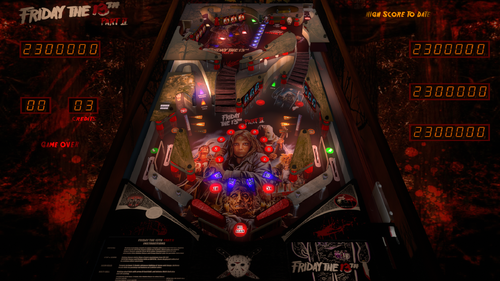
"The body count continues..." In this mod... Complete color tone changed with some graphic and sound improvements to get more realistic/80's slasher movie feel and look + you can additionally choose between 11 different LUTs, 8 backwall panel images, two flipper colors (all via F12 menu) + new script options to turn on/off drain screams and new light flashes, configure look for desktop mode... etc. Please read below (and check script) for all details... Friday The 13th Part II (TBA 2019) - GRITTY MOD - made from Ivantba's table (https://www.vpforums.org/index.php?app=downloads&showfile=14260) with permission. I really like Ivantba's original table - but, as a horror fan in general, and especially fan of 70's and 80's giallos and slashers, I wanted to mod this table to get more gritty, cheap 80's movie slasher look and feel. I hope I got it. Well, you'll be the judge Thanks to Ivantba for permission to mod his table. Also, with this mod you can use any backglass made for original Ivantba table, but you can also try my "Gritty backglass version" - I think it also fits nice with this + you get some light animations supported by code in this mod. Get it here: https://vpuniverse.com/files/file/27585-friday-the-13th-part-ii-tba-2019-gritty-version-2025-b2s/ About mod: There are some graphic and sound changes - nothing too radical because playfield graphic is amazing in original table and audio is really great too, but overall color tone of entire game is now changed - this sepia/brown non-metallic look, fits better to the original movie atmosphere (I hope...) + you now (in F12 menu) have various LUTs (I like all high contrast settings - try it) and backwall panel images to choose and customize look to your preferences. Also, I tried to improve visibility of various table parts (for us who uses smaller screens in our cabs) and there are also big redesign in a desktop mode where changes are from background to LEDs engine, with a support for playing in desktop mode with standard b2s backglass (I know there are lot of you who play tables that way - so, here are some script options to turn off all LEDs and other information on desktop mode background and use b2s on a "clean" screen). Also, some fixes in sound playback are made, some new sounds added etc. ... And now you can turn off screams if you like to play in more silent atmosphere! Check "GRITTY MOD OPTIONS" in script. Now, I know that some things I did here looks a bit rough and it still need some "polishing", but let's left that for some future upgrade. I just hope it won't decrease fun of playing it... NOTE: If you play this mod (or original table) in cabinet mode, I really recommend you to set "View layout mode" (F12 menu) to "Window". I also recommend you to set POV settings. Otherwise table might look a bit strange (stretched, some reflections are not right etc.). So, for those of you who already don't have set all that, I added my INI with my POV settings in ZIP - it is far from perfect but works OK on my setup, and maybe can be helpful as a starting point for your setup. Detail list of all changes: Different colors and slight changes in material on various parts of the table with more realistic lighting on most of elements (playfields, apron lights and background added, new lower flippers look, fixed some light spills etc.) Lights are now set to interact with ball (trying to get more natural reflections on every ball on the table) Better visibility of texts on the table New ramps graphics (inspired by ramps from the "Friday The 13th" table by theGhost787) New graphics and lights on some targets and walls (Jason's head etc. with new light flashes on hits that can be activated/deactivated via options in script) Added several playfield backwall panel images, LUTs, flipper colors (use F12 menus to select) Added holes for drop targets (for realistic look) Added discrete shadows to all flippers and to most of pegs on upper playfield (also for more realistic look) Added dynamic ball color and dynamic ball shadow - discrete changes depending on ball position - trying to get a bit more realistic ball shine, shadow and general look depending of a color tone of a playfield (I hope it also improves realistic look and feel) Some new sound effects added, some changed a little, some plays differently by random choice... Intro speech now plays from start (on some PCs, intro playback skips almost a second of speech - fixed now...) New script options to set specific look of desktop mode, light hits, turn screams om drains on/off etc. - check "GRITTY MOD OPTIONS" section in the script for details For desktop mode players: lot of desktop mode changes - from background to content, trying to get more backglass style look - background image changed, logo added, new LED engine (code borrowed from "301 Bullseye" table - VPX8 version, release v6.0.0 by jpsalas), added ball in play, match, high score to date, bonus ball, shoot again, tilt and game over info + added option to turn off/hide all that info, logo and LEDs (useful if you use desktop mode together with standard b2s backglass - check "BackGlassOnDestop" option in "GRITTY MOD OPTIONS" section in the script) Support for b2s backglass lights animations (if paired with my "gritty version" backglass - check details at backglass release) Added some ASCII art at the top of the script (well, eh... looks nice, I think... ) VPX file size significantly reduced (by removing unused graphics, using WEBP image format and by compressing main score to HQ MP3, VPX size is now around 58MB) And yes - I know that Jason did not use axe nor hockey mask in part 2... But let's look at original table and this mod as a homage to entire movie franchise - so why not mixing things a bit? All Logos, Music, Copyrights and Trademarks are property of their respective owners. PROVIDED STRICTLY FOR PERSONAL AND HOME USE AND NOT FOR COMMERCIAL SALE/RE-SALE OR DISTRIBUTION! Enjoy! -
View File Friday The 13th Part II (TBA 2019) - GRITTY MOD (source Ivantba v1.0, mod by Arminio) "The body count continues..." In this mod... Complete color tone changed with some graphic and sound improvements to get more realistic/80's slasher movie feel and look + you can additionally choose between 11 different LUTs, 8 backwall panel images, two flipper colors (all via F12 menu) + new script options to turn on/off drain screams and new light flashes, configure look for desktop mode... etc. Please read below (and check script) for all details... Friday The 13th Part II (TBA 2019) - GRITTY MOD - made from Ivantba's table (https://www.vpforums.org/index.php?app=downloads&showfile=14260) with permission. I really like Ivantba's original table - but, as a horror fan in general, and especially fan of 70's and 80's giallos and slashers, I wanted to mod this table to get more gritty, cheap 80's movie slasher look and feel. I hope I got it. Well, you'll be the judge Thanks to Ivantba for permission to mod his table. Also, with this mod you can use any backglass made for original Ivantba table, but you can also try my "Gritty backglass version" - I think it also fits nice with this + you get some light animations supported by code in this mod. Get it here: https://vpuniverse.com/files/file/27585-friday-the-13th-part-ii-tba-2019-gritty-version-2025-b2s/ About mod: There are some graphic and sound changes - nothing too radical because playfield graphic is amazing in original table and audio is really great too, but overall color tone of entire game is now changed - this sepia/brown non-metallic look, fits better to the original movie atmosphere (I hope...) + you now (in F12 menu) have various LUTs (I like all high contrast settings - try it) and backwall panel images to choose and customize look to your preferences. Also, I tried to improve visibility of various table parts (for us who uses smaller screens in our cabs) and there are also big redesign in a desktop mode where changes are from background to LEDs engine, with a support for playing in desktop mode with standard b2s backglass (I know there are lot of you who play tables that way - so, here are some script options to turn off all LEDs and other information on desktop mode background and use b2s on a "clean" screen). Also, some fixes in sound playback are made, some new sounds added etc. ... And now you can turn off screams if you like to play in more silent atmosphere! Check "GRITTY MOD OPTIONS" in script. Now, I know that some things I did here looks a bit rough and it still need some "polishing", but let's left that for some future upgrade. I just hope it won't decrease fun of playing it... NOTE: If you play this mod (or original table) in cabinet mode, I really recommend you to set "View layout mode" (F12 menu) to "Window". I also recommend you to set POV settings. Otherwise table might look a bit strange (stretched, some reflections are not right etc.). So, for those of you who already don't have set all that, I added my INI with my POV settings in ZIP - it is far from perfect but works OK on my setup, and maybe can be helpful as a starting point for your setup. Detail list of all changes: Different colors and slight changes in material on various parts of the table with more realistic lighting on most of elements (playfields, apron lights and background added, new lower flippers look, fixed some light spills etc.) Lights are now set to interact with ball (trying to get more natural reflections on every ball on the table) Better visibility of texts on the table New ramps graphics (inspired by ramps from the "Friday The 13th" table by theGhost787) New graphics and lights on some targets and walls (Jason's head etc. with new light flashes on hits that can be activated/deactivated via options in script) Added several playfield backwall panel images, LUTs, flipper colors (use F12 menus to select) Added holes for drop targets (for realistic look) Added discrete shadows to all flippers and to most of pegs on upper playfield (also for more realistic look) Added dynamic ball color and dynamic ball shadow - discrete changes depending on ball position - trying to get a bit more realistic ball shine, shadow and general look depending of a color tone of a playfield (I hope it also improves realistic look and feel) Some new sound effects added, some changed a little, some plays differently by random choice... Intro speech now plays from start (on some PCs, intro playback skips almost a second of speech - fixed now...) New script options to set specific look of desktop mode, light hits, turn screams om drains on/off etc. - check "GRITTY MOD OPTIONS" section in the script for details For desktop mode players: lot of desktop mode changes - from background to content, trying to get more backglass style look - background image changed, logo added, new LED engine (code borrowed from "301 Bullseye" table - VPX8 version, release v6.0.0 by jpsalas), added ball in play, match, high score to date, bonus ball, shoot again, tilt and game over info + added option to turn off/hide all that info, logo and LEDs (useful if you use desktop mode together with standard b2s backglass - check "BackGlassOnDestop" option in "GRITTY MOD OPTIONS" section in the script) Support for b2s backglass lights animations (if paired with my "gritty version" backglass - check details at backglass release) Added some ASCII art at the top of the script (well, eh... looks nice, I think... ) VPX file size significantly reduced (by removing unused graphics, using WEBP image format and by compressing main score to HQ MP3, VPX size is now around 58MB) And yes - I know that Jason did not use axe nor hockey mask in part 2... But let's look at original table and this mod as a homage to entire movie franchise - so why not mixing things a bit? All Logos, Music, Copyrights and Trademarks are property of their respective owners. PROVIDED STRICTLY FOR PERSONAL AND HOME USE AND NOT FOR COMMERCIAL SALE/RE-SALE OR DISTRIBUTION! Enjoy! Submitter arminio Submitted 12/06/25 Category VPX - Pinball Tables VPX Standalone No

