Future Pinball doesn't natively support displaying it's DMD on a separate window or on a real DMD for cabinet users.
Until now, the solution to this was to use FP-Intercept (for real DMD only), or to use FutureDMD to display on a virtual DMD. While both solutions did work, there were limitations and quirks with each. For years, Visual Pinball, Pinball FX3/2 and The Pinball Arcade have been using DMDext (freezy) to display their DMD to a real DMD or a virtual DMD.
Now thanks to the work of MrMoose74 and freezy, Future Pinball can now join the fun with DMDExt!
This guide is now completely updated and renamed as the DMDExt Guide (for Future Pinball)
- I now have all my guides and tutorials in PDF format
- this new guide has been created to be used with the FP and BAM Essentials AIO package
- all my guides and tutorials are now only included with the FP and BAM Essentials AIO package
You can download the FP and BAM Essentials AIO package (and DMDExt Guide) here:
A video tutorial that walks you through this guide can be seen here
00:00 Start
01:25 DMDExt - What does it do?
03:14 Guide walkthrough
06:50 How to run DMDExt with FP
08:00 Copy dmddevice.ini to FP folder
09:04 dmddevice.ini settings
11:46 Run DMDExt - set it's position and size
13:16 Styles - window and settings (always appears on PF screen)
16:15 Test DMDExt with Sonic Pinball Mania
17:52 FP must be run in windowed mode to access Styles window
18:34 Test different Styles presets
22:22 Run FP and DMDExt with BAT file
23:45 Setup Popper to run DMDExt
31:04 Test launching FP table and DMDExt from Popper
33:03 Closing
FP DMD display and score gets garbled and is unreadable for non-English players
SOLUTION BELOW!
For some players who have Windows set to a non-English language, their FP DMD becomes garbled, and the score and text becomes unreadable. This is something I couldn't see myself as my Windows is always set to English. Well finally, there might be a solution for those who have this issue! We simply need to tell FP that the locale is US in the table script!
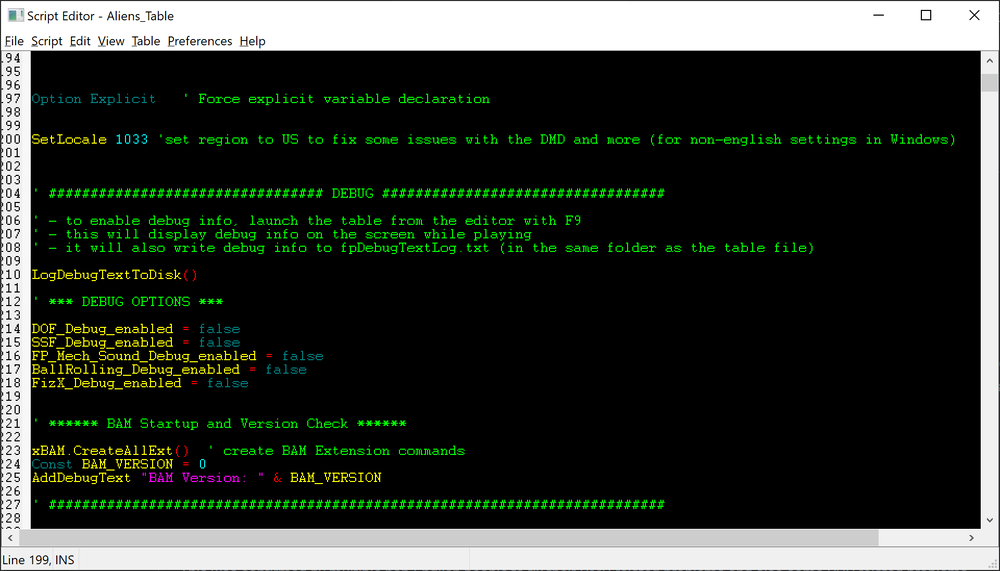
Just goto the table's script, and at the top add the line below under Option Explicit
SetLocale 1033 'set region to US to fix some issues with the DMD and more (for non-english settings in Windows)
Save the table. Done!
This was confirmed by multiple non-English people to fix their DMD related problems and also some PUP related problems.




Question
TerryRed
Future Pinball doesn't natively support displaying it's DMD on a separate window or on a real DMD for cabinet users.
Until now, the solution to this was to use FP-Intercept (for real DMD only), or to use FutureDMD to display on a virtual DMD. While both solutions did work, there were limitations and quirks with each. For years, Visual Pinball, Pinball FX3/2 and The Pinball Arcade have been using DMDext (freezy) to display their DMD to a real DMD or a virtual DMD.
Now thanks to the work of MrMoose74 and freezy, Future Pinball can now join the fun with DMDExt!
This guide is now completely updated and renamed as the DMDExt Guide (for Future Pinball)
- I now have all my guides and tutorials in PDF format
- this new guide has been created to be used with the FP and BAM Essentials AIO package
- all my guides and tutorials are now only included with the FP and BAM Essentials AIO package
You can download the FP and BAM Essentials AIO package (and DMDExt Guide) here:
https://vpuniverse.com/files/file/14807-future-pinball-and-bam-essentials-all-in-one-complete/
A video tutorial that walks you through this guide can be seen here
00:00 Start
01:25 DMDExt - What does it do?
03:14 Guide walkthrough
06:50 How to run DMDExt with FP
08:00 Copy dmddevice.ini to FP folder
09:04 dmddevice.ini settings
11:46 Run DMDExt - set it's position and size
13:16 Styles - window and settings (always appears on PF screen)
16:15 Test DMDExt with Sonic Pinball Mania
17:52 FP must be run in windowed mode to access Styles window
18:34 Test different Styles presets
22:22 Run FP and DMDExt with BAT file
23:45 Setup Popper to run DMDExt
31:04 Test launching FP table and DMDExt from Popper
33:03 Closing
=================================================================
FP DMD display and score gets garbled and is unreadable for non-English players
SOLUTION BELOW!
For some players who have Windows set to a non-English language, their FP DMD becomes garbled, and the score and text becomes unreadable. This is something I couldn't see myself as my Windows is always set to English. Well finally, there might be a solution for those who have this issue! We simply need to tell FP that the locale is US in the table script!
Just goto the table's script, and at the top add the line below under Option Explicit
SetLocale 1033 'set region to US to fix some issues with the DMD and more (for non-english settings in Windows)Save the table. Done!
This was confirmed by multiple non-English people to fix their DMD related problems and also some PUP related problems.
Edited by TerryRedTop Posters For This Question
27
8
7
6
Popular Days
May 29
7
Mar 6
6
Dec 7
4
Jan 16
3
Top Posters For This Question
TerryRed 27 posts
ginzu 8 posts
outhere 7 posts
mrbrightside80 6 posts
Popular Days
May 29 2021
7 posts
Mar 6 2022
6 posts
Dec 7 2024
4 posts
Jan 16 2025
3 posts
Popular Posts
TerryRed
Future Pinball doesn't natively support displaying it's DMD on a separate window or on a real DMD for cabinet users. Until now, the solution to this was to use FP-Intercept (for real DMD
TerryRed
Added a FAQ ****** FAQ ****** Some tables like Tutenkham, Ghostbusters and others show nothing on the DMDExt DMD, and show nothing on the FP Backglass in game. How do I get the
jino0372
It's been a while since I've done much with Future Pinball. This and all of the other cool stuff going on with FP is re-peaking my interest. Thanks Terry for all of the excellent guides and work you
Posted Images
93 answers to this question
Recommended Posts
Create an account or sign in to comment
You need to be a member in order to leave a comment
Create an account
Sign up for a new account in our community. It's easy!
Register a new accountSign in
Already have an account? Sign in here.
Sign In Now