Jump to content
  • 0

DMDExt Guide (for Future Pinball) by TerryRed


Question

  • Content Provider
Posted (edited)

Future Pinball doesn't natively support displaying it's DMD on a separate window or on a real DMD for cabinet users.


Until now, the solution to this was to use  FP-Intercept (for real DMD only), or to use FutureDMD to display on a virtual DMD. While both solutions did work, there were limitations and quirks with each. For years, Visual Pinball, Pinball FX3/2 and The Pinball Arcade have been using DMDext (freezy) to display their DMD to a real DMD or a virtual DMD.


Now thanks to the work of MrMoose74 and freezy, Future Pinball can now join the fun with DMDExt!


4hrSBXG.png


DRxjPjz.png


This guide is now completely updated and renamed as the DMDExt Guide (for Future Pinball)

- I now have all my guides and tutorials in PDF format
- this new guide has been created to be used with the FP and BAM Essentials AIO package
- all my guides and tutorials are now only included with the FP and BAM Essentials AIO package


You can download the FP and BAM Essentials AIO package (and DMDExt Guide) here:
 

https://vpuniverse.com/files/file/14807-future-pinball-and-bam-essentials-all-in-one-complete/


A video tutorial that walks you through this guide can be seen here


00:00 Start
01:25 DMDExt - What does it do?
03:14 Guide walkthrough
06:50 How to run DMDExt with FP
08:00 Copy dmddevice.ini to FP folder
09:04 dmddevice.ini settings
11:46 Run DMDExt - set it's position and size
13:16 Styles - window and settings (always appears on PF screen)
16:15 Test DMDExt with Sonic Pinball Mania
17:52 FP must be run in windowed mode to access Styles window
18:34 Test different Styles presets
22:22 Run FP and DMDExt with BAT file
23:45 Setup Popper to run DMDExt
31:04 Test launching FP table and DMDExt from Popper
33:03 Closing


=================================================================


FP DMD display and score gets garbled and is unreadable for non-English players


SOLUTION BELOW!


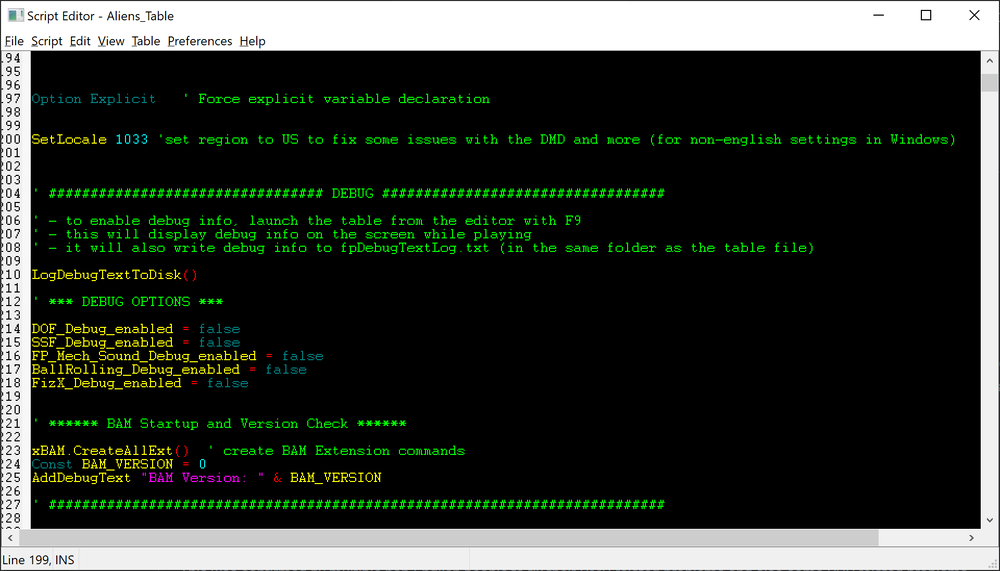
For some players who have Windows set to a non-English language, their FP DMD becomes garbled, and the score and text becomes unreadable. This is something I couldn't see myself as my Windows is always set to English. Well finally, there might be a solution for those who have this issue! We simply need to tell FP that the locale is US in the table script!


Just goto the table's script, and at the top add the line below under Option Explicit


SetLocale 1033 'set region to US to fix some issues with the DMD and more (for non-english settings in Windows)


Save the table. Done!


This was confirmed by multiple non-English people to fix their DMD related problems and also some PUP related problems.


 

image.thumb.png.203049f077c58e0f03b5a5f84ad59426.png

Edited by TerryRed

Recommended Posts

  • 0
Posted

Hello , 


I tried some old fpt tables  i have and  i have some questions


For example : i launched GOLDORAK.fpt and  my DMD is very ugly  ( we can guess there is goldorak behind the very first image but  it is almost full orange when i launch the game. 

I tried another version of this table that  i found but  it remain the same......    Is there  any fix for that ?  Also, when i leave this table, the DMD won't clear by itself.


I also noticed , some  display issue ( score) on other tables.


Another  question is : In the table Star Wars - Death Star Assault (Original 2014) , the DMD is a nice colorized video but  i am not able to get it  on my Dmd.  i tried what i read in the help guide  ( pdf guide) where  Terry speak about to rename The Hud DMD : this part

Quote

on the Translite Editor, rename the HUD DMD to something else, and rename the DMD 
on the Backbox to the original name used for the HUD DMD 


But  i did'nt succeed with that. Is it possible to send the Video onto the DMD for this table ?


And  my last question :  Is it possible to get colorization like on vpx table  with Future DMD  (  sorry , i am not  an expert).


  • 0
  • Content Provider
Posted
On 12/10/2024 at 5:45 PM, ginzu said:

Hello , 


I tried some old fpt tables  i have and  i have some questions


For example : i launched GOLDORAK.fpt and  my DMD is very ugly  ( we can guess there is goldorak behind the very first image but  it is almost full orange when i launch the game. 

I tried another version of this table that  i found but  it remain the same......    Is there  any fix for that ?  Also, when i leave this table, the DMD won't clear by itself.


I also noticed , some  display issue ( score) on other tables.


Another  question is : In the table Star Wars - Death Star Assault (Original 2014) , the DMD is a nice colorized video but  i am not able to get it  on my Dmd.  i tried what i read in the help guide  ( pdf guide) where  Terry speak about to rename The Hud DMD : this part


But  i did'nt succeed with that. Is it possible to send the Video onto the DMD for this table ?


And  my last question :  Is it possible to get colorization like on vpx table  with Future DMD  (  sorry , i am not  an expert).


Videos on FP Overlays are not the same as a DMD, so no you can't simply display them on the DMD... not without recoding the table and doing a lot more work yourself.


As for colourization on a real DMD similar to some VPX cilour DMDs. No. The FP DMD is output to dmdext in monochrome (greyscale values) and then dmdext will choose what colour is used based on your settings for dmdext, etc. The colours on the FP DMD are not retained when sent to DMDext. Beyond that, if someone wants to attempt to create their own colorization for each table, similar to how it needs to be done.... they are on their own their (it's a lot of tedious work).


As for your DMD score, etc being garbled... read my next post for a possible solution.

  • 0
  • Content Provider
Posted (edited)


FP DMD display and score gets garbled and is unreadable for non-English players


SOLUTION BELOW!


For some players who have Windows set to a non-English language, their FP DMD becomes garbled, and the score and text becomes unreadable. This is something I couldn't see myself as my Windows is always set to English. Well finally, there might be a solution for those who have this issue! We simply need to tell FP that the locale is US in the table script!


Just goto the table's script, and at the top add the line below under Option Explicit


SetLocale 1033    'set region to US to fix some issues with the DMD and more (for non-english settings in Windows)


Save the table. Done!


This was confirmed by multiple non-English people to fix their DMD related problems and also some PUP related problems.

 

image.thumb.png.a4cca2c080f5e2f78948f91fda67d0a9.png


Edited by TerryRed
  • 0
Posted

Sory to bother you with my questions  again @TerryRed , ( but it may help other in the future ) , 


I stop testing FP during 2 weeks and  now if i want to launch your script DMDExt_FP.BAT , i encouter this error

*********** DMDExt has been run for Future Pinball ***********


01/16/2025 14:37:34|Fatal|WebSocket.Connect|System.Net.Sockets.SocketException (0x80004005): Aucune connexion n'a pu être établie car l'ordinateur cible l'a expressément refusée 127.0.0.1:80
                             at System.Net.Sockets.TcpClient..ctor(String hostname, Int32 port)
                             at WebSocketSharp.WebSocket.setClientStream()
                             at WebSocketSharp.WebSocket.doHandshake()
                             at WebSocketSharp.WebSocket.connect()


What i did trying to solve my issue

Upgrade my PPUC ZEDMD firmware form 3.6.0 to 4.0.2

Using DMDExt version 2.3.0 now replacing my 2.2.2 version  ( testing X86 and X64 version) currently i use the X64 version and  i use  Windows 10 )

If  i set Virtual DMD to True in DMDDevice.ini  in the FuturePinball folder, i am able to display it correctly but not on the Real dmd ( ZEDMD ) even with the  above error displayed on my terminal.

I even changed my usb port where the Real dmd is pluged in.

I change my usb cable as well.


It look like a DMDext issue........


  • 0
  • Content Provider
Posted
Just now, ginzu said:

Sory to bother you with my questions  again @TerryRed , ( but it may help other in the future ) , 


I stop testing FP during 2 weeks and  now if i want to launch your script DMDExt_FP.BAT , i encouter this error

*********** DMDExt has been run for Future Pinball ***********


01/16/2025 14:37:34|Fatal|WebSocket.Connect|System.Net.Sockets.SocketException (0x80004005): Aucune connexion n'a pu être établie car l'ordinateur cible l'a expressément refusée 127.0.0.1:80
                             at System.Net.Sockets.TcpClient..ctor(String hostname, Int32 port)
                             at WebSocketSharp.WebSocket.setClientStream()
                             at WebSocketSharp.WebSocket.doHandshake()
                             at WebSocketSharp.WebSocket.connect()


What i did trying to solve my issue

Upgrade my PPUC ZEDMD firmware form 3.6.0 to 4.0.2

Using DMDExt version 2.3.0 now replacing my 2.2.2 version  ( testing X86 and X64 version) currently i use the X64 version and  i use  Windows 10 )

If  i set Virtual DMD to True in DMDDevice.ini  in the FuturePinball folder, i am able to display it correctly but not on the Real dmd ( ZEDMD ) even with the  above error displayed on my terminal.

I even changed my usb port where the Real dmd is pluged in.

I change my usb cable as well.


It look like a DMDext issue........


Unfortunately, I don't have a real DMD so I can't test this myself or help you in this regard.

  • 0
Posted (edited)
1 hour ago, TerryRed said:


Unfortunately, I don't have a real DMD so I can't test this myself or help you in this regard.

😢😢😢


EDIT :  i succeeded!  


I uninstall VC_redist_x86 on my computer then i reinstall them:

https://aka.ms/vs/17/release/vc_redist.x86.exe

Then, i reinstalled ( just did a copy paste and applied modifications) of this version of the DMDExt version : dmdext-2.2.2-SNAPSHOT-r1-x64-Release.zip  into my main FP folder (I copied all the files in the folder except DmdDevice.ini)

https://github.com/freezy/dmd-extensions/releases


And that's all! After that, when i launch your bat script ( DMDExt_FP.BAT) i can see no error and  it can connect to it's socket just waiting  i launch FP trough the /BAM/FPLoader.exe


Edited by ginzu
  • 0
Posted

Hello @TerryRed,


By any chance, do you know if it is possible to change the color of the DMD ( my zedmd ) like we can do on the virtual DMD when using the mirror argument to display on our real DMDs ?

Even one color would be fine at least.thank you.

  • 0
  • Content Provider
Posted
1 hour ago, ginzu said:

Hello @TerryRed,


By any chance, do you know if it is possible to change the color of the DMD ( my zedmd ) like we can do on the virtual DMD when using the mirror argument to display on our real DMDs ?

Even one color would be fine at least.thank you.


I've only used a virtual DMD, which allows colour changing of dmdext per table when launched from a front-end. 


I do recall someone saying that there was an issue getting real DMDs working correctly with that before. This is why I had a separate install of dmdext.exe in the FP folder, so it won't interfere with their VP / FX settings in case they needed to use separate colour settings just for FP as best they can.


  • 0
Posted
22 hours ago, TerryRed said:


I've only used a virtual DMD, which allows colour changing of dmdext per table when launched from a front-end. 


I do recall someone saying that there was an issue getting real DMDs working correctly with that before. This is why I had a separate install of dmdext.exe in the FP folder, so it won't interfere with their VP / FX settings in case they needed to use separate colour settings just for FP as best they can.


Ok, and so, do you know maybe if it is possible to setup the default color of the DMD directly from each table script.. ? Or you know it is absolutely not possible? .thank you anyway. I love FP as I love vpx. I understood that there are less people using FP nowaday than people using vpx but as a desktop user, I find that FP is really cool and I like how lot of tables have been done with good taste and improvement ( music etc... ) FP is great.

22 hours ago, TerryRed said:


  • 0
  • Content Provider
Posted (edited)
8 hours ago, ginzu said:


Ok, and so, do you know maybe if it is possible to setup the default color of the DMD directly from each table script.. ? Or you know it is absolutely not possible? .thank you anyway. I love FP as I love vpx. I understood that there are less people using FP nowaday than people using vpx but as a desktop user, I find that FP is really cool and I like how lot of tables have been done with good taste and improvement ( music etc... ) FP is great.


You can have each table use a different colour profile as specified in dmdevice.ini, but that name of each table needs to be passed to dmdext either from a front-end or from a tables script (from script is more advanced, I'm not sure how it works exactly), but I think that still didn't work for real DMDs with dmdext.exe based on what some others had reported.


Edited by TerryRed
  • 0
Posted

@TerryRed Thank you so much for this table and your countless others which I've played a ton. 

I've run into some challenges using a real DMD on the MOTU collectors edition table. 

Other tables of yours (Jaws, Retroflair, Sonic, Etc) it seems to light it up fine.

Any advice would be greatly appreciated! Thanks again for adding so much to the community.


John

  • 0
  • Content Provider
Posted
12 hours ago, Johnnybabyusa said:

@TerryRed Thank you so much for this table and your countless others which I've played a ton. 

I've run into some challenges using a real DMD on the MOTU collectors edition table. 

Other tables of yours (Jaws, Retroflair, Sonic, Etc) it seems to light it up fine.

Any advice would be greatly appreciated! Thanks again for adding so much to the community.


John


DMDext mirrors the FP DMD that's running in memory, so that can be changed depending on what DMD_Location you are using. MOTU CE is different because its the first time I offered option for relocating the HUD DMD (using DMD_Location ), and that can change where in ram the FP DMD is being used.


Try changing the value of DMD_Location in TABLE OPTIONS at the top of the table script. One of those positions should make it work. Which one it will be will depend on if you have the FP Backbox enabled... so try each one until you find one that works.


image.thumb.png.d8cd8810842b6e252d61cb466c06a1e6.png

  • 0
Posted
On 4/3/2025 at 12:26 PM, TerryRed said:


DMDext mirrors the FP DMD that's running in memory, so that can be changed depending on what DMD_Location you are using. MOTU CE is different because its the first time I offered option for relocating the HUD DMD (using DMD_Location ), and that can change where in ram the FP DMD is being used.


Try changing the value of DMD_Location in TABLE OPTIONS at the top of the table script. One of those positions should make it work. Which one it will be will depend on if you have the FP Backbox enabled... so try each one until you find one that works.


image.thumb.png.d8cd8810842b6e252d61cb466c06a1e6.png


@TerryRed You are. a prince among men! Thank you. I also changed the DMD_Size_FP to Zero as I don't need it anymore. I was stumped for a minute as I kept testing it directly within FPLoader and not through PUP (I guess that fires up the DMDext?)


Thanks again man! Love your work. 


I never think to look at the script, but you've certainly given me faith in delving into the setting more now. 


MOTU.jpeg

  • 0
Posted

Hi there,


Looking for answers to error with DMDext while updating FP.  I used the FP and BAM Essentials AIO zip file to replace necessary files as suggested in the guide.


Problem:  getting Unhandled Exception error after updating DMDext to 2.4

image.thumb.png.e414f2db07a6dd88c0447eeccb21d47d.png


Troubleshooting

  1. I reread the Setup pdf file twice.
  2. I deleted my dmddevice.ini and started from version included
  3. I reinstalled DirectX and runtime c++ files
  4. Having run the BACKUP batch file first as suggested, the directory Backup was created under my Windows roaming folder.  This folder is empty.  Not sure why the Make Directory commands did not create the desired subfolders there.  Nothing to possibly restore then.
  5. Using the Start FP - backbox - DMD batch file will load FP and tables will work.  But DMDext will have crashed and burned.
  6. Scoured / googled possible issues with DMDext across various forums.  Nothing recent or relevant yet found.
  7. Downloaded a fresh DMDext zip from GitHub.  Same problem.


Your suggestions are welcome.  Your answers are appreciated as always.


Best regards,

Matt


  • 0
  • Content Provider
Posted
1 hour ago, ManWorkingHere said:

Hi there,


Looking for answers to error with DMDext while updating FP.  I used the FP and BAM Essentials AIO zip file to replace necessary files as suggested in the guide.


Problem:  getting Unhandled Exception error after updating DMDext to 2.4

image.thumb.png.e414f2db07a6dd88c0447eeccb21d47d.png


Troubleshooting

  1. I reread the Setup pdf file twice.
  2. I deleted my dmddevice.ini and started from version included
  3. I reinstalled DirectX and runtime c++ files
  4. Having run the BACKUP batch file first as suggested, the directory Backup was created under my Windows roaming folder.  This folder is empty.  Not sure why the Make Directory commands did not create the desired subfolders there.  Nothing to possibly restore then.
  5. Using the Start FP - backbox - DMD batch file will load FP and tables will work.  But DMDext will have crashed and burned.
  6. Scoured / googled possible issues with DMDext across various forums.  Nothing recent or relevant yet found.
  7. Downloaded a fresh DMDext zip from GitHub.  Same problem.


Your suggestions are welcome.  Your answers are appreciated as always.


Best regards,

Matt


Don't update DMDExt in the FP folder. Use only the files that came with the Essentials AIO zip. The dmdext.exe in the FP folder is already correctly updated and working fine with FP. If you use the incorrect version, then you will get errors.


Be sure the AIO zip was not blocked before extracting files and installing them.


Be sure you don't have Defender or other AV blacking the FP folder or removing files. Add exceptions for the FP folder.


Copy the included dmddevice.ini to the FP main folder. Run DMDExt_FP.BAT. It should run fine and open a black DMDext window. Position and size it, then right-click and save global config and close.


Then, after that, to use DMDext, you need to launch it correctly along side FP. To test it with no front-end, use one of the "Start FP" bat files that includes DMDext.


It should work fine, unless something on your system is restricting / blocking files.


  • 0
Posted
22 hours ago, TerryRed said:

I did check these items but had not noted them.  I really did read and observe the caveats in the Guide.


Don't update DMDExt in the FP folder. Use only the files that came with the Essentials AIO zip. The dmdext.exe in the FP folder is already correctly updated and working fine with FP. If you use the incorrect version, then you will get errors.

= rechecked that 2.4.0 is the installed version of DMDext


Be sure the AIO zip was not blocked before extracting files and installing them.

= I did notice the zip file was blocked at first.  So I did uncheck that and reinstalled with that file.


Be sure you don't have Defender or other AV blacking the FP folder or removing files. Add exceptions for the FP folder.

= No antivirus conflicts perceived.


Copy the included dmddevice.ini to the FP main folder. Run DMDExt_FP.BAT. It should run fine and open a black DMDext window. Position and size it, then right-click and save global config and close.

= I wish DMDext did work to show a black window at least.  Using the included dmddevice.ini as a replacement step did not help eitther.

= I like knowing that once working, I can save the location of the DMDext window in the global config.


Then, after that, to use DMDext, you need to launch it correctly along side FP. To test it with no front-end, use one of the "Start FP" bat files that includes DMDext.

= As you can see from the screenshot, one of my tests of DMDext by itself does not work.  That test alone show how DMDext's dependencies have been affected.  Registry entries?  C++ versions?  Not sure what DMDext 'needs' to work.


It should work fine, unless something on your system is restricting / blocking files.

= Yes, DMDext should work.  But since it doesn't, there is something particular to my setup that is keeping it from working.  I blame Microsoft...


I am wondering which library files or drivers or ??? is needed to get DMDext to run properly.


Really do appreciate the comments.


I do serve as a example for others of what to watch out for...

  • 0
  • Content Provider
Posted
49 minutes ago, ManWorkingHere said:

I am wondering which library files or drivers or ??? is needed to get DMDext to run properly.


Really do appreciate the comments.


I do serve as a example for others of what to watch out for...


dmdext.exe runs on its own and for FP uses the OpenGL32.dll that is in the FP folder (that dll allows dmdext to read FP's ram for mirroring the 128x32 FP DMD). dmddevice.ini in the FP folder is where its settings are kept.


Be absolutely sure you didn't install any different files into the FP folder for dmdext. Even though FP is a 32 bit app, you need to use the 64 bit version of dmdext.exe that is installed in the FP folder with the AIO package for use in 64 bit operating systems (pretty much all computers today). If you installed any 32 bit dmdext files, or installed any additional files that were not part of the Essentials AIO, then you will get errors that prevent it from running.


If it was running correctly, ensure the dmdext black window is not just hidden among a black background (lots of people miss this).

Create an account or sign in to comment

You need to be a member in order to leave a comment

Create an account

Sign up for a new account in our community. It's easy!

Register a new account

Sign in

Already have an account? Sign in here.

Sign In Now
×
  • Create New...