Ho installato con successo e sto provando Visual Pinball, Future Pinball e PinballX su un Pc con Windows 11 e una Tv da 32'' fullhd in hdmi a 1920*1080 (fullhd), già impostato ruotato in Windows.
La mia intenzione è di costruire un cabinet dedicato al gioco del flipper con un tv da 40'' per il playfield inclinato di circa 6° e un tv da 22'' per il BackBox; Vorrei capire se si ottiene un buon realismo e una buona qualità prima di spendere soldi e costruire un cabinet con pc dedicato.
Ho riscontrato 2 problemi:
Il primo problema riguarda Visual Pinball e Future Pinball: ho usato diversi tavoli, ma in nessuno sono riuscito ad avere l'intera area del tv occupata dalla tavola del flipper, rimanendo sempre spazio libero a destra e a sinistra della tavola. Uso Future Pinball in modalità schermo intero/widescreen.
E' possibile avere l'intera area 1920*1080 (16/9) occupata dal flipper nella modalità top view, che è l'unica che fornisce un discreto realismo?
Inoltre le tavole hanno una prospettiva per rendere l'idea dell'inclinazione: si può azzerare la prospettiva, dato che inclinerò fisicamente il tv per avere l'angolo di circa 6 gradi ?
Il secondo problema riguarda Future Pinball: la velocità di gioco e della pallina è troppo elevata in tutti i tavoli, quindi penso sia un problema di Future Pinball e non della specifica tavola: è possibile avere un migliore realismo, riducendo la velocità ? In Visual Pinball la velocità di gioco e della pallina sono più realistici



Question
serclaudio
Ciao a tutti voi.
Ho installato con successo e sto provando Visual Pinball, Future Pinball e PinballX su un Pc con Windows 11 e una Tv da 32'' fullhd in hdmi a 1920*1080 (fullhd), già impostato ruotato in Windows.
La mia intenzione è di costruire un cabinet dedicato al gioco del flipper con un tv da 40'' per il playfield inclinato di circa 6° e un tv da 22'' per il BackBox; Vorrei capire se si ottiene un buon realismo e una buona qualità prima di spendere soldi e costruire un cabinet con pc dedicato.
Ho riscontrato 2 problemi:
Il primo problema riguarda Visual Pinball e Future Pinball: ho usato diversi tavoli, ma in nessuno sono riuscito ad avere l'intera area del tv occupata dalla tavola del flipper, rimanendo sempre spazio libero a destra e a sinistra della tavola. Uso Future Pinball in modalità schermo intero/widescreen.
E' possibile avere l'intera area 1920*1080 (16/9) occupata dal flipper nella modalità top view, che è l'unica che fornisce un discreto realismo?
Inoltre le tavole hanno una prospettiva per rendere l'idea dell'inclinazione: si può azzerare la prospettiva, dato che inclinerò fisicamente il tv per avere l'angolo di circa 6 gradi ?
Il secondo problema riguarda Future Pinball: la velocità di gioco e della pallina è troppo elevata in tutti i tavoli, quindi penso sia un problema di Future Pinball e non della specifica tavola: è possibile avere un migliore realismo, riducendo la velocità ? In Visual Pinball la velocità di gioco e della pallina sono più realistici
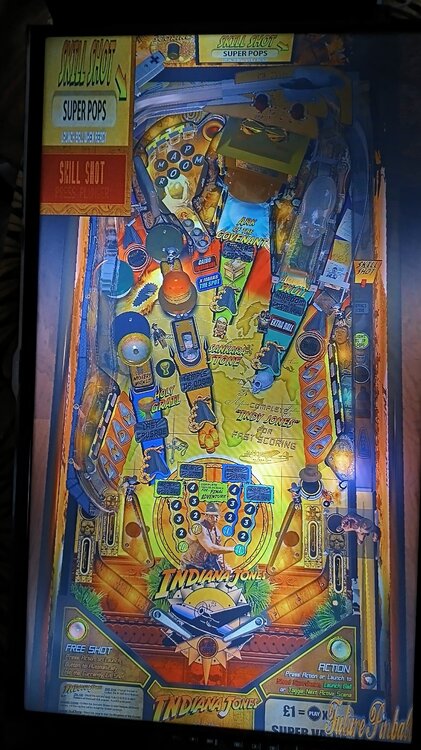
Edited by serclaudio3 answers to this question
Recommended Posts
Create an account or sign in to comment
You need to be a member in order to leave a comment
Create an account
Sign up for a new account in our community. It's easy!
Register a new accountSign in
Already have an account? Sign in here.
Sign In Now