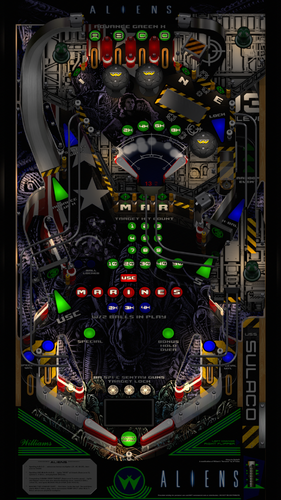
About This File Permission to Mod VP Version Aliens 2.0 - Heavy mod of William's Sorcerer by JP Salas Thank you JP for allowing mods without permission. Yes v10.6 required
World-of-Virtual-pinball 615 Posted September 19, 2021 Very nice @Delta23 thanks for this Aliens is one of my favorites films and this has it all 🙂
scutters 65 Posted September 22, 2021 (edited) Great stuff! Here's a quick script for 3 screen or real dmd users that want a dmd score display rather than backglass scoring (and then show a backglass image/video via the front end). You need flexdmd and freezy installed. Aliens 2.0.zip Extract the file and folder into your VP tables folder, name the 'Aliens 2.0.vbs' the same as your table file, then turn off 'use external dmd' in vpinmame for the rom. It should give you a flex dmd score display like this; ( @Delta23 - feel free to mess around with the script / flexdmd files however you want) Edited September 22, 2021 by scutters
MikeDASpike 384 Posted September 22, 2021 (edited) 5 hours ago, scutters said: Great stuff! Here's a quick script for 3 screen or real dmd users that want a dmd score display rather than backglass scoring (and then show a backglass image/video via the front end). You need flexdmd and freezy installed. Aliens 2.0.zip 29.73 kB · 1 download Extract the file and folder into your VP tables folder, name the 'Aliens 2.0.vbs' the same as your table file, then turn off 'use external dmd' in vpinmame for the rom. It should give you a flex dmd score display like this; ( @Delta23 - feel free to mess around with the script / flexdmd files however you want) Thats a pretty good addition Scutters. I have a real DMD and your script with the flex dmd files looks much better than the freezy dll output. I created an alias for pinmame for this rom. To get flexdmd to overwrite the pinmame display, I disabled the use of external dll. Because I made an alias in pinmame for it, I don't have the realdmd disabled when playing the original table Edited September 22, 2021 by MikeDASpike
Ammeron 5 Posted October 2, 2021 Hey this table is great. thanks heaps for the work. cant stop playing it right now.
PTFilm 3 Posted October 27, 2021 Hello! The table load, the backglass is there as well as the sound but the table does not respond to anything. Any ideas why? What is the correct rom for this table? Thanks!
DarkMatter19755 6 Posted January 28, 2022 Very nice, one of my Favourite Movies of all time, you did fantastic work with this Table Thankyou so much!
PsychoKiller 191 Posted June 26, 2022 On 9/21/2021 at 11:15 PM, scutters said: Great stuff! Here's a quick script for 3 screen or real dmd users that want a dmd score display rather than backglass scoring (and then show a backglass image/video via the front end). You need flexdmd and freezy installed. Aliens 2.0.zip 29.73 kB · 87 downloads Extract the file and folder into your VP tables folder, name the 'Aliens 2.0.vbs' the same as your table file, then turn off 'use external dmd' in vpinmame for the rom. It should give you a flex dmd score display like this; ( @Delta23 - feel free to mess around with the script / flexdmd files however you want) Love it @Scutters wonder if you can do the same with this version without losing use of the Pup Pack?
Content Provider BurtMacklin 4823 Posted June 26, 2022 Content Provider 7 minutes ago, PsychoKiller said: Love it @Scutters wonder if you can do the same with this version without losing use of the Pup Pack? use scutters FlexDMD folder that is in this zip (copy it to your tables folder) and open the exiting pup table and replace the table script with the one in this text file. You'll want to turn off external DMD however in your F1 pinmame settings Aliens Pup FlexDMD.7z
PsychoKiller 191 Posted June 26, 2022 Amazing. Thank you. I tried to do it myself, but I kept losing the pup pack in doing so. I don't know the code, but wish I did so I can get things running the way I like sometimes. Thank you again. Works perfect. I just copied the .txt file into scripts and changed the name to the table and the ext to .vbs.
SecretAntelope 10 Posted October 9, 2023 @Delta23 - Love the table. Is there a way to lower the volume of the music/callouts? For some reason this table is extremely loud in that dept. and I have to lower the volume so much that I can't hear my SSF anymore. Wondering if there may be an easy solution!
Recommended Comments
Create an account or sign in to comment
You need to be a member in order to leave a comment
Create an account
Sign up for a new account in our community. It's easy!
Register a new accountSign in
Already have an account? Sign in here.
Sign In Now
