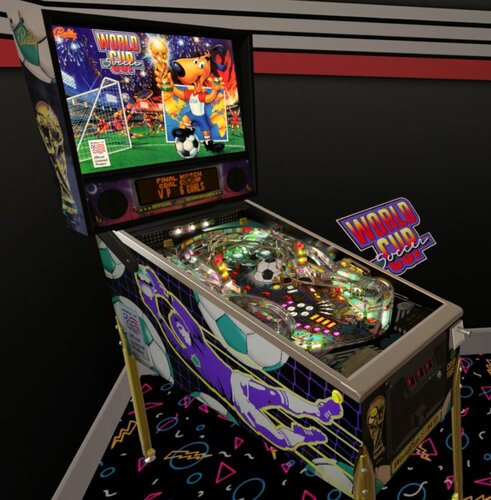
LukeDeMott 1 Posted June 29, 2022 Thank you! Been looking forward to this VR Room. Unfortunately the cab and room scale is tiny. Still fun playing a miniature version of the game. A rescaled version that works with VPVR global settings would be awesome!
Content Provider Solters 1273 Posted August 15, 2022 Content Provider How is this to be understood? There are different lengths and widths. Also in vr. I don't know that there is a zoom or any fix.
Content Provider DarthVito 680 Posted June 17, 2023 Content Provider I guess this takes “minimal” room to a new meaning! It’s a cab for ants! Lol. Anyway to fix this?? @Sixtoe
slydog43 102 Posted July 12, 2023 Looking how to fix scale also. Only one in my cab that does this. At least its happening to most if not all. Using newest 10.8 beta allows table specific setting via an .ini file. I found the entry ScaleRelative = 1.9 works for me (1.0 was default). Loving the ini stuff now
cox 1859 Posted July 26, 2023 (edited) Bonjour j'ai un soucis au niveau de la taille de la room qui est petite .Comment agrandir la room ? ou se trouve le fichier ini? Merci d'avance Hello, I have a problem with the size of the room, which is small. How can I enlarge the room? where is the ini file? Thanks in advance Edited July 26, 2023 by cox
Spoor12B 34 Posted January 1, 2024 (edited) Thanks for the hint @slydog43 This is such a great table to play in 3D as well. At first I didn't realize to add the section to the INI file as well. So now my World Cup Soccer (Bally 1994).ini file ends with: [PlayerVR] ScaleRelative = 1.9 Edited March 19, 2024 by Sjonnie
Rufous78 5 Posted March 21, 2024 I simply set my VR Options in VPX and enabled 'Scale table to width (in cm)' in Table Setup and it fixed the problem with this tables. I haven't seen any adverse effects on any other of my VR tables with this setting enabled.
Korg82 141 Posted April 7, 2024 Gorgeous table !!! But the table is way too easy for some reason? I know the real game. Is there any way this table can be made more challenging? Ball times are just endless! Thanks!!
abique 28 Posted August 2, 2024 Such a great table in VR! Thanks for sharing! Unfortunately my sideblades are to high. They are higher than the playfield glass. Did I miss an option in the table scipt? Thanks in advance!


Recommended Comments
Create an account or sign in to comment
You need to be a member in order to leave a comment
Create an account
Sign up for a new account in our community. It's easy!
Register a new accountSign in
Already have an account? Sign in here.
Sign In Now