Jump to content

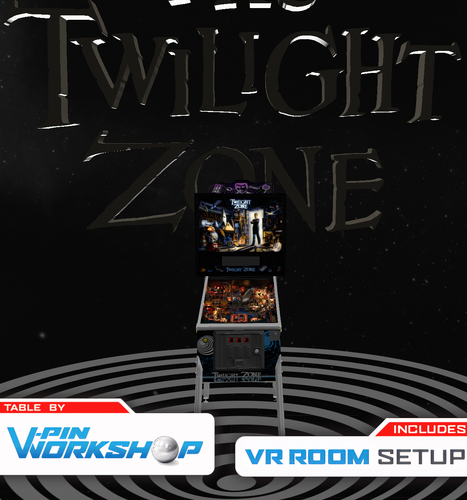
Twilight Zone (Bally 1993) VPW Edition

  • Get Support
  • Create an account or sign in to download this
download_no_perm
57641 Views
12599 Downloads
4.9 From 98 reviews
284.28 MB File Size
tz_94h ROM Name
VPW / Numerous Created by
VPW Artwork by
VPW / Numerous Scripting by
Bally Manufacturer
1993 Year

2 Screenshots

"You have just crossed over... into the Twilight Zone"


Finally. Been a while coming hasn't it?


VPW are very proud to present Twilight Zone by Bally/Midway, arguably one of the best pinball machines ever made!


Niwak wanted to test the idea of making his "VPX Blender Toolkit" back in 2022, and decided to use Twilight Zone as his first experiment in importing and converting a VPX table, a screenshot was posted of the test render and everyone was, like, "ooooo".


However... The tools were in their infancy and Niwak wasn't happy with how the table looked in motion compared to real life, so decided to go and rewrite both pinmame and vpx so that it could do real fading PWM lighting and numerous other things.
While this was going on rothbauer and nfozzy looked at the physics and then Sixtoe rebuilt and simplified the table in VPX after we found the dimensions of the original table were incorrect.

The project then went on hold as we wanted 10.8.0 to stabilise as this table needed the new features to work properly, and we're happy enough with where VPX 10.8.0 RC4 is that we've now punted this out the door into your caring arms.


Make sure to check out the in game "F12" options menu for loads of fancy mods!


This table has gone through some of the best hands in the VPX community at one point or another in its history;


VPW Anomalies
Project Leads - Niwak & Sixtoe
Niwak - Blender Toolkit, Scripting, Inventing.
Sixtoe - VPX Rebuild, Script Stuff, VR Stuff, General Dogsbody.
rothbauer - Physics and Guidance.
apophis - Script Updates & Various Tweaks.
leojreimrc - FSS Backglass.
Darth Vito - 360 room.
mcarter78 - 360 room 3D text, script tweaks.
Flupper & Tomate - Graphics Advice.
nfozzy - physics advice and scripting.
Testing - AstroNasty, DGrimmReaper, Cliffy, Primtime5k, Studlygoorite, Lumi, somatik, BountyBob, RetroRitchie, DarthVito, Dr.Nobody, Rigo, Pinballfan2018, DaRdog, Manu, Flux, geradg


VPW Edition Based on;
Remaster by Skitso, rothbauerw and Bord
Which was based on;
VPX recreation by Ninuzzu & Tom Tower
Which was based on;
FP conversion by Coindropper


Previous Mods Credits/Thanks
Tom Tower for the mini clock, pyramid, piano, camera, gumball machine models.
nFozzy for scripting complicated things.
Fleep for Audio system.
Hauntfreaks for the Mystic Seer Toy.
rom for "Robbie the Robot" model.
Flupper for retexturing and remeshing the plastic ramp.
JPSalas for the help with the inserts and the script.
Clark Kent for early graphics and physics work.


Required Software (64-bit versions)
VPX 10.8.0 RC4 or later: https://github.com/vpinball/vpinball/releases/tag/v10.8.0-1975-051104c
VPinMame 3.6.0-998 or later: https://github.com/vpinball/pinmame/releases/tag/v3.6.0-998-a77c2d2
B2S Server 2.1.1 or later (if B2S used): https://github.com/vpinball/b2s-backglass/releases/tag/v2.1.1

https://www.ipdb.org/machine.cgi?id=2684
https://vpuniverse.com/files/file/12147-twilight-zone-bally-1993-b2s-full-dmd/
Contact Author First.
10.8+ beta required
Yes

What's New in Version 1.0.0

Released

No Changes
Uploaded correct cabinet screenshot (old one was missing playfield lighting)

User Feedback

Recommended Comments


loonytu

Posted (edited)

 hi there updated to new table matrix not working  compared to older version  . it seems not to read the gif file

Edited by loonytu
sllerts

Posted (edited)

Is there something wrong with the Clock Millions target between the two ramps for anybody?  On other versions and IRL, I'm hitting this all the time, but it doesn't seem to register often in this VPW version.  EDIT: well I simply restarted the table and it seems to be registering correctly now.  Weird.

Edited by sllerts
Gravy

Posted

The attention to detail in this table is amazing, little things like the screws that hold the apron wire in place, something that I haven't noticed being included in other tables.

Thanks again.

Zimond

Posted

hey there. I have a weird problem that my flipper fingers wont react. Of course I suspected that I updated something wrong but it seems that other tables continue to work fine with the latest vpx, pinmame and b2s. I tested Die Hard Trilogy and Fish Tales for example. Still work fine. Before I fiddle around with my installation further. Any idea if there might be a quick fix for not responding flipper fingers? All other inputs work fine, I can start the table and launch the ball.

Thalamus

Posted (edited)

I would first - stop the table, then rename or delete the nvram file. I do sometime rename the nvram, if for some reason the issues is elsewhere ... that way, I can rename it back and keep my high-scores pr. example.


If you rename, or delete. Run the table once, wait for the rom to init and exit. Then again try before deciding if that was the cure or not. Pinmame might sometime be a bit confused if it doesn't find the nvram file that it expects. It is just the same as a pinball machine without a working battery.


The first time a rom is run - it will get default values. You exit and it is written to disk. Being the same as - hey, we have a battery installed and the previous values was ..... on the next run.

Edited by Thalamus
Zimond

Posted

When I updated pinmame I only grabbed the pinmame64.exe and not the vpinmame dlls... now everything is working. These updates are always so confusing ^^

BILLMAN

Posted

Need help please. I am using hauntfreaks b2s/full DMD with this fantastic table. I an only getting table sounds and nothing from the back glass. Other tables installed today have worked good. I opened the coin door and turned the volume all the way out and did not help (this one step exhausts by VPX knowledge on sound issues). Any ideas? 

BILLMAN

Posted

On 8/13/2024 at 12:07 PM, Zimond said:

When I updated pinmame I only grabbed the pinmame64.exe and not the vpinmame dlls... now everything is working. These updates are always so confusing ^^

Never mind. 

monkeyboy27

Posted

is there a way to get a copy of this table in cabinet mode? i cant change it in the 10.8 editor. 

robertms

Posted

9 hours ago, monkeyboy27 said:

is there a way to get a copy of this table in cabinet mode? i cant change it in the 10.8 editor. 


You'll need to unlock the table: Table>Lock> Unlock. Then you'll be able to use the editor to set the POV. Or launch the table and hit F12, followed by the launch button (or Enter on keyboard) to begin tweaking it for your cab.

tylxmen

Posted

Encore un boulot de dingue, MERCIIII pour ce que vous faites, bravo et merci 🙏 👍 👏

DyoGTS

Posted

Getting a very slight stutter on only this table and can't seem to figure out what to change to fix it. Any suggestions?
Min Refraction and VR Room off in table, no B2S, no V-Sync. Ryzen 9 5950X, RTX 3080, 64GB RAM, 1440p @ 144hz VPX/VpinMame/B2S all updated. The stutter isn't much, but it is very noticeable. Again this is the ONLY table to experience an issue.

purcho

Posted

This table is perfect. Absolutely awesome. Congratulations and thank you to everyone involved in bringing this to life.

On a side note, Just wondering if there is there a ceramic ball option?

ricokiller

Posted

Hi everybody,

Very good job fantastic....

My trouble is that my upper flip on the right doesn't work.

I don't know why ?

Someone has the same trouble ?

Thank you again.


Pontigrym

Posted

Im new to this, and ive gotten every table to run without a hitch for so far, except this one.. Everything seems to work except the game sound... I have opened the coin door and adjusted the volume to max but there is now music or call-outs just the mechanical sounds of solenoids and bumpers. Is there seperate files to download? or am i just stupid?


  • Content Provider
CarnyPriest

Posted

2 minutes ago, Pontigrym said:

Im new to this, and ive gotten every table to run without a hitch for so far, except this one.. Everything seems to work except the game sound... I have opened the coin door and adjusted the volume to max but there is now music or call-outs just the mechanical sounds of solenoids and bumpers. Is there seperate files to download? or am i just stupid?


MaxVelocity

Posted

To summarise the above link, this table needs ROMs 'tz_94h' and 'tz_94ch'. Another thing to note is that some other tables require more than one ROM to run the table correctly. As a first point of call I'd recommend checking a particular table's entry on the Virtual Pinball Spreadsheet with regard to ROMs required (or anything else) should you run into problems etc. ROM info is of course usually on the page for the table on this site but sometimes further info is needed. The VPS database is very useful. Even though I've been using VPX for quite a while I'm still learning stuff even now...! If you need any help with anything else, let me know.
https://virtualpinballspreadsheet.github.io/games

sho

Posted

On 7/18/2024 at 3:03 PM, kevnniq said:

Is there anyway to make the playfield more vibrant and bright? The Daylight option is at 100% to begin with. I'm currently running the LW version and the playfield looks much better but I want to use this version because of all the great features. Thanks and great work. Table is amazing

I am on an update spree and this stands out amongst all the other VPW releases I have tested (and there are a few) that it already starts out at 100% daylight and is still far too dark. (Switching to AGX tonemapper alleviates it some, but nowhere enough).


Is there any way around this?

Also Legacy view mode is always vertical, not what I have seen from other VPW tables, is that intentional?

VPX 10.8.0 rev 2051 (scripts folder up to date :),  VPinMAME  3.6.0-1227 & B2SServer 2.1.3

newjersey

Posted

First of all, this is really one hell of a ride. 
My grandma used to have this one in her cafe, of course i was a small boy then and of course i sucked.
Now i'm a grown man and i still suck 😆 (but a little less now)
The graphics, the physics its a great game.

I just really like to know, how the game knows when the Powerball is coming. (Not the real pin, but this game)
The rom tells you like: POWERBALL, but how does the vba code and the visual table know when it's that ball?
When i exit the table and that white ball is not in the Gumball machine, but in the inlane the game also knows it's coming.
Just something i have been wondering a long time.
 

Msila28

Posted

Pour le Pup Pack By GtecArcade


Ajouter ce bout au script de la table


'****** PuP Variables ******

Dim usePUP: Dim cPuPPack: Dim PuPlayer: Dim PUPStatus: PUPStatus=false ' dont edit this line!!!

'*************************** PuP Settings for this table ********************************

usePUP   = True         ' set to TRUE to enable Pup.   Download and move to proper folder on PC.
cPuPPack = "tz_94ch"    ' name of the PuP-Pack / PuPVideos folder for this table

'//////////////////// PINUP PLAYER: STARTUP & CONTROL SECTION //////////////////////////

' This is used for the startup and control of Pinup Player

Sub PuPStart(cPuPPack)
    If PUPStatus=true then Exit Sub
    If usePUP=true then
        Set PuPlayer = CreateObject("PinUpPlayer.PinDisplay")
        If PuPlayer is Nothing Then
            usePUP=True
            PUPStatus=True
        Else
            PuPlayer.B2SInit "",cPuPPack 'start the Pup-Pack
            PUPStatus=true
        End If
    End If
End Sub

Sub pupevent(EventNum)
    if (usePUP=false or PUPStatus=false) then Exit Sub
    PuPlayer.B2SData "W"&EventNum,1  'send event to Pup-Pack
End Sub

'************ PuP-Pack Startup **************

PuPStart(cPuPPack) 'Check for PuP - If found, then start Pinup Player / PuP-Pack

Pour que le PuP Pack se déclenche automatiquement.png

georgedoors

Posted

thank you for another lovely table :)

tz1.png

Lroy

Posted

Thanks

SlippyTpoad

Posted (edited)

I was flicking through the feature adjustments menu in the rom for this table and noticed things like 'piano difficulty' and 'slot difficulty'. 


Does changing these settings in the rom have an effect on the table?   does it depend on how the author of the table has coded it?  Can the scripting of the table take into account difficulty settings in the rom?

Edited by SlippyTpoad

Create an account or sign in to comment

You need to be a member in order to leave a comment

Create an account

Sign up for a new account in our community. It's easy!

Register a new account

Sign in

Already have an account? Sign in here.

Sign In Now
×
  • Create New...