Jump to content

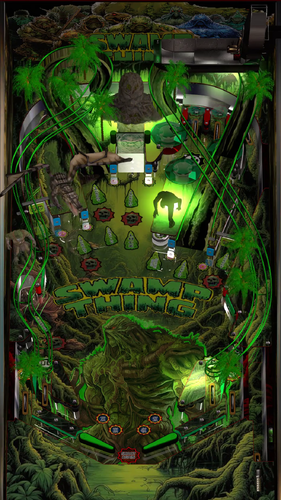
Swamp Thing (Clairvius 2024)

  • Get Support
  • Create an account or sign in to download this
download_no_perm
12912 Views
4665 Downloads
5 From 11 reviews
274.79 MB File Size
None ROM Name
Clairvius Created by
JPSalas Scripting by
Original Manufacturer
2024 Year

3 Screenshots

Journey deep into the Louisiana Swamps with this latest table reskin Swamp Thing (Clairvius 2024)


Table is based off of JP's Serious Sam 2 table. Huge thanks to @jpsalas for allowing me to use his table. All credit should go to him for his amazing work. 


Hope everyone enjoys the table, everything you will need is included in the download. No rom needed.  At this time the table runs with the B2S Backglass included in the download. It has both background Music and vocal callouts.  

If people enjoy the table, I will look into making a pup pack and release it at a later date. 

Yes
10.8 required
No

What's New in Version 1.5   See changelog

Released

Missions requirements have been cut in half to make the table easier. 


Flipper are a little longer to cut down on drains.


VR version of the table with a basic VR room. 

User Feedback

Recommended Comments

Maver1972

Posted

Nice table.  Thanks for all your hard work.  Greatly appreciate it.

  • Content Provider
LAROUILLAS

Posted

Good Job, thanks 

pbplay4

Posted

Thank you!

clairvius

Posted

3 minutes ago, PEandS1Ws said:

Nice job Clairvius! I added a Full DMD for it in my Mega 


super nice, thanks brother 

digitalarts

Posted

if one want dof effects with this table, just change cgamename to "serioussam" in table script

mouseypluta

Posted

14 hours ago, PEandS1Ws said:

Nice job Clairvius! I added a Full DMD for it in my Mega 


Awesome job, always love your work.


Many thanks.

massico88

Posted

Lovely Pinball.


One thing I have to ask,

Is it possible to get the music louder please, educate me. ( haha )


Thank ytou very much

clairvius

Posted

1 hour ago, massico88 said:

Lovely Pinball.


One thing I have to ask,

Is it possible to get the music louder please, educate me. ( haha )


Thank ytou very much

If you open sound manager from vpx they have a volume option where you can select the track and turn it up a little. 

massico88

Posted

19 hours ago, clairvius said:

If you open sound manager from vpx they have a volume option where you can select the track and turn it up a little. 

Oh yes. this is a really cool thing to know.


Thanks a lot Clairvius .

toady

Posted

Graphics......10 , Physics.......10 , Game play.......10 , Music........20!! Who are these guys?

Great job!!!!!!

ps  loved the 80's flic!

LTek

Posted

looking forward to the PuP Pack.  

Tron

Posted

Loving everything about this table, a lot.  I'm only getting music and sounds effects tho, I have yet to hear any callouts?

clairvius

Posted

7 hours ago, Tron said:

Loving everything about this table, a lot.  I'm only getting music and sounds effects tho, I have yet to hear any callouts?

You should get a vocal swamp thing clip every time you hit a ramp

LTek

Posted (edited)

On 6/10/2024 at 9:14 AM, clairvius said:

You should get a vocal swamp thing clip every time you hit a ramp

I had to boost the backglass speakers via PinVol. 

Edited by LTek
jcat

Posted

On 6/18/2024 at 9:23 AM, PinballLizard said:

Beautiful table!  I am so diggin' the music as well.
Thanks @clairvius!


Swamp Thing VPX.jpg

Is that VR or your room? In any case, awesome!

PinballLizard

Posted

40 minutes ago, jcat said:

Is that VR or your room? In any case, awesome!

Thanks! It's part of my basement Man Cave.  I built a hybrid pinball/arcade cab.

Jaxpin

Posted

Multipliers (upper right) don't shift when right flipper is activated. 

drbranko

Posted

What a summer treat! Thanks!

Korg82

Posted (edited)

Cool ass table!! Thank you so much!! 


But in VR, this table and Cenobite both display the DMD off to the left side of the cab rather than on the back box. Any idea why this might be happening? None of my other 150 VR tables do this. Using a Quest 3 with Meta Link cable.


Edited by Korg82
  • Content Provider
unclewilly

Posted

On 8/6/2024 at 9:57 AM, Korg82 said:

Cool ass table!! Thank you so much!! 


But in VR, this table and Cenobite both display the DMD off to the left side of the cab rather than on the back box. Any idea why this might be happening? None of my other 150 VR tables do this. Using a Quest 3 with Meta Link cable.


I can say for cenobite it is from the flasher based dmd that is used for desktop.  I forgot to code turning it off for vr.  Not sure about swampthing

Create an account or sign in to comment

You need to be a member in order to leave a comment

Create an account

Sign up for a new account in our community. It's easy!

Register a new account

Sign in

Already have an account? Sign in here.

Sign In Now
×
  • Create New...