Update for those using PinUp Player 2.0
If on a Pup Pack version older than v2.1, please update.
If on v2.1, verify the usePuPDriver.ini in the PUPVideos\grease folder has the following:
Driver=PinUPDisplayX.exe
------------------------------------------------------------------------------------------------------
Make sure to download both the newest Table and newest Pup Pack.
The PuP Pack uses the external DMD to trigger events, so make sure to press F1 and have "Use External DMD" checked in order for the table to work correctly.
Follow the instructions in the Read Me First.txt in the Grease Pup Pack folder.
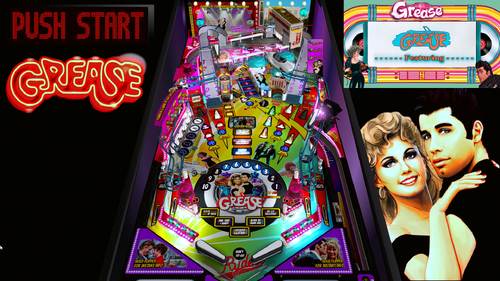
Grease is the Word! Finally, a Grease table with a fully integrated Pup-Pack. I spent about 500 hours on this learning how to build a pup-pack and do an integration using pupscript_vbs.pup to have three music tracks that the table switches between depending on the type of mode you are in and which song should play for that mode. Please read the included "Read Me First.txt" file for setup instructions.
SPECIAL THANKS TO VPW
The whole crew for guidance and direction. Especially via their great VPW ROM Example table.
Kudos to apophis for inviting me in so the group could help me out and assistance throughout my upgrade.
DaRdog & Rawd for the VR room, cabinet, and more.
THANKS
Thanks go out to the usuals:
- JPSalas (for the original table and help with some features)
- NailBuster (for PUP)
- Joe Picasso (for the 3Dmodels)
- marty02 for the original Grease table art
Thanks also go out to:
- Boroka (for his constant encouragement & assistance with coming up with the modes)
- justthebest (for his QA help)
If you enjoy this table, feel free to donate to me here: https://paypal.me/judremy
IMPORTANT
In VPinMAME, be sure you have the following:
In DMDDevice.ini:
[pinup]
; if enabled, send frames to PinUP.
enabled = true
In VPMAlias you should have a row that says:
grease,elvis
Download the Serum Colorization of Elvis which changes the DMD to Grease (by Boroka):
Some other things to mention about the music for the table:
The magna buttons change the song playing when in normal play mode. You can also engage a "jukebox mode" when a game isn't playing by using the same buttons.
You can add/replace the music that plays during normal play by adding files to this folder (no special naming required):
PinUPSystem\PUPVideos\grease\MusicBackground
You can replace the music in PinUPSystem\PUPVideos\grease\MusicModes (filenames must match):
the five main modes,
the Encore mode (spelled Grease),
the Graduation (wizard mode)
and more in this folder
FUN FACT: The Grease song heard from spelling GREASE is the unused original opening song for the movie.
Edited by judremy
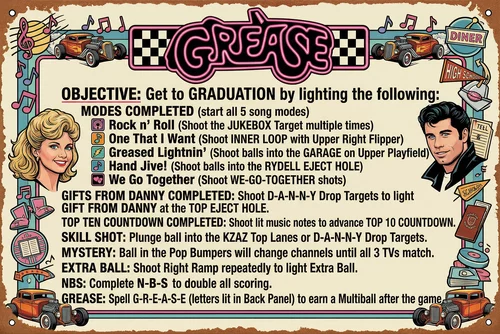
Updated help image in table description
Permission from ORIGINAL Author(s)?
Reached out to original author(s) but no response in 60 days or more.
 With version 2.0:
User Feedback
Create an account or sign in to leave a review
You need to be a member in order to leave a review
Create an account
Sign up for a new account in our community. It's easy!
Register a new accountSign in
Already have an account? Sign in here.
Sign In Now