
Jump to content

The X Files (Sega 1997)

  • Get Support
  • Create an account or sign in to download this
download_no_perm
32747 Views
9413 Downloads
5 From 21 reviews
179.18 MB File Size
xfiles ROM Name
JPSalas, Sliderpoint, TastyWasps Created by
Sega Manufacturer
1997 Year

4 Screenshots

Deny Everything.  Trust No One.

The X Files was released by Sega in 1997 with a production run of only 1500 units.

I noticed that the X Files for VPX was in need of the newer VPW enhancements as this version is based off Sliderpoint's 2016 version (then based off JPSalas version 2011!).  There have been many improvements to VPX (from the VPW team) since 2106 to make it play better plus there were a few bugs and gameplay issues to balance. 


Additions / Updates:

* nFozzy Physics

* Fleep Sounds

* Flupper Domes 

* Dynamic Ball Shadows
* LUT Selector (hold left magna then press right magna)
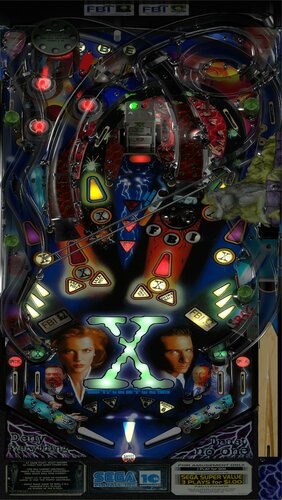
* Playfield image enhanced for better clarity
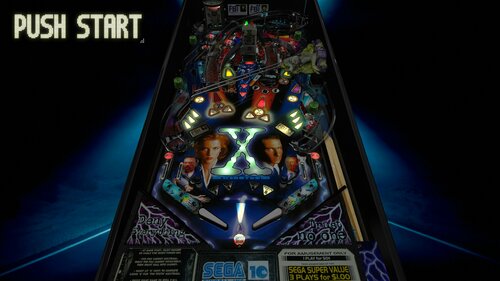
* Desktop background updated to a clean, minimal look.

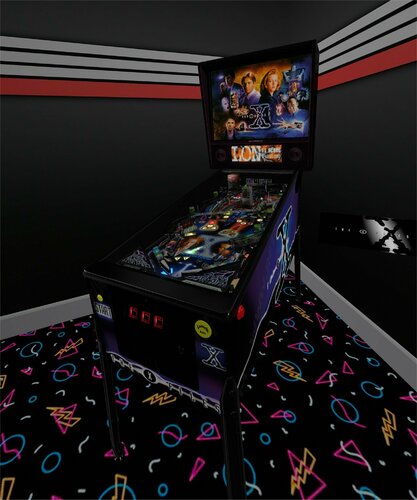
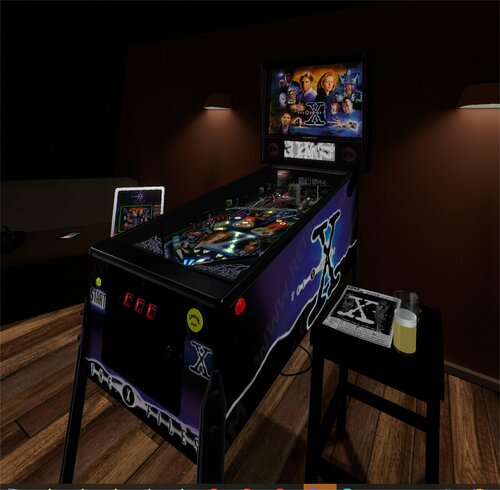
* 2 Hybrid VR Rooms (Deluxe and Minimal) (Thanks Sixtoe, Basti and Rawd for the templates as always)
* Ball Size change to accommodate previous mod's slightly larger table size. (thanks Apophis)

* Many small tweaks and code clean-ups.
 

The physical X Files pinball machine is known for playing as a difficult shooter with tight shots and some brick shots that can catch you off guard.  This digital version replicates those tight shots in the inner orbits and ramps so expect some real satisfaction when you are able to hit those shots! 

Commendations:
Thanks to the original Sega team listed in the IPDB link.

Thanks to the original authors, JPSalas and Sliderpoint for a very solid recreation of this table.

Thanks to the VPW team, Studlygoorite (for the original vpx file) and the following testers: PinStratsDan, Apophis, PrimeTime5K, Sixtoe, Lumi, Smaug

Enjoy!

Edited by TastyWasps
B2S link updated to Hauntfreaks version.

https://www.ipdb.org/machine.cgi?id=4137
https://vpuniverse.com/files/file/14927-x-files-sega-1997-b2s-with-full-dmd
Contact Author First.
v10.7 required
Yes

What's New in Version 1.29   See changelog

Released

* Fixed DMD on cabinet issue.

User Feedback

Recommended Comments


CheesyMoon

Posted

Really fantastic update.  Thankyou.

mikepmcs

Posted

Thank you for the update!

"The truth is out there.."

slydog43

Posted

Great timing, thanks.  I just went through all my VR tables and captured a view for each.  Just did the old X-files yesterday, so I will update.  Thanks

Chairman7w

Posted

I put together a Tutorial for this table here:


Jewer

Posted

After updating VPX to 10.8 the table either crashes or freezes on me. Anyone else seeing this?


Both 32 bit and 64 bit have been updated to their respective versions, but the table won't run on either.

Jewer

Posted

On 12/25/2023 at 5:19 PM, Jewer said:

After updating VPX to 10.8 the table either crashes or freezes on me. Anyone else seeing this?


Both 32 bit and 64 bit have been updated to their respective versions, but the table won't run on either.

No one?

GordonJames

Posted

On 1/11/2024 at 6:04 AM, Jewer said:

No one?

I'm running 32 and latest 10.8 beta and it works just fine.

newer

Posted (edited)

I have the DMD on the Playfield and in my third Monitor.

How can i Hidden the DMD on ther Playfield?

Edited by newer
Jewer

Posted

6 hours ago, GordonJames said:

I'm running 32 and latest 10.8 beta and it works just fine.

I found out it was the altcolor that did it, so had to revert back on this one.

JAmerica15

Posted (edited)

7 hours ago, newer said:

I have the DMD on the Playfield and in my third Monitor.

How can i Hidden the DMD on ther Playfield?

Same here.  


**UPDATE - SOLVED**.  Click on the backdrop icon under Toolbar within the editor.  Drag the black DMD box out of the playfield outline.  

Edited by JAmerica15
Matteo

Posted

thank's :)

ddwall

Posted

This is a nice update I did not care for this table it is much improved. I am also using the alt sound not sure if it needed it.


Thank you very much TastyWasps

newer

Posted

On 1/26/2024 at 5:12 PM, JAmerica15 said:

Same here.  


**UPDATE - SOLVED**.  Click on the backdrop icon under Toolbar within the editor.  Drag the black DMD box out of the playfield outline.  

Perfekt many thanks for the Infos....

mikepmcs

Posted

Thank you for the continuing updates on this amazing game. 

giphy.gif

Matteo

Posted

nice work!

TNT2

Posted

On 1/26/2024 at 9:12 AM, JAmerica15 said:

Same here.  


**UPDATE - SOLVED**.  Click on the backdrop icon under Toolbar within the editor.  Drag the black DMD box out of the playfield outline.  


Great. Thank you!

bladeof

Posted

Thank You Tastywasps.

S0L1DxSNAKE

Posted

Wow!  Looks and plays great.  Impressive update.  Thanks!!

Turnbull

Posted (edited)

Is there any PuPPack available for this great table?

Edited by Turnbull
overridex

Posted

On 1/26/2024 at 7:51 AM, Jewer said:

I found out it was the altcolor that did it, so had to revert back on this one.

I just ran into this, and it was only crashing 10.8 when I had both the altcolor and altsound enabled. Oddly enough, just deleting the `.pal` file of the altcolor and leaving the `.pac` file in place allows both the altcolor and altsound to work together without crashing. Really strange side effect, but hopefully this info might help someone else in the future.

Cliffy

Posted

2 hours ago, overridex said:

just deleting the `.pal` file of the altcolor and leaving the `.pac` file in place

This is always the rule with colorized dmd's. Always rename the pal extension or just delete the file if you will use a pac or crz. the dmddevice.dll will always try to use a pal/vni set first, if found.

overridex

Posted

3 hours ago, Cliffy said:

This is always the rule with colorized dmd's. Always rename the pal extension or just delete the file if you will use a pac or crz. the dmddevice.dll will always try to use a pal/vni set first, if found.

Any reason why an altcolor would be posted with just .pal and .pac files if they're not meant to be used together? Are they needed to use the altcolor with physical DMDs or something?


The example altcolor I had the problem with:


Cliffy

Posted

37 minutes ago, overridex said:

Any reason why an altcolor would be posted with just .pal and .pac files if they're not meant to be used together? Are they needed to use the altcolor with physical DMDs or something?


The example altcolor I had the problem with:


There are a ton of 4 color pal (palette) files out there as well as some Stern color patched rom pal files.

Whichever you choose to use the best practice is to have ONLY that file (or file set as in pal/vni or pal/fsq) in the folder

lebaronrouge

Posted

best version ! j'ai l'impression de jouer au flipper original comme quand j'avais 15 ans !!!!


Create an account or sign in to comment

You need to be a member in order to leave a comment

Create an account

Sign up for a new account in our community. It's easy!

Register a new account

Sign in

Already have an account? Sign in here.

Sign In Now
×
  • Create New...