
Jump to content

Q*bert's Quest (Gottlieb 1983)

  • Get Support
  • Create an account or sign in to download this
download_no_perm
14884 Views
2863 Downloads
5 From 9 reviews
77.18 MB File Size
qbquest ROM Name
bord Created by
Gottlieb Manufacturer
1983 Year

3 Screenshots

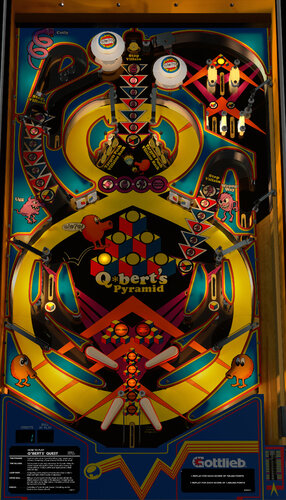
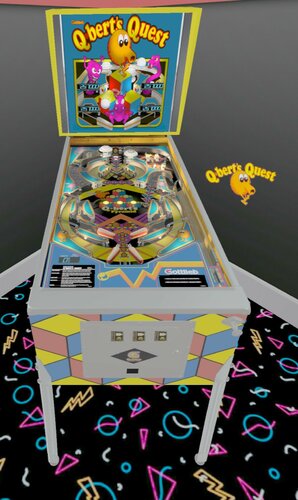
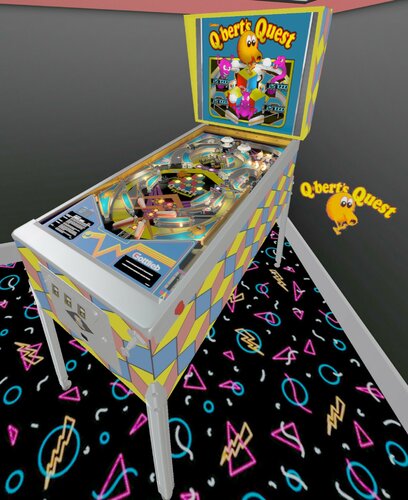
Here is a strange table from Gottlieb. They were definitely thinking out of the box during this era. Q*bert's Quest features four flippers and a figure eight layout. Gameplay is pretty straightforward: complete pyramids and stop the bad guys.

Resources were all redrawn from scratch for this version.

I recommend entering the F6 menu and changing Game Mode to extra ball.

2021 notes: now VR compatible, improved gameplay & sounds but visuals I'm calling good enough. Plenty of other games deserve more attention than this one.

Enjoy!


Changelog:

1.0 released 9.2.2017

1.0.1 DOF update by Arngrim

v.2.0 bumper, plastic mesh, fastflips script, and lighting/shadow updates; ClarkKent did graphic reshaping for accuracy

v.2.1 added roth/fozzy physics, minor visual updates, fleep sound package added by apophis at vpw, VR room setup by psiomicron

v.2.2 raytraced texture for PF

http://www.ipdb.org/machine.cgi?id=1885
https://vpuniverse.com/forums/files/file/6322-qberts-quest-gottlieb-1983/
Contact Author First.
v10

What's New in Version 2.2   See changelog

Released

2.2 update

Raytraced playfield texture and a whole mess of lighting and texture changes to make that work. A much less flat visual experience now.

User Feedback

Recommended Comments


  • Content Provider
Sheltemke

Posted

Thank you so much for the update Bord.

studly_do_right

Posted

Table plays great.....in VR ;) thanks for adding it and sharing. 

WrATH2000

Posted

You know what would be nice, it an option to change the VR room lighting conditions and the table syncs with that lighting, like a day night version. is there any way this can be linked to the automatic day and night cycle option already there? I've been watching the PAPA pinball videos and the lighting is great on the real tables, exterior lighting makes a big difference and those screenshots don't do the tables justice in VR, they look washed out.

bord

Posted

9 minutes ago, WrATH2000 said:

You know what would be nice, it an option to change the VR room lighting conditions and the table syncs with that lighting, like a day night version. is there any way this can be linked to the automatic day and night cycle option already there? I've been watching the PAPA pinball videos and the lighting is great on the real tables, exterior lighting makes a big difference and those screenshots don't do the tables justice in VR, they look washed out.


I have to admit I'm at the mercy of the VR guys on that one. I don't have VR and can't test or adjust.

WrATH2000

Posted

3 minutes ago, bord said:


I have to admit I'm at the mercy of the VR guys on that one. I don't have VR and can't test or adjust.

Thought about having a crack at it myself but I can't do anything on the coding side, just in the editor, it's a shame they can't tie the environment lighting option of the table to the VR room, probably can but just havn't done it yet, I mean I can't see why not, the room is lit by it's own light sources, probably would just needs some scripting magic, I mean I wouldn't expect real time lighting from the table but again I don't see why not other than a performance thing.

DeathInc

Posted

Thanks Bord, Cant wait to get home and try it.


bord

Posted

12 minutes ago, WrATH2000 said:

Thought about having a crack at it myself but I can't do anything on the coding side, just in the editor, it's a shame they can't tie the environment lighting option of the table to the VR room, probably can but just havn't done it yet, I mean I can't see why not, the room is lit by it's own light sources, probably would just needs some scripting magic, I mean I wouldn't expect real time lighting from the table but again I don't see why not other than a performance thing.


@WrATH2000, just poking my nose into the VR meshes quickly and I suggest starting here:

image.png.476f4c2960dfda6c9df77edec5154c15.png


On any VR element take disable lighting down to zero and start working your way up as needed. When it is set to 1 it ignores the environment lighting for the most part, hence the flat lighting you're seeing.

WrATH2000

Posted

I'll have a look into it cheers. I never liked that dark space behind the table in the VR room either, pretty easy to make another wall though and placement.

  • Content Provider
RajoJoey

Posted

1 hour ago, WrATH2000 said:

I'll have a look into it cheers. I never liked that dark space behind the table in the VR room either, pretty easy to make another wall though and placement.

You have to look at the pinball and not behind you. 😉


I also start to insert tables in the vr-room. And I implemented JPSalas' LUT-files, which can be changed with the magnasave-buttons. For me it looks good.

WrATH2000

Posted

7 minutes ago, RajoJoey said:

You have to look at the pinball and not behind you. 😉


I also start to insert tables in the vr-room. And I implemented JPSalas' LUT-files, which can be changed with the magnasave-buttons. For me it looks good.

Yes LUT presets are a good idea like on the Hook table but was wondering if the day and night cycle built in to the app could be used in VR.

bladeof

Posted

Thank You for this update @bord, your work is very much appreciated.

toxie

Posted

Great! Thanks..

tmpc

Posted

Very cool , thank you.

Rawd

Posted

3 hours ago, WrATH2000 said:

Thought about having a crack at it myself but I can't do anything on the coding side, just in the editor, it's a shame they can't tie the environment lighting option of the table to the VR room, probably can but just havn't done it yet, I mean I can't see why not, the room is lit by it's own light sources, probably would just needs some scripting magic, I mean I wouldn't expect real time lighting from the table but again I don't see why not other than a performance thing.


Hi Wrath.   Indeed you can tie environmental lighting into the room in VR.  Sometimes it looks a bit jolting if tied to the table GI (like the whole room flickers a bit much).   You can also do things like swap out the textures to fake the lighting swap (much like is done on VP tables already).   3rDaxis ties some lighting options into the magnasave buttons on his tables, and if you want to see how I did some lighting texture swaps you can check out my VR Educational Toybox room.  Have fun!

bord

Posted

Guys, I know I said I was done with this but the VP lights were just too sickly and flat. Won't be a full render but the pf is going to get an update in a couple hours. Sorry to make you download again (or not).

image.thumb.png.3d5c6b1079a6165329a0e0763875f177.png

Rgarriott

Posted

Looks great Bord.  It is an odd table for sure.

JasonDH

Posted

Thank you Bord for sharing another great looking table! 

JFR1

Posted

This table triggers some odd flashbacks.

Thanks bord!

BrandonLaw

Posted

This game is horseshit sober let alone drinking.  I tried it whilst drinking.  Had to turn my  monitor upside down...seemed to work out more better.


That reminds me...I need to turn it around....


Also reminds me I need to get down from this handstand and stop typing with my toes.


Chicken or the egg situation I'm in.  

bord

Posted

Updated to a rendered playfield texture. Walking away now...

h0pp4z

Posted

Wow... Thank you one more time! Will try soon... Cool

robertms

Posted

@bord thank god you weren't satisfied with the lighting, what a brilliant upgrade! Thanks!


Redwings13

Posted

Thanks Bord.  😄


Create an account or sign in to comment

You need to be a member in order to leave a comment

Create an account

Sign up for a new account in our community. It's easy!

Register a new account

Sign in

Already have an account? Sign in here.

Sign In Now
×
  • Create New...