
Jump to content

Medieval-Madness-The-Royal-Treatment-PuP-Pack-v1.0

  • Get Support
  • Create an account or sign in to download this
download_no_perm
2537 Views
253 Downloads
4.3 From 4 reviews
5.8 GB File Size
Keith Brownlow Created by
Ai Artwork by
Ai / Keith Brownlow Scripting by

1 Screenshot

About This File

I built The Royal Treatment to give Medieval Madness a kingdom that reacts to the game. My aim was to enhance the original table with more personality, humor, and a sense of progress every time you play.

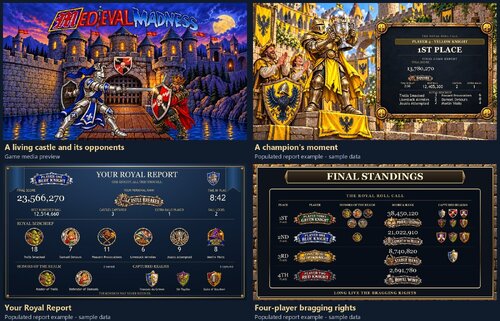
The pack includes changing castle scenes, four distinct player knights, shot reactions, varied launch and lock sequences, performance cards, ball reports, personal ranks, and earned honors. It supports three-screen and optional four-screen setups.

Single-player finishes with a personal recap of your campaign. Multiplayer adds individual reports, a countdown of the final places, and a closing standings screen. I wanted each player to feel like part of the story.

I also tucked plenty of jokes, alternate scenes, and Easter eggs throughout the pack. I’ll leave those for you to discover. Another game may reveal something you haven’t seen before.

My thanks go to the original Medieval Madness creators, the VPW team, the creators of PinUP Player and PinUP Popper, and the virtual pinball community.

Thanks for giving it a play. I hope you enjoy exploring it as much as I enjoyed putting it together.

 

User Feedback

Recommended Comments


thrillride11

Posted

OMG can't wait to give this a try, I repeat what I said on a previous comment, the use of Ai may not be for everyone but it certainly opens up the possibilites of creating pups like this giving it that modern 'spike 3' feel and look to the game for older tables. Thank you so much for the time and effort you must have put in creating this.

abab

Posted

hi there ,i downloaded the pup bat is not working for me on 2 screens at all help please 

thanks

  • Content Provider
guet35

Posted

Ça ne fonctionne pas chez moi.les écran sont ma placés et surtout écran noir. Je comprend pas

Tikimaster

Posted

How do I run that phenomenal thing on desktop? Using my own pinupplayer.ini I got no pupscreens at all using patched table. 

fourbanks

Posted

looks fantastic; however, I get a script error Compile error
-------------
Line: 6041
Name redefined

WhatsApp Image 2026-10-26 at 12.18.47 (2).jpeg

coolball

Posted

Great work and very nice idea, but no Pup screens for me as desktop user.🙄

MonsterArcades

Posted

Sorry you guys are having issues with my PUP. I am trying to figure out what is happening. Please let me know if it is working on anybody's setup? Works fine on mine. But this is my 1st PUP. Here it is working on my setup.

  • Content Provider
guet35

Posted

1 hour ago, PEandS1Ws said:

I have not had a chance to play it yet but I did notice a PinUpPlayer.ini in the root folder of the pup pack. This would override everyone's own PinUpPlayer.ini found in their PinUpSystem folder that sets your screens. For those having issues try deleting that in the pup pack folder and let us know. 

image.png.94cc11a7696ea94683a4a40a6529ed2e.png

same problem without PinUpPlayer.ini and the screens are still poorly positioned

agent327

Posted (edited)

What a labour of love!!! A lot of work went into this one and it shows. Real cool concept, Keith! Well done!!!!!!!!!!!


To all having trouble....the manual is very explicit. RTFM. The biggest change in comparison with a lot of other already running puppacks is that you have to change some coordinates in the script of the table!!!!!!  (screen 2/info2 = BG and screen 5/info5 - FullDMD).  Get these from YOUR original PinUpPlayer.ini file, open VPX, load the table and press the toggle script editor button. Then do what manual says and your good to go!!! (change the coordinates to your own situation and save) Also...get a fresh download of the VPW version of the table and use that one with the .diff to prevent compile errors. 


Thanks for creating and sharing your gem. Real fun to play this way! MUCH APPECIATED!!

Edited by agent327
agent327

Posted

3 minutes ago, guet35 said:

same problem without PinUpPlayer.ini and the screens are still poorly positioned

@Guet35 and PEandS1Ws see above.

MonsterArcades

Posted

1 minute ago, agent327 said:

What a labour of love!!! A lot of work went into this one and it shows. Real cool concept, Keith! Well done!!!!!!!!!!!


To all having trouble....the manual is very explicit. RTFM. The biggest change in comparison with a lot of other already running puppacks is that you have to change some coordinates in the script of the table!!!!!!  (screen 2/info2 = BG and screen 5/info5 - FullDMD).  Get these from YOUR original PinUpPlayer.ini file, open VPX, load the table and press the toggle script editor button. Then do what manuals says and your good to go!!! (change the coordinates to your own situation and save) Also...get a fresh download of the VPW version of the table and use that one with the .diff to prevent compile errors. 


Thanks for creating and sharing your gem. Real fun to play this way! MUCH APPECIATED!!

Thanks for the verification that it works on another cabinet. I am sweating bullets over here! LOL

  • Content Provider
guet35

Posted

1 hour ago, agent327 said:

@Guet35 and PEandS1Ws see above.

I’m still in the same boat—between my limited English and using Google Translate, things are a bit difficult for me. I feel silly asking, but could you provide a step-by-step explanation with images? Thanks!

MonsterArcades

Posted

2 minutes ago, guet35 said:

I’m still in the same boat—between my limited English and using Google Translate, things are a bit difficult for me. I feel silly asking, but could you provide a step-by-step explanation with images? Thanks!

What is your native language? I might be able to help? 

  • Content Provider
guet35

Posted

1 hour ago, MonsterArcades said:

What is your native language? I might be able to help? 

francais, cependant j'ai réussis, c'est génial

  • Content Provider
guet35

Posted

j'ai la video balle 2 bloquée qui apparait sans raison

Tikimaster

Posted (edited)

For Desktoppers HD
This isn't a manual; it's just a report on what I've tried.


I copied my default ini into the pack.
My pinupplayer ini says:

[INFO2]
ScreenXPos=1345
ScreenYPos=29
ScreenWidth=565
ScreenHeight=329
....

[INFO5]
ScreenXPos=0
ScreenYPos=0
ScreenWidth=565
ScreenHeight=329
......


I set the table-script to: (line 810)
' Same standard FullDMD5 and explicit normal mode as working FG09.
    Err.Clear:MM33Player.SetScreenEx 2,1345,29,565,329,0
    ok=MM33Call("SetScreenEx BG2=7680,0,1920,1080 mode0",Err.Number,Err.Description)
    Err.Clear:MM33Player.SetScreenEx 5,0,0,565,329,0
    ok=MM33Call("SetScreenEx FullDMD5=5760,0,1920,1080 mode0",Err.Number,Err.Description)

What I get on Desktop is:

mm.jpg.6139dea3abfb7ca247a51c7279782d81.jpg


So, no matter what config you use - you MUST edit these positions inside the table script to see something, I guess. Read: Medieval-Madness-The-Royal-Treatment-Install-Guide-v1.0.pdf - Step 4b
Do not forget to patch the table!! 
VERY nice PupPack. But hard to read the report in desktop.. 🙂 

Edited by Tikimaster
PEandS1Ws

Posted

I just installed it. Made the script changes and it works fine. Make sure you follow the install guide.


Nice job MonsterArcades. Unconventional Pup Pack installation but I will allow it 😄


I did notice if I cradle the ball and the "instant info" comes up on the rom display it triggers a random ball lock video even though I am only holding the ball and had not locked any balls yet. 


Medieval-Madness-The-Royal-Treatment-Install-Guide-v1.0.pdf

bombaj344

Posted

1 hour ago, Tikimaster said:

For Desktoppers HD
This isn't a manual; it's just a report on what I've tried.


I copied my default ini into the pack.
My pinupplayer ini says:

[INFO2]
ScreenXPos=1345
ScreenYPos=29
ScreenWidth=565
ScreenHeight=329
....

[INFO5]
ScreenXPos=0
ScreenYPos=0
ScreenWidth=565
ScreenHeight=329
......


I set the table-script to: (line 810)
' Same standard FullDMD5 and explicit normal mode as working FG09.
    Err.Clear:MM33Player.SetScreenEx 2,1345,29,565,329,0
    ok=MM33Call("SetScreenEx BG2=7680,0,1920,1080 mode0",Err.Number,Err.Description)
    Err.Clear:MM33Player.SetScreenEx 5,0,0,565,329,0
    ok=MM33Call("SetScreenEx FullDMD5=5760,0,1920,1080 mode0",Err.Number,Err.Description)

What I get on Desktop is:

mm.jpg.6139dea3abfb7ca247a51c7279782d81.jpg


So, no matter what config you use - you MUST edit these positions inside the table script to see something, I guess. Read: Medieval-Madness-The-Royal-Treatment-Install-Guide-v1.0.pdf - Step 4b
Do not forget to patch the table!! 
VERY nice PupPack. But hard to read the report in desktop.. 🙂 


AAA.png

bombaj344

Posted

1 minute ago, bombaj344 said:


AAA.png

I did as you wrote, but unfortunately, it doesn't work for me

Tikimaster

Posted (edited)

8 minutes ago, bombaj344 said:

it doesn't work for me

double check the values inside your pinupdisplay.ini (take the one found in your PinUpSystem folder and overwrite the one in the puppack folder or delete the one, which came with the puppack) and the values you put in the script. It will NOT work to copy the numbers from my message above to your table) You must match your own numbers you got in YOUR own pinupdisplay.ini. 
I had to restart my windows after some tries to get on. 

Edited by Tikimaster
bombaj344

Posted (edited)

32 minutes ago, Tikimaster said:

double check the values inside your pinupdisplay.ini (take the one found in your PinUpSystem folder and overwrite the one in the puppack folder or delete the one, which came with the puppack) and the values you put in the script. It will NOT work to copy the numbers from my message above to your table) You must match your own numbers you got in YOUR own pinupdisplay.ini. 
I had to restart my windows after some tries to get on. 


Edited by bombaj344
bombaj344

Posted

5 minutes ago, bombaj344 said:

[INFO]
ScreenXPos=7
ScreenYPos=5
ScreenWidth=561
ScreenHeight=153
volume=100
hidestopped=0
AspectWide=0
AspectHigh=0
fitToWindow=1
ScreenRotation=0
DebugMode=0
VideoDriver=0
FirstRun=0
[INFO1]
ScreenXPos=1404
ScreenYPos=511
ScreenWidth=516
ScreenHeight=216
volume=100
hidestopped=0
AspectWide=0
AspectHigh=0
fitToWindow=1
ScreenRotation=0
DebugMode=0
VideoDriver=0
FirstRun=0
[INFO2]
ScreenXPos=1345
ScreenYPos=29
ScreenWidth=565
ScreenHeight=329
volume=100
hidestopped=0
AspectWide=0
AspectHigh=0
fitToWindow=1
ScreenRotation=0
DebugMode=0
VideoDriver=0
FirstRun=0
[INFO3]
ScreenXPos=0
ScreenYPos=58
ScreenWidth=810
ScreenHeight=980
volume=100
hidestopped=0
AspectWide=0
AspectHigh=0
fitToWindow=1
ScreenRotation=0
DebugMode=0
VideoDriver=0
FirstRun=0
[INFO4]
ScreenXPos=110
ScreenYPos=743
ScreenWidth=480
ScreenHeight=254
volume=100
hidestopped=2
AspectWide=0
AspectHigh=0
fitToWindow=1
ScreenRotation=0
DebugMode=0
VideoDriver=0
FirstRun=0
[INFO5]
ScreenXPos=0
ScreenYPos=0
ScreenWidth=565
ScreenHeight=329
volume=100
hidestopped=0
AspectWide=0
AspectHigh=0
fitToWindow=1
ScreenRotation=0
DebugMode=0
VideoDriver=0
FirstRun=0
[INFO6]
ScreenXPos=60
ScreenYPos=67
ScreenWidth=800
ScreenHeight=600
volume=100
hidestopped=3
AspectWide=0
AspectHigh=0
fitToWindow=1
ScreenRotation=0
DebugMode=0
VideoDriver=0
FirstRun=0
[INFO7]
ScreenXPos=70
ScreenYPos=77
ScreenWidth=800
ScreenHeight=600
volume=100
hidestopped=3
AspectWide=0
AspectHigh=0
fitToWindow=1
ScreenRotation=0
DebugMode=0
VideoDriver=0
FirstRun=0
[INFO8]
ScreenXPos=80
ScreenYPos=87
ScreenWidth=800
ScreenHeight=600
volume=100
hidestopped=3
AspectWide=0
AspectHigh=0
fitToWindow=1
ScreenRotation=0
DebugMode=0
VideoDriver=0
FirstRun=0
[INFO9]
ScreenXPos=90
ScreenYPos=97
ScreenWidth=800
ScreenHeight=600
volume=100
hidestopped=3
AspectWide=0
AspectHigh=0
fitToWindow=1
ScreenRotation=0
DebugMode=0
VideoDriver=0
FirstRun=0
[INFO10]
ScreenXPos=20
ScreenYPos=694
ScreenWidth=532
ScreenHeight=288
volume=100
hidestopped=3
AspectWide=0
AspectHigh=0
fitToWindow=1
ScreenRotation=0
DebugMode=0
VideoDriver=0
FirstRun=0
[SYSTEM]
VideoDriver=4
These are my settings


Zrzut ekranu (3401).png

bombaj344

Posted

Just now, bombaj344 said:


Zrzut ekranu (3401).png

It’s a bit better now – the left side of the puppack isn’t working for me.


Create an account or sign in to comment

You need to be a member in order to leave a comment

Create an account

Sign up for a new account in our community. It's easy!

Register a new account

Sign in

Already have an account? Sign in here.

Sign In Now
×
  • Create New...