
Jump to content

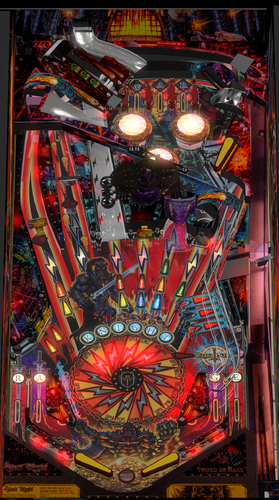
Black Knight Sword Of Rage (Stern 2019)

  • Get Support
  • Create an account or sign in to download this
download_no_perm
13937 Views
4527 Downloads
4.9 From 16 reviews
2.33 GB File Size
None ROM Name
Meakin68 Created by
Vinch52 Artwork by
Meakin68 Scripting by
Stern Manufacturer
2019 Year

1 Screenshot

Welcome Please Read Me.docx

Welcome to my version of Black Knight Sword of Rage (Stern 2019/Modified)
By Meakin68

Black Knight Sword of Rage (Limited Edition) / IPD No. 6569


The table has not been touched since 2023.
The table was actually at best, a WIP so I have basically rewritten a lot of the code, updated physics, sounds, puppack and table.


The story behind me working on this was that I got "stuck/unmotivated" on another project I was working on and needed some time away from it so I thought I would give this a shot. I got fed up of the table crashing, multiballs not working etc. so I thought it would be a simple weeks’ worth of modifying but as I delved deeper I realised it needed a lot more. This is my first table and I hope this meets with approval.


I am very nervous about submitting this as I don’t know what kind of reception it will get. I hope it will just provide a bit of entertainment for everyone. If you spot bugs please tell me about them rather than just moan, and if you want to modify then please get in touch.


Thank you to:

Vinch52 for originally producing the table and puppack which I was able to modify.

VPW tutorials they were essential and extremely useful. Especially their “VPin Workshop Example & Resource Table”, which allowed me to add Nfozzy Physics and Fleep sounds.

NailBuster, for his superb Puplayer code and tutorials. This table relies on puppack to be playable.


What I have done (Version 0.9):


·         Table code modified and most routines rewritten, to allow the game to play with some additional modifications from the Stern table based upon comments from forums. There are some notes below will help understand the features I have done.

·          I have added all the features that were missing such as the powersword and super features.

·         As it stands this game is set to freeplay and one player only. If people like it then I may improve in the future. It is at the stage I think people will like it.

·         I have added Nfozzy Physics, and Fleep Sounds.

·         Rewritten puppack and sounds

·         Modified table to "look nicer"

·         When pressing start please wait for “I am the Black Knight” to be announced especially after a game.


Important notes:

This is my first table and it was a lot of work to debug and rewrite the code. It is not as clean as I would have liked but functional and plays properly now. Please ignore comments to myself within the code and also the name "Meakin" or “PM” occurring. This was often used to allow me to jump about the code, not some ego trip 😉


Adjustables are currently at the top of the script. I haven't added a F12 menu yet, I may do if this proves popular and people like what I have done.


It is based on the Ruleset from Stern Version 1.18, which I have included in the puppack.


The table has been written based upon a cabinet with two screens, I am sure it should work with three or desktop with the settings of the pupack.


This table has a puppack as it make no sense without one. However there are a few bits I had to "fiddle":


Skelton Animation for War Hurry-Up: The animation is using images that animate like a "flick book" ie one image after another. I have added an adjustment which sets how many balls are on the table before it switches to "static" image. I found it was no problem with performance, but the adjustment will fix lag if experienced when War happens.


Callout Sounds are based on a separate CSV which lists all the callout sounds, stored in the pupack. The callouts are played directly using a routine rather than using the puplayer events. I did this as there are a lot of callouts (500+) and I didn’t want to have to add all these to the puppack editor and have too many event numbers.


Finally the folder structure is modified from the original and had extras and some files missing. I have left the extras in for people to be able to use if they wish and I had to create my own missing files. This includes the powersword animations and final stages of black castle. I am not an artist so if you wish to use better versions then please do so (and let me have a copy;-)) 


I hope people enjoy the table.

Edited by meakin68
Originally didn't have the text as I thought the readme file would appear. Had this as a comment but just been told how to edit it so thought the original description should be here. Also changed where meakin69 appears back to meakin68. Thank you.


Permission from ORIGINAL Author(s)?

Reached out to original author(s) but no response in 60 days or more.

Allow file to be included on a VPUniverse downloader app?

Yes
6569
Contact Author First.
10.8 required
Meakin68

What's New in Version 0.91   See changelog

Released

Version 0.91
Code Changes
Thanks to:
@Panasony  for creating code for the Finding the callout folder (now credited properly in the code)
@FilthTribe211  for creating code that clears the table better and fixed ramp rolling issues.
I have also added the @FilthTribe211  Linux code in comments so anyone should be able to alter easily. (search For Linux)
Fixed the Catapult Multi-ball Ramp and so that it counts balls correctly and shouldn't have the lost ball error. 
The ramp rolling error was fixed last update (quickly) and have now checked it a lot and the error has not occurred
Changed Ball Search to also drop the Drop Target on far left lane so should free any trapped balls. NB the LE version has a drop target not spinner I presume due to adding the upper table.
Changed Start button checks to include FilthTribes211 code and also to wait for "I am the Black Knight" automatically, so table will only start when it is ready.
Added routines to turn rails on/off (not added side blades yet) in F12 Menu
Ensured Callout volume can be adjusted separately from music and sound effects is in F12 menu.
Added F12 Menu: This is has a lot of options mostly based on the code adjustments in the previous version. Most defaults match the previous version. 
NB Reset high scores runs in the F12 menu so if it is True it will clear high scores when F12 menu exits. To keep high scores after that go back into the F12 menu and set it back to default of False  
Changed Default values of Balls to 3 to match other tables (can be altered in F12 Menu)


Physics Changes
Thanks to @houstonc11  I have Altered Table Physics to : Table friction: 0.32, Table slope 6.1 (min & max), Flipper strength: 2600 (with coil ramp up set to 1.0), upper flipper strength: 1800 (with coil ramp up set to 1.0)
Altered other physics setting to match Iron Maiden Legacy of the Beast Table which was near to the release of this table.
I think its about right now (please do give feedback with settings, if not)


Graphics Changes
Big learning curve for me as I'm more used to 3D editing, the previous graphics were just minor changes before.
I have altered the alignment of the images to hopefully fit better overall.
Altered the Plunger ramp to use original playfield shots I think it looks a lot better (its not perfect) 


Still To Do

Alter attract mode to include extra videos, Add side blades, Allow more players, Add credits, and of course Any suggestions for improvement.


As always, Thanks to all for the feedback it is much appreciated. 

Next update may be a while as I want to give my other project (non-pinball) some attention, and I need to actually play some pinball rather than just play-test.😉

Paul


User Feedback

Recommended Comments


Gravy

Posted (edited)

8 hours ago, meakin68 said:

@Panasony that is absolutely amazing. Is there a discord normal visual pinball group? If so it would be great to be part of that to help develop. As long as they will accept a newbie like me 😉
 

So I wont post a new update just yet as I'm sure the moderators/administrators will be well chuffed if I keep doing just minor updates. So I'm looking at posting end of next week new updates, hopefully with a bit more added. If that's ok with everyone.


@meakin68 Your tags don't seem to be tagging, so in case Panasony doesn't read that message, here are two groups to join:

VR Pinball Group
https://discord.gg/tqD3NepEu

Virtual Pinball Chat:
https://discord.gg/HK9Fb4dJ2 


Edited by Gravy
jejevpuniverse

Posted (edited)

@meakin68 You can improve the image above the slingshots because the image is misaligned :

You can see the problem directly in the editor when you check "Display Image in Editor" :

slingshots.jpg.d383df2caed20d594f91423f634722e8.jpg


On Photoshop, you can add a layer with all elements in the table for check if the image image25.webp is adapted to all plastics : you can export the layer in Visual Pinball : File/Export/Blueprint.

Edited by jejevpuniverse
kiwidi

Posted

Hi, I’ve tried to lower the background music volume through the PuP-Pack. I’ve checked the script, but no matter what I do, I can’t get the volume to change. Does anyone know how to make it sound quieter? Thanks a lot.

mkarasek

Posted

Fix a few things:

1. Edit the puppack and look at triggers, change all the 5 to a 2.

2. Edit the script, at the top there is A FullDMD = 5 option change the 5 to a 2.


In the Table1_Exit 

Add a line before Controller.Stop 
On Error Resume Next


This will put the PUP on the Backglass and will fix a error on table exit

FilthTribe211

Posted (edited)

Here, i fixed the start game early issue by start gating the button, also fixed some of the ball tracking issues, as I had a ball get lost/destroyed and my vpinball..log blew up to like 25mb and then started numbering them, the longer i left the table open. Some other fixes in here too.

However, I run this on the VPXS standalone so be warned any VPX Windows users will need to redo the callouts fixed found in the comments section here.

@meakin68 - Feel free to take/borrow/steal any reworks/fixes to code in here to include in your future updates (just "Find" all my edits by searching "VPXS"), no credit necessary

vpx-bksorwip.vbs.txt

Edited by FilthTribe211
tabascoman77

Posted

On 9/25/2026 at 12:52 AM, sho said:

Ty, will have a play when I get back Sunday

Following up with you, @sho...let me know how it went.

niliang74

Posted

Hi !

Unfortunately I have a lot of ball blocked  somewhere during multiball combined with other multiball or mission....there is no ball search so it is impossible to continue the game.

I've seen a ball jailed under the ramp or other totally disappeared somewhere.....

FilthTribe211

Posted (edited)

3 hours ago, niliang74 said:

Hi !

Unfortunately I have a lot of ball blocked  somewhere during multiball combined with other multiball or mission....there is no ball search so it is impossible to continue the game.

I've seen a ball jailed under the ramp or other totally disappeared somewhere.....


@niliang74 check out the script I posted a few comments up.... You will have to redo the callout fix if you are using VPX on Windows, as My script I edited for VPXS (Linux based). But that callouts fix is also here in the comments, on page 2 from someone. or I can just multi-quote lol


21 hours ago, FilthTribe211 said:

Here, i fixed the start game early issue by start gating the button, also fixed some of the ball tracking issues, as I had a ball get lost/destroyed and my vpinball..log blew up to like 25mb and then started numbering them, the longer i left the table open. Some other fixes in here too.

However, I run this on the VPXS standalone so be warned any VPX Windows users will need to redo the callouts fixed found in the comments section here.

@meakin68 - Feel free to take/borrow/steal any reworks/fixes to code in here to include in your future updates (just "Find" all my edits by searching "VPXS"), no credit necessary

vpx-bksorwip.vbs.txt 705.24 kB · 5 downloads


Edited by FilthTribe211
sho

Posted (edited)

12 hours ago, tabascoman77 said:

Following up with you, @sho...let me know how it went.

So, it appears that indeed the images, not the pup files are causing the issue (which makes much more sense, for some reason the .alt file works correctly, while the others do not)

Everyone interested, please test the options files here.
I have added Option 0, which is the original setup in this download, to be used with a b2s file. So everything can be reverted at any point

Edited by sho
tabascoman77

Posted

18 hours ago, sho said:

So, it appears that indeed the images, not the pup files are causing the issue (which makes much more sense, for some reason the .alt file works correctly, while the others do not)

Everyone interested, please test the options files here.
I have added Option 0, which is the original setup in this download, to be used with a b2s file. So everything can be reverted at any point

So, the PUP files I gave you didn't work? When I tested yours, they didn't work at all. When I tested mine with the same assets you have, they were fine. If you're using the PUP backglass, do NOT use a B2S or you're gonna have issues.

sho

Posted (edited)

Yeah, yours worked for all practical purposes (and so did mine). Both showed BKSOR_BackGlass.png and BKSOR2ScreenBG.png as black rectangles however (without any b2s)

Edited by sho
niliang74

Posted

On 9/27/2026 at 8:04 PM, FilthTribe211 said:


@niliang74 check out the script I posted a few comments up.... You will have to redo the callout fix if you are using VPX on Windows, as My script I edited for VPXS (Linux based). But that callouts fix is also here in the comments, on page 2 from someone. or I can just multi-quote lol


Hi ! thank you very much...so I have totally replaced the script of the table with yours, then I have  replaced the session "callout" with the fix for  VPX on Windows.....everything it seems working now ! In case, I let you know...thanks again !

Herbivore

Posted

Hi everyone,

I redesigned this screen for the PuP-Pack. To get the PuP-Pack video perfectly centered inside the frame, I modified the variables in PuP Pack Editor. 

For FullDMD and DMDVideos, I used these ⁠CustomPos⁠ settings:

⁠2,22.5,32.6,54.9,48.9⁠ 

Hope this helps

Black Kight Sword Of Rage LE (Stern 2019) Illuminatedscreen.png

sho

Posted

On 9/23/2026 at 6:14 PM, meakin68 said:

Hi All


What a day I've had so:


@houstonc11 if you could say what flipper and friction settings you are using  that would be great. I don't have access to the machine and never played it so the physics was purely a guess based on Nfozzy documents and watching videos of the game being played. If you have experience of the table and those setting are better I would love to use them.

I changed it to 0.25 and it is way less bouncy. (IM LotB uses 0.26 FWIW)
Flippers I know nothing about.

houstonc11

Posted

I've played the table in person and is what I use and feels pretty darn close:


Table friction: 0.32

Table slope 6.1 (min & max)

Flipper strength: 2600 (with coil ramp up set to 1.0)

upper flipper strength: 1800 (with coil ramp up set to 1.0)

meakin68

Posted

@houstonc11 That is brilliant thank you. Just put these settings on my latest version and it seems to play well. Got to sign out now but will be hopefully posting version 0.91 with several improvements. Just need to do some final checks, tomorrow before updating. But this is how it now looks and quite a few code changes such as @FilthTribe211 ramp checks (with extra checks to ensure start button resets lights too) Thank you I have added a credit in script and will on the update too.  Also New F12 menu for a lot of the settings including turning on/off rails and default to 3 balls.

Paul

BKSORscreenshot.png

tabascoman77

Posted

@meakin68 - You fixed how the plunge lane looks! You magnificent bastard! I love you! :) In all seriousness, this is a beautiful overhaul. The lighting is a lot better. The only thing I am getting upon launch with the PUP is that the backglass is all black and doesn't show up. Using my backglass produces blank white video on occasion. Don't know what's going on with that. Also, you seem to be missing ball rolling audio effects and you can't hear the ball interacting with other pieces on the table. Yes, you can hear slingshots and bumpers but everything else is largely silent. Hope that helps. Otherwise, phenomenal job. Major step forward.

  • Content Provider
Itchigo

Posted

Will this work with just UltraDMD?

coolball

Posted

The table is so amazing, the new update is brillant.

Thanks for you hard work on this beauty.

nateynatenate99

Posted

@meakin68Thanks for clarifying that the object in the far left orbit is indeed supposed to be a drop target, and for fixing it so the ball no longer gets stuck behind it. This is a fantastic update and this table is really amazing now. Thanks again for your excellent work!!!


jcopps

Posted (edited)

This table has improved leaps and bounds with your work, thank you so much for taking over this project.  This latest update is especially wonderful.


If i may request something for a future update:  I don't work how this works, but is it possible to set the 3D depth of the top of the playfield (the area with the pop bumpers and the upper rollovers) so that it appears UNDER the clear upper playfield (i.e. the part at the top of the ramps)?  Currently it looks like that area is on the upper playfield when using 3D shaders.  Everything else looks great.  Not a huge thing but just wondering.


Edited by jcopps
tabascoman77

Posted

Here's what I'm getting trying to launch straight from your PUP on a 2 screen cab. A few others are having this issue, too. Trying to switch out backglass with the one I created does the same. Overriding it using the Pup Editor fixes it but causes issues with the Pup. 


bgp[.png


Create an account or sign in to comment

You need to be a member in order to leave a comment

Create an account

Sign up for a new account in our community. It's easy!

Register a new account

Sign in

Already have an account? Sign in here.

Sign In Now
×
  • Create New...