Jump to content

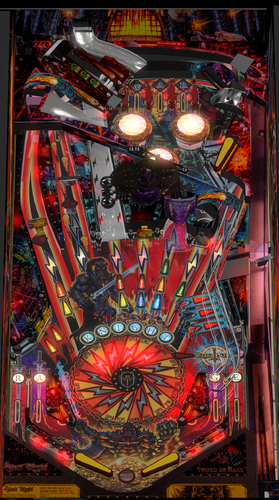
Black Knight Sword Of Rage (Stern 2019)

  • Get Support
  • Create an account or sign in to download this
download_no_perm
14687 Views
4755 Downloads
4.9 From 17 reviews
2.33 GB File Size
None ROM Name
Meakin68 Created by
Vinch52 Artwork by
Meakin68 Scripting by
Stern Manufacturer
2019 Year

1 Screenshot

Welcome Please Read Me.docx

Welcome to my version of Black Knight Sword of Rage (Stern 2019/Modified)
By Meakin68

Black Knight Sword of Rage (Limited Edition) / IPD No. 6569


The table has not been touched since 2023.
The table was actually at best, a WIP so I have basically rewritten a lot of the code, updated physics, sounds, puppack and table.


The story behind me working on this was that I got "stuck/unmotivated" on another project I was working on and needed some time away from it so I thought I would give this a shot. I got fed up of the table crashing, multiballs not working etc. so I thought it would be a simple weeks’ worth of modifying but as I delved deeper I realised it needed a lot more. This is my first table and I hope this meets with approval.


I am very nervous about submitting this as I don’t know what kind of reception it will get. I hope it will just provide a bit of entertainment for everyone. If you spot bugs please tell me about them rather than just moan, and if you want to modify then please get in touch.


Thank you to:

Vinch52 for originally producing the table and puppack which I was able to modify.

VPW tutorials they were essential and extremely useful. Especially their “VPin Workshop Example & Resource Table”, which allowed me to add Nfozzy Physics and Fleep sounds.

NailBuster, for his superb Puplayer code and tutorials. This table relies on puppack to be playable.


What I have done (Version 0.9):


·         Table code modified and most routines rewritten, to allow the game to play with some additional modifications from the Stern table based upon comments from forums. There are some notes below will help understand the features I have done.

·          I have added all the features that were missing such as the powersword and super features.

·         As it stands this game is set to freeplay and one player only. If people like it then I may improve in the future. It is at the stage I think people will like it.

·         I have added Nfozzy Physics, and Fleep Sounds.

·         Rewritten puppack and sounds

·         Modified table to "look nicer"

·         When pressing start please wait for “I am the Black Knight” to be announced especially after a game.


Important notes:

This is my first table and it was a lot of work to debug and rewrite the code. It is not as clean as I would have liked but functional and plays properly now. Please ignore comments to myself within the code and also the name "Meakin" or “PM” occurring. This was often used to allow me to jump about the code, not some ego trip 😉


Adjustables are currently at the top of the script. I haven't added a F12 menu yet, I may do if this proves popular and people like what I have done.


It is based on the Ruleset from Stern Version 1.18, which I have included in the puppack.


The table has been written based upon a cabinet with two screens, I am sure it should work with three or desktop with the settings of the pupack.


This table has a puppack as it make no sense without one. However there are a few bits I had to "fiddle":


Skelton Animation for War Hurry-Up: The animation is using images that animate like a "flick book" ie one image after another. I have added an adjustment which sets how many balls are on the table before it switches to "static" image. I found it was no problem with performance, but the adjustment will fix lag if experienced when War happens.


Callout Sounds are based on a separate CSV which lists all the callout sounds, stored in the pupack. The callouts are played directly using a routine rather than using the puplayer events. I did this as there are a lot of callouts (500+) and I didn’t want to have to add all these to the puppack editor and have too many event numbers.


Finally the folder structure is modified from the original and had extras and some files missing. I have left the extras in for people to be able to use if they wish and I had to create my own missing files. This includes the powersword animations and final stages of black castle. I am not an artist so if you wish to use better versions then please do so (and let me have a copy;-)) 


I hope people enjoy the table.

Edited by meakin68
Originally didn't have the text as I thought the readme file would appear. Had this as a comment but just been told how to edit it so thought the original description should be here. Also changed where meakin69 appears back to meakin68. Thank you.


Permission from ORIGINAL Author(s)?

Reached out to original author(s) but no response in 60 days or more.

Allow file to be included on a VPUniverse downloader app?

Yes
6569
Contact Author First.
10.8 required
Meakin68

What's New in Version 0.91   See changelog

Released

Version 0.91
Code Changes
Thanks to:
@Panasony  for creating code for the Finding the callout folder (now credited properly in the code)
@FilthTribe211  for creating code that clears the table better and fixed ramp rolling issues.
I have also added the @FilthTribe211  Linux code in comments so anyone should be able to alter easily. (search For Linux)
Fixed the Catapult Multi-ball Ramp and so that it counts balls correctly and shouldn't have the lost ball error. 
The ramp rolling error was fixed last update (quickly) and have now checked it a lot and the error has not occurred
Changed Ball Search to also drop the Drop Target on far left lane so should free any trapped balls. NB the LE version has a drop target not spinner I presume due to adding the upper table.
Changed Start button checks to include FilthTribes211 code and also to wait for "I am the Black Knight" automatically, so table will only start when it is ready.
Added routines to turn rails on/off (not added side blades yet) in F12 Menu
Ensured Callout volume can be adjusted separately from music and sound effects is in F12 menu.
Added F12 Menu: This is has a lot of options mostly based on the code adjustments in the previous version. Most defaults match the previous version. 
NB Reset high scores runs in the F12 menu so if it is True it will clear high scores when F12 menu exits. To keep high scores after that go back into the F12 menu and set it back to default of False  
Changed Default values of Balls to 3 to match other tables (can be altered in F12 Menu)


Physics Changes
Thanks to @houstonc11  I have Altered Table Physics to : Table friction: 0.32, Table slope 6.1 (min & max), Flipper strength: 2600 (with coil ramp up set to 1.0), upper flipper strength: 1800 (with coil ramp up set to 1.0)
Altered other physics setting to match Iron Maiden Legacy of the Beast Table which was near to the release of this table.
I think its about right now (please do give feedback with settings, if not)


Graphics Changes
Big learning curve for me as I'm more used to 3D editing, the previous graphics were just minor changes before.
I have altered the alignment of the images to hopefully fit better overall.
Altered the Plunger ramp to use original playfield shots I think it looks a lot better (its not perfect) 


Still To Do

Alter attract mode to include extra videos, Add side blades, Allow more players, Add credits, and of course Any suggestions for improvement.


As always, Thanks to all for the feedback it is much appreciated. 

Next update may be a while as I want to give my other project (non-pinball) some attention, and I need to actually play some pinball rather than just play-test.😉

Paul


User Feedback

Recommended Comments


meakin68

Posted

Sorry this was my first submission. So Didn't know how it works the please read me file has the "about this file" I have copied the important bits below.


Welcome to my version of Black Knight Sword of Rage (Stern 2019/Modified)
By Meakin68

Black Knight Sword of Rage (Limited Edition) / IPD No. 6569


The table has not been touched since 2023.
 

The table was actually at best, a WIP so I have basically rewritten a lot of the code, updated physics, sounds, puppack and table.


The story behind me working on this was that I got "stuck/unmotivated" on another project I was working on and needed some time away from it so I thought I would give this a shot. I got fed up of the table crashing, multiballs not working etc. so I thought it would be a simple weeks’ worth of modifying but as I delved deeper I realised it needed a lot more. This is my first table and I hope this meets with approval.


I am very nervous about submitting this as I don’t know what kind of reception it will get. I hope it will just provide a bit of entertainment for everyone. If you spot bugs please tell me about them rather than just moan, and if you want to modify then please get in touch.


Thank you to:

Vinch52 for originally producing the table and puppack which I was able to modify.

VPW tutorials they were essential and extremely useful. Especially their “VPin Workshop Example & Resource Table”, which allowed me to add Nfozzy Physics and Fleep sounds.

NailBuster, for his superb Puplayer code and tutorials. This table relies on puppack to be playable.


What I have done (Version 0.9):


·         Table code modified and most routines rewritten, to allow the game to play with some additional modifications from the Stern table based upon comments from forums. There are some notes below will help understand the features I have done.

·          I have added all the features that were missing such as the powersword and super features.

·         As it stands this game is set to freeplay and one player only. If people like it then I may improve in the future. It is at the stage I think people will like it.

·         I have added Nfozzy Physics, and Fleep Sounds.

·         Rewritten puppack and sounds

·         Modified table to "look nicer"

·         When pressing start please wait for “I am the Black Knight” to be announced especially after a game.


Important notes:

This is my first table and it was a lot of work to debug and rewrite the code. It is not as clean as I would have liked but functional and plays properly now. Please ignore comments to myself within the code and also the name "Meakin" or “PM” occurring. This was often used to allow me to jump about the code, not some ego trip 😉


Adjustables are currently at the top of the script. I haven't added a F12 menu yet, I may do if this proves popular and people like what I have done.


It is based on the Ruleset from Stern Version 1.18, which I have included in the puppack.


The table has been written based upon a cabinet with two screens, I am sure it should work with three or desktop with the settings of the pupack.


This table has a puppack as it make no sense without one. However there are a few bits I had to "fiddle":


Skelton Animation for War Hurry-Up: The animation is using images that animate like a "flick book" ie one image after another. I have added an adjustment which sets how many balls are on the table before it switches to "static" image. I found it was no problem with performance, but the adjustment will fix lag if experienced when War happens.


Callout Sounds are based on a separate CSV which lists all the callout sounds, stored in the pupack. The callouts are played directly using a routine rather than using the puplayer events. I did this as there are a lot of callouts (500+) and I didn’t want to have to add all these to the puppack editor and have too many event numbers.


Finally the folder structure is modified from the original and had extras and some files missing. I have left the extras in for people to be able to use if they wish and I had to create my own missing files. This includes the powersword animations and final stages of black castle. I am not an artist so if you wish to use better versions then please do so (and let me have a copy;-)) 


I hope people enjoy the table.


tnkcmdr69

Posted (edited)

This table does not work. It gives a callout error on line 1059. Says the zzzcalloutlist CSV does not exist. Will not load.... 

Edited by tnkcmdr69
thechadisgr8

Posted

yea getting the same error weird thing is the zzzcalloutlist.csv is there says can't find then the 1059m error

tnkcmdr69

Posted

Just now, thechadisgr8 said:

yea getting the same error weird thing is the zzzcalloutlist.csv is there says can't find then the 1059m error

where are you finding the zzzcalloutlist.csv? all I see is a calcforzzzcallouts.xlsx

thechadisgr8

Posted (edited)

bottom of callouts folder in pup pack


Edited by thechadisgr8
ivo71

Posted

Use the full path and it will work:
In script change path to fullpath, for me it is:
Const calloutpath = "P:\vPinball\PinUPSystem\PUPVideos\bksor\Callouts\"

Lotso

Posted

5 hours ago, tnkcmdr69 said:

This table does not work. It gives a callout error on line 1059. Says the zzzcalloutlist CSV does not exist. Will not load.... 

Change the path on line 174 in the script. 

nico455

Posted

Error 174..

RusstyT

Posted

Good on you for taking on such a complex game and giving it your best shot. It requires such a broad skill set to make a virtual pinball game and I can only imagine how challenging it has been to get the game to work. Take your time and keep improving the game. 😊


kwijibo

Posted

Well done on giving it a crack! Maybe some of the guru's on discord can help iron out some bugs. 

tabascoman77

Posted (edited)

Plays nice. Physics still need a ton of work. The ball shouldn't be bouncing off the walls this much. The right side plunge lane is still an eyesore. Pup is missing a lot. Also, there's no backglass? Just the Pup video? This still plays like a WIP. I appreciate your hard work on it...but this is still far from release quality. Still...a lot smoother than Vinch's version.

Edited by tabascoman77
tabascoman77

Posted (edited)

Here's a nifty backglass I made for all the 2-screen cab users, which includes myself. I opened up the Pack Editor, picked Backglass as the playlist, then chose the file in the next field over. Saved and it works.

BKSOR2ScreenBG.png

Edited by tabascoman77
tnkcmdr69

Posted (edited)

9 hours ago, ivo71 said:

Use the full path and it will work:
In script change path to fullpath, for me it is:
Const calloutpath = "P:\vPinball\PinUPSystem\PUPVideos\bksor\Callouts\"

That did not work for me. Still gives the same error. NEVERMIND! Helps if I spell callouts right....:)  Great Table!

Edited by tnkcmdr69
tabqwerty

Posted

I applied the line 174 fix that was brought up already in the comments here, but I'm still getting this error:

"Runtime error
-------------
Line: 1059
Type mismatch: 'calloutData' "


The game still won't work because of it.

coolball

Posted

Thats your first release, resect. What for an amazing Work. Thank you very much for this amazing table.

tabqwerty

Posted

38 minutes ago, tabqwerty said:

I applied the line 174 fix that was brought up already in the comments here, but I'm still getting this error:

"Runtime error
-------------
Line: 1059
Type mismatch: 'calloutData' "


The game still won't work because of it.


I had ChatGPT help me fix it. 

Const calloutpath = "P:\vPinball\PinUPSystem\PUPVideos\bksor\Callouts\"

That 'P:' the other commenter put in that line is what threw me off. My vPinball folder is on drive C.

Thank you for getting this table in a playable state now. It was out before, but I think the author then abandoned it. This version still needs polishing, but again, thank you.

meakin68

Posted

Hi Thanks for the comments. It is my first table and I'm more a programmer than an artist so I have tried to improve the table a bit from the original files (the lights and mace ramp for example) I agree the right hand ramp is still not as nice as it should be. That will take a bit of learning on altering the graphics. If anyone can recommend a tutorial or what software is best to use that would be great.

I used the backglass by wildman and B2S with the puppack to go over the top if that helps.

Wildmans Backglass


 I did not include it as that wouldn't be right, and thought that people would automatically find the excellent version by Wildman. Add the BS2 file and you should get the right backglass and hopefully look better.

As for the callouts they are within the puppack. So the path should be linked to the folder "callouts" in the puppack. mine is  c:\Visual Pinball\PinUPSystem\PUPVideos\BKSOR\Callouts\  The line 173 in the code is:

Const calloutpath = "..\PinUPSystem\PUPVideos\bksor\Callouts\" 


The file is a CSV called "zzzCalloutList.csv" and should be in the the same folder as above. 


The .. should take it back one directory (out of tables folder and back to Visual Pinball folder)  My structure is  c:\Visual Pinball\ and in that, are the folders PinUPSystem and Tables.  If your structure is different then this line needs to match your setup. I don't know a way of automating this I'm afraid. Sorry if some of you have had problems. 


TabascoMan77: I did put that the version is 0.9 and said I felt it was at a stage people would like it. What exactly is missing from the puppack? AFIK that was it.  I had to make my own Power-sword animations and Superfeatures icons as the previous version used a lot of overlays and I thought icons would be a better way of doing it.  The only thing I haven't implemented was the skeletons being hit by the poppers , I missed this out as even in the original when I watched videos they hardly appeared before being replaced by another. If you can tell me what's missing from the puppack  then please let me know (even better if you have the files), but I haven't seen a video with anything different. Physics was changed to nfozzy and so should be realistic. I don't have access to the machine (In fact there isn't one in my country!) so I could only go on  videos. The original VPX was very "lack luster" especially with the raised playfield which used walls not rubbers, hence why I have implemented Nfozzy. The table is renowned to be hard and the posts are meant to be that dangerous (ie straight back at you), watching the videos and play testing the physics seemed about right to me. Which walls do you think are wrong? I don't have "nudge/tilt" buttons or similar on my cabinet so could it be that causing the "too bouncy effect" if so they are implemented on lines 6384 . I have no idea what they should be set at 😉

Thanks all for the comments so far, any suggestions on how to improve are well appreciated.

Paul

Michaelkap70

Posted

For a first crack at a table not bad.


Once I configured line 174 and setup the backglass in the pup, everything ran as expected. Looking forward to your future releases on this table.

PinballVR

Posted

The Table doesnt work. 

1000008405.jpg

PinballVR

Posted

in line 174, i change the line to this one and it is working. "C:\vPinball\PinUPSystem\PUPVideos\bksor\Callouts\"

tabascoman77

Posted

Here's a better-matching BG for 2-screeners.

BKSOR2ScreenBGAlt.png

apinbalwiz

Posted

Oh man I can't believe I can't get this thing running. I'm coping the exact line PinballVR has posted (thank you by the way) and I'm still getting these 1059 errors now file not found. I don't get it, hopefully I will or someone can clue me in further.

tabascoman77

Posted (edited)

51 minutes ago, apinbalwiz said:

Oh man I can't believe I can't get this thing running. I'm coping the exact line PinballVR has posted (thank you by the way) and I'm still getting these 1059 errors now file not found. I don't get it, hopefully I will or someone can clue me in further.


Don't "copy the exact line". You have to copy where that folder is on YOUR OWN drive. For VRPinball and for my setup, he and I are exactly the same. Where is your Callouts folder located? Copy that path and paste it (with the quotes) and it should work. 

Edited by tabascoman77
loonytu

Posted (edited)

how come there's no feed back on this version. solenoid's ,lights etc

Edited by loonytu
apinbalwiz

Posted

3 hours ago, tabascoman77 said:


Don't "copy the exact line". You have to copy where that folder is on YOUR OWN drive. For VRPinball and for my setup, he and I are exactly the same. Where is your Callouts folder located? Copy that path and paste it (with the quotes) and it should work. 

I'll try that, thank you.


Create an account or sign in to comment

You need to be a member in order to leave a comment

Create an account

Sign up for a new account in our community. It's easy!

Register a new account

Sign in

Already have an account? Sign in here.

Sign In Now
×
  • Create New...