


Jump to content

Kickboxer (therealjazzee)

  • Get Support
  • Create an account or sign in to download this
download_no_perm
1752 Views
996 Downloads
5 From 6 reviews
1.09 GB File Size
Kickboxer ROM Name
TheRealJazz Created by
TheRealJazz Artwork by
TheRealJazz Scripting by
Original Manufacturer
2026 Year

3 Screenshots

Hi there,


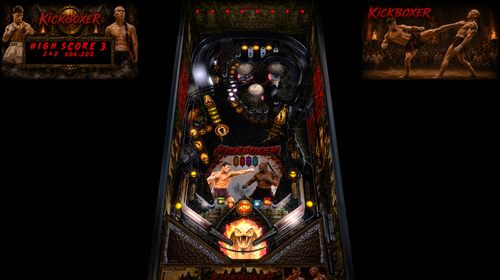
This is my first virtual pinball table that im happy to share with you all. "Kickboxer" based on the movie released in 1989.

Pinballmachine downloads
Virtualpinball forums
 
I started this as a simple question “can I make a table myself”…… “is it actually possible for me to modify or build an original table into something cool”.


I’m a property developer. I have no experience with coding or graphic design but after a lot of effort and many, many hours the short answer is “Yes to a certain extent lol and much more than I thought possible with A.I.”.


The base table I started with was A7x (Fabouh) and appreciate he let me share this and a majority of the code has actually been changed for the gameplay i wanted to create and a complete new flex DMD which looks awesome. 


I wanted the design of the table to be instantly recognisable Thailand. I think I achieved that and there is lots of detail in all the graphics.


There were many ideas i wanted to implement but i have exceeded my technical capabilities and wasn't much help available to me. Maybe someone will take this to the next level or my skills will evolve in time.  


For now, I'm happy with the outcome and its fun, challenging and visually looks great to play. I really hope other people enjoy it too but be kind, its my first attempt, i'm sure there will be bugs and things that could be done better. 


There is a pup pack included but only consists of a backglass and full DMD. Maybe oneday i'll come back to this and build one but the spots are in the code waiting for it :)


Save the music and DMD folder in your tables folder and the pup in your relevant folder. Have fun, see if you can achieve the multiball :) 


This was made for Desktop single screen use. You may need to customise your pup display settings for this table. For 3 screens edit your screen 1 by adding 5,0,0,100,100 to the CustomPOS column


If you're feeling generous  or are enjoying the table you can tip me on ko-fi.com/therealjazzee and maybe i can recover a tiny fraction of what i spent making it. Tipping is optional but that Bangkok humidity is thirsty lol 


TheRealJazzee


Edited by therealjazzee
more detail


Permission from ORIGINAL Author(s)?

Yes
written permission received.

Allow file to be included on a VPUniverse downloader app?

Yes

VPX Standalone

No
Contact Author First.
10.8 required
No

User Feedback

You may only provide a review once you have downloaded the file.


Gerhard__B

   2 of 2 members found this review helpful 2 / 2 members

Just downloaded this Table and added a UltraMinimal VR Room using @Nesta78 VR Room Injector.

Installed it on my OnePlus Pad3 running VisualPinball Standalone Mobile.

Works like a charm 👍


Great Job, thanks for this.

Screenshot_2026-09-06-15-29-45-86_ae968820d7d0f83f0eedfe1fafbbfe0d.jpg

sportsfan949

   1 of 1 member found this review helpful 1 / 1 member

Very nice job, setup on cab with just a few tweaks. Thanks for sharing your work.

WOVP.jpg

Response from the author:

That is so cool! wish i could play it, if i had a dollar for every download i'd be halfway to having my own cabinet lol glad you like it :) 

Rivermatty

· Edited by Rivermatty

   1 of 1 member found this review helpful 1 / 1 member

I like this, have seen Thai Boxing a few times in Thailand, much more fun than western boxing and nowhere near so violent. Table works really well on my 2 screen cab with a little help from a custom pinupplayer.ini and altering the destination for the two screens in the pup pack editor. Music and lighting evoke the mood nicely, amazing job for a first time Table builder, I wouldn't know where to start so you've done really well in my opinion.

Cabinet.png

Response from the author:

Thanks for the kind words. I was worried after the first comment it was a big mess but glad to hear with some adjustment it will work okay on a cabinet too. I dont own a cabinet but would love to see it in action!

lukas1980

· Edited by lukas1980


mesa muito linda 

mas queria saber como faço para aparecer a tela do dmd pra colocar ele dentro q esta sem nada na 3 tela aki 

silentkat


Wonderful first table! Thank you so much for your time in creating this. Got it working great with a couple of small adjustments.  I made a standard back glass instead of using the pup. Keep up the great work! 

Response from the author:

Thanks! appreciate it.

×
  • Create New...
