
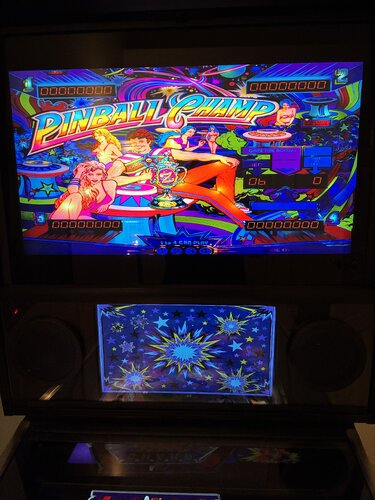
About This File
I found the existing low resolution DMD that was used in my favorite B2S Backglass for Zaccaria's Pinball Champ didn't really add to the look of the table on my cabinet. Although it isn't as simple as just putting the new image file in the table directory, it is worth going through the steps with B2S Backglass Designer to replace the existing DMD with this new AI generated image.
Follow these steps:
Launch B2S Backglass Designer in Windows (or in my case, a Windows VM)
Import the existing directB2S backglass file using File - Import (ignore any font error messages - we won't be changing those)
Import the new DMD image using Image - Import Images - Import DMD image
Delete the Zaccaria Logo DMD that is listed in the Resources window (you might not need to do this, but it helps to keep things organized)
Check File - Settings - make sure B2S DMD location setting is set to only on DMD (third monitor).
Click Backglass - Create 'directB2S' backglass file.
Rename your old directB2S file if you want to keep a copy. Save the new directB2S file in your table directory for that table and name it the same as your table file. Enjoy!

User Feedback
Create an account or sign in to leave a review
You need to be a member in order to leave a review
Create an account
Sign up for a new account in our community. It's easy!
Register a new accountSign in
Already have an account? Sign in here.
Sign In NowThere are no reviews to display.