
About This File
Profile manager for Visual Pinball X.
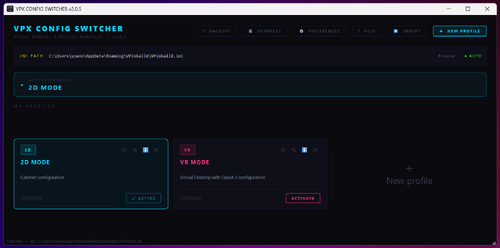
Instantly switch between your 2D, VR and custom configs — without touching any file manually.
Full documentation is available here : https://github.com/Nesta78/VPXConfigSwitcher
What it does
On a pinball cabinet or a pinball simulation PC, switching modes (2D to VR, or between VPX versions) requires manually replacing several configuration files. VPX Config Switcher automates all of this in one click.
Profiles
- Unlimited profiles — one profile per mode: 2D cabinet, VR Quest, perf testing, etc.
- One-click activation — applies all your config files simultaneously
- Auto re-apply — if you edit the active profile, files are instantly re-applied on disk
- Profile sharing — export/import .vpxprofile files to share your config with the community
Files managed per profile
- VPinballX.ini — main VPX config (resolution, rendering, VR mode...)
- DMDDevice.ini— virtual DMD config, with automatic update after VPX closes if a table calibration was made
- ScreenRes.txt— window resolution and position (playfield, backglass, DMD)
- Windows audio output — switches the default audio device (VR headset, cabinet speakers...)
- Symbolic links (Symlinks) — instantly redirects entire folders, ideal for switching PuPVideos between 2D and VR
- Custom commands — run any .bat, .exe or Windows command when the profile is activated (can be useful for Future Pinball for example)
Tools
- Built-in .ini editor — syntax highlighting for sections, keys and values
- Launch VPX from the app — opens your chosen exe directly, then captures the resulting [FONT=Courier New].ini[/FONT]
- Auto-detection of VPX executables and config files on the PC
- Automatic backups — timestamped backup before each change, restore from the interface (VPX .ini, DMD, ScreenRes)
- PuPPack manager — detects packs available in 2D/VR, duplicates missing ones, opens folders to configure .bat files
- EN / FR interface — language auto-detected, changeable in Preferences
- Auto-update — notification and installation from GitHub Releases at startup

User Feedback
Create an account or sign in to leave a review
You need to be a member in order to leave a review
Create an account
Sign up for a new account in our community. It's easy!
Register a new accountSign in
Already have an account? Sign in here.
Sign In NowThere are no reviews to display.