
About This File
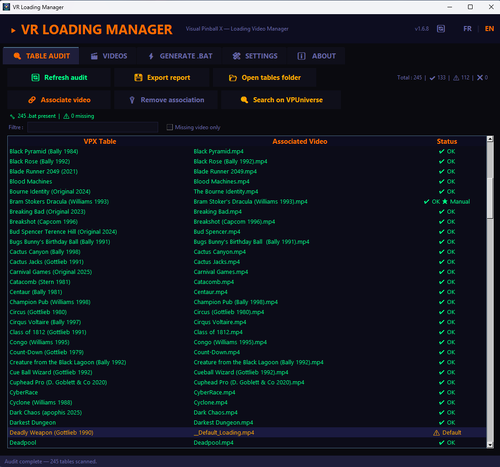
🎬 VR Loading Manager is a tool designed for Virtual Desktop + VPX Launcher users who want to display loading videos while their VPX tables are loading in VR.
Features
- Automatic VPX table audit and video matching
- .bat launcher generator for all tables
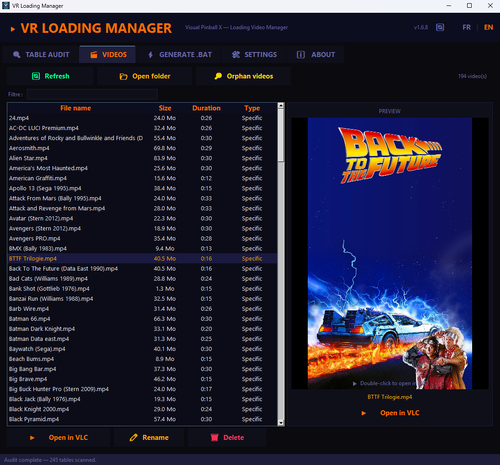
- Video manager (import, preview, delete, associate, search on VPUniverse, etc ...)
- Built-in .bat template editor
- FR / EN bilingual interface
- Automatic updates via GitHub
Installation
- Download VR_Loading_Manager.exe
- Place it for example in C:\vPinball\VisualPinball\VR Loading Manager\
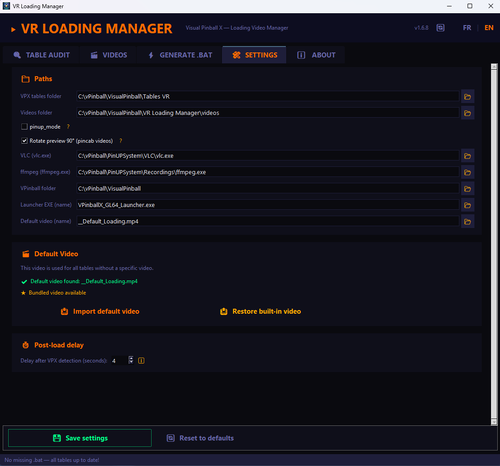
- Launch it and configure paths in the Settings tab
-
Recommended: Create a dedicated folder for your loading videos (e.g., C:\vPinball\VisualPinball\VR Loading Manager\videos\) and add your .mp4 files there. If you are short on storage, you can alternatively point to your existing PinUP Popper loading videos folder directly from the Settings tab. The names of the .mp4 files don't need to be exactly the same as the table names, but try to have at least one word in common

- ⚠️ Generate .bat files from the Generate .bat tab each time you modify options!
- If needed, you can adjust "post_delay" option in config tab to extend time between video closing and vpx starting
Requirements
Windows 10/11
VLC installed (already included in PinUP System)
VPinballX + VPX Launcher
Virtual Desktop (even if it's also working good for desktop 2D users)
Advice
⚠️ You should enable the "Black Desktop" option in VPX Launcher Settings, to avoid seeing your desktop screen between each table loading
Thank you to @b4ast1 for VPX Launcher and to all the testers
Github project page with complete changelog : https://github.com/Nesta78/VR-Loading-Manager

User Feedback
Create an account or sign in to leave a review
You need to be a member in order to leave a review
Create an account
Sign up for a new account in our community. It's easy!
Register a new accountSign in
Already have an account? Sign in here.
Sign In Now