
About This File
VPX-Launcher (64bit)
based on VPX 10.8.0 (Jan 2026)
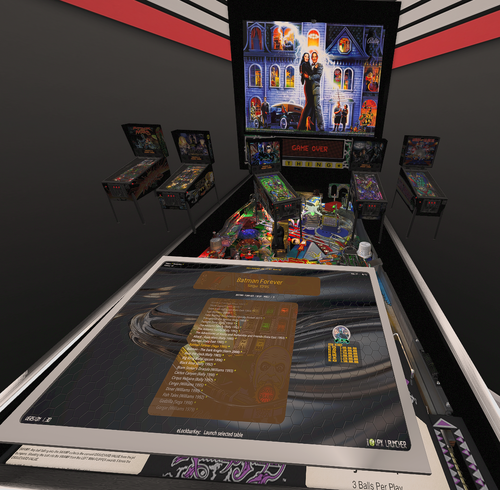
VPX Launcher brings seamless table selection directly into your VR headset — no more fumbling with the Windows desktop or taking off your headset just to pick a new table.
The Problem:
Every time you want to switch tables in Visual Pinball X, the application has to restart. In VR, this means a black screen in your headset, a jarring break in immersion, and a frustrating wait.
The Solution:
VPX Launcher keeps you inside VR the entire time. Browse your entire collection using flipper buttons and cabinet controls, pick a table, and a dedicated VR Loading Screen holds your headset active with a smooth transition while VPX restarts in the background.
Key Features:
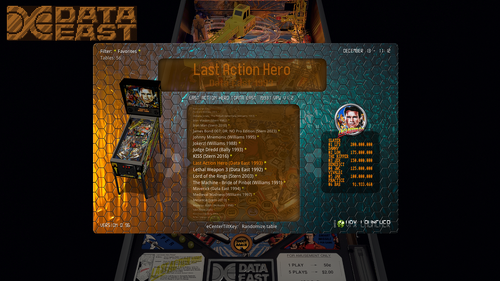
Full table browser with filters, favorites, and "recently played"
Navigate entirely with cabinet buttons — no mouse or keyboard needed
3D launcher environment inside VR with an animated virtual cabinet
VR Loading Screen Highscore display with PinMAME/PINemHi integration
Table metadata and artwork support (wheel images, table previews)
POV and VR tweaks accessible without leaving the game
Works alongside VPX-Launcher.exe for orchestrated restarts
Built for VR cabinet owners who want a polished, all-in-one experience without ever leaving the headset.
How it's built:
VPX Launcher isn't a separate frontend or wrapper application — it's compiled directly into the Visual Pinball X 10.8.0 executable. The launcher logic lives inside the player engine itself, using the same rendering pipeline and ImGui-based Live UI that VPX already uses for its tweak menus. When VPX starts with a dummy table, it automatically enters launcher mode, turning the full game engine into your table browser. This means zero additional dependencies, no fragile inter-process communication, and native access to VR, input handling, and rendering — all in a single binary.
VPX and Launcher installation guide:
VPX + Launcher Installation Guide.pdf
VPX Launcher v1.31
Browse and launch your entire VPinball collection without ever leaving VR. Seamless table switching with a dedicated loading screen, cabinet button navigation, filters, favorites, and highscores — all from inside your headset.
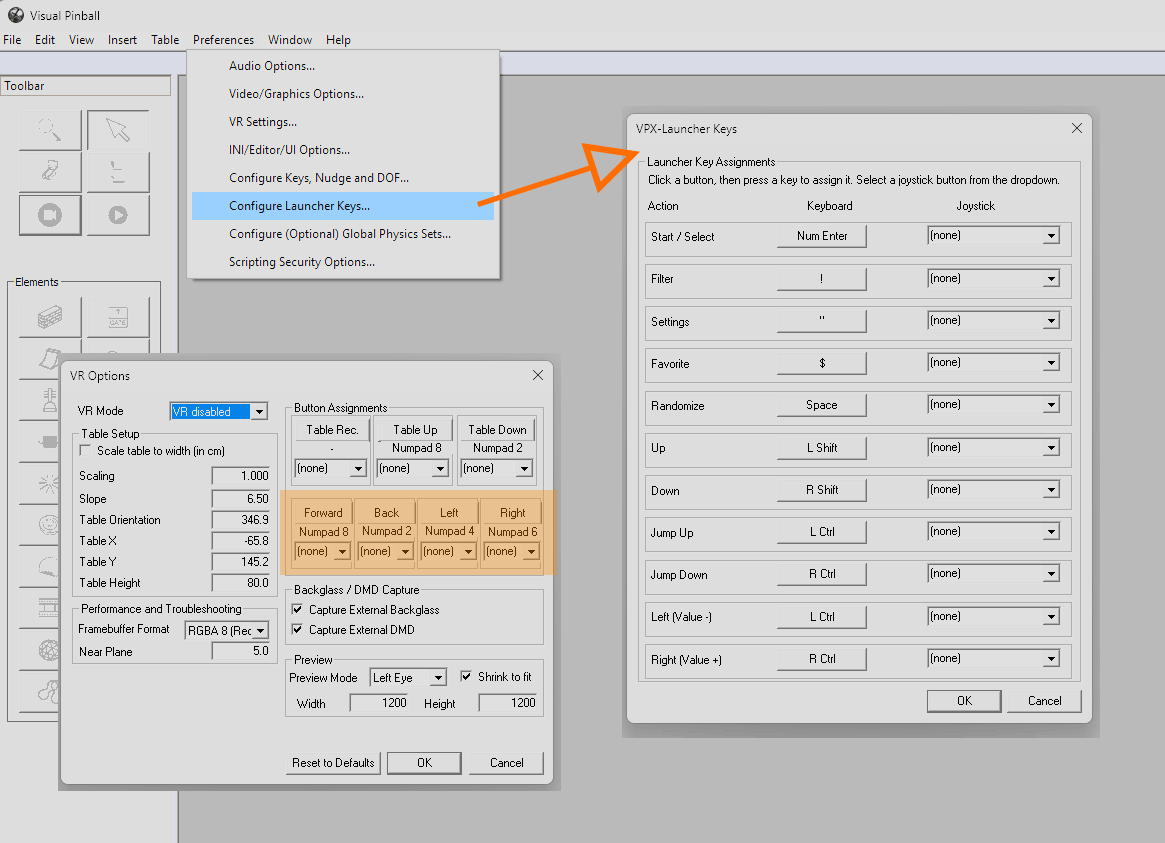
Button / key setup:
Visual Pinball 10 (VPX) is not made by me!!!
I only coded the launcher into it.
I only created the trayicon launcher app.
You can find the original VPX here:
https://github.com/vpinball/vpinball
Many thanks to all these geniuses who have been developing VPX for years.
Thanks to A. Rubin for his support making 90% of the tablepreviews!
----------------------------------------------------------------
How it works:
How it looks in VR (with Virtual Desktop):
----------------------------------------------------------------
Installation / Setup:
- install to an existing VPX 10.8.0 - folder (it will install 2 exe and a subdirectory "/vpxlauncher")
- launch VPX-Launcher.exe (inside yourr VPX-folder) there is a new green vpx-icon at your taskbar.
- rightclick to see menu settings
- setup your tables-folder path; set "Autostart last table" (for next start)
- click on apply changes
- click on "Launch VPX"
----------------------------------------------------------------
If you need to go with steamvr (not recommend):
- rename openvr_api64.dll to openvr_api64_openxr.dll
- rename openvr_api64_steam.dll to openvr_api64.dll
----------------------------------------------------------------
Anyone knows why my overlay is horizontal most of the time but not always?
You have to change from cabinet to desktop view in VPX graphics options.
If you have loaded a non working table you can click trayicon-menu "remove starttable".
----------------------------------------------------------------
How to use:
-
key-mapping of each function is displayed
at the bottom of launcher overlay
-----------------------------------------------------------------
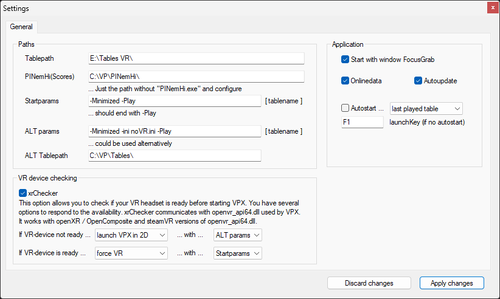
Infos about xrChecker (Trayicon Menu - Settings)
This option allows you to check if your VR headset is ready before starting VPX. You have several options to respond to the availability. xrChecker communicates with openvr_api64.dll used by VPX. It is developed for openXR / OpenComposite and is currently not compatible with steamVR (more info below).
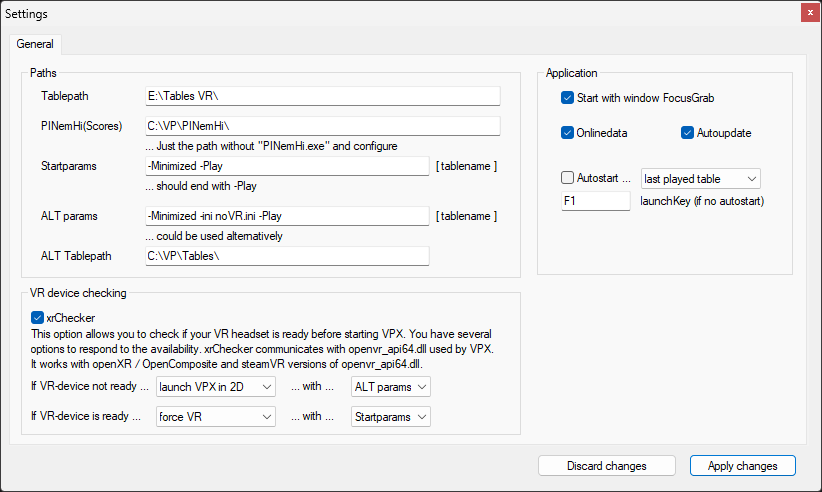
For me - playing only in VR and setting up everything in 2D - this is a gemechanger!!!
If i attach my VR-device, i play in VR and if not, i play/edit in 2D.
I don't have to toggle anything. my settings to achieve this:
- active xrChecker
- VR-device not ready ... launch VPX in 2D
-
VR-device is ready ... force VR.
For the VR user, this changes many things, but your ini files and VPX settings remain untouched. All it changes are the responses of my modifications inside VPX. My special version of VPX_Launcher listens to the configuration sent by the tray icon app. The config-central is the tray icon app. To handle VR device availability, it uses my little helper app (located in the subfolder /vpxlauncher/xrchecker/). The screenshot of the new settings dialog shows what can now be configured.
However, keep in mind that if you start the original (non-launcher modified) VPX, everything will be as it was before. Additionally, there is the option "Let VPX decide," which allows you to start VPX_Launcher as it used to (with ini settings). You can also completely disable the xrchecker, and VPX_Launcher will behave exactly as it did before this new version.
-----------------------------------------------------------------
If getting any errors while autoupdating...
- go to /vpxlauncher/update/
- delete all update_*.zip
- reinstall with installer
- restart launcher
Update will be downloaded again and patch will be done again.
-----------------------------------------------------------------
Version 0.71 (autoupdate)
New overlay setting: VR Fontsize This needs VPX to restart (so restart table) after changing value. Default: 100%
Version 0.72 (autoupdate)
+ 2 new previewtables
Version 0.73 (autoupdate)
+ 9 new previewtables thx @Ext2k
Version 0.74 (autoupdate)
Recursive folder scan added
Now tablepath will scan for tablepath/file1.vpx tablepath/file2.vpx tablepath/subfolder1/file1.vpx tablepath/subfolder1/file2.vpx tablepath/subfolder2/file1.vpx tablepath/subfolder2/file2.vpx
Version 0.75 (autoupdate)
There are sub-updates: Launcher can now perform small graphic updates without the need to increase the version of the launcher.
Version 0.77 (autoupdate)
If someone wants to launch a tablename.bat instead of a tablename.vpx you can check this by replacing the launcher by hand:
- 1st param: tablepath/table
- 2nd: vpx-exe
- 3rd: params
bugfix with memory-error while highscore-grabbing. (e.g. kiss table)
Version 0.80 (installer)
based on 10.8.0 RC 5 rev.2015
Version 0.83 (autoupdate)
based on 10.8.0 rev.2028 Nov 2024
Version 085 (autoupdate)
You can now configure the selection-wheel. Keep in mind that you can adjust the height and width of the window too.
Version 086 (autoupdate)
I cleaned up the positions of the elements and straightened them out. There is now also a nice border around the window (Bearbeitet)
Version 0.87 (autoupdate)
Many calculations corrected or made more dynamic. Now you can adjust the size of the window disproportionately to your liking.
Added template system. More will be added in the future. You can also paint your own surface.
Version 0.97 (autoupdate)
reset overlaysize once (if installing with installer)
new trayicon-app
new DMD look font - display - optimization (imGui-draw)
from VPX master: sdl64.dll v9 -> v10
added more templates
optimized font-readability
/vpxlauncher/logdata.txt is generated at start (if we need to check your settings)
Launcher needs the trayicon App VPX-Launcher.exe running. To prevent wrong usage you will get an errormessage in overlay.
Version 0.98 (autoupdate)
now you can define subfolders for filters in your /vpxlauncher/config.xml
You can make a subfolder --Top10-- and just place your files in there. Subfolder is a folder inside your defined tablepath. You can use subfolder/subsubfolder too. The foldername is casesensitive! (Like Windows handles directories.) Then you can combine the other nodes (needed and forbidden) with foldername. Or list all files of a folder if your regex is .* <-- everything matches: (Or list only favorites <forbidden>1</forbidden> of this folder)
<filter>
  <name><![CDATA[Top 10]]></name>
  <needed><![CDATA[.*]]></needed>
  <folder><![CDATA[--Top10--]]></folder>
  <forbidden></forbidden>
</filter>
sub-folders are ok too:
<folder><![CDATA[CHARTS/--Top10--]]></folder>
Version 0.99 (autoupdate)
now you can open VPX Exit-Menu (if you are in editmode)
bugfix VPX-pause-function <-> Launcher
bugfix settingchanges get lost sometimes
Version 1.00 (autoupdate)
- you can now display a topper image, if you use it as your 2d-cabinet launcher:
- you can now use mp4 (if they play in windows mediaplayer) in topper-window
- volume can be adjusted in registry node "Volume" 0-100
if you use it as your 2d-cabinet launcher: double klick launcher-topper.reg (entries will be stored in registry)
configure your screenpos here: Computer\HKEY_CURRENT_USER\Software\Visual Pinball\VP10\Launcher\topper use DECIMAL values! 🙂
place tablename.jpg or tablename.png next to vpx-file (exact same filename) + lowercase extension
place placeholderfile (if no topperfile is next to table) to vpxlauncher\data\topper.jpg
https://www.dropbox.com/scl/fi/3uq0el3yw6w7vn36298ck/launcher-topper.reg?rlkey=acgmp4bha6hhgz1qa9hessve3&st=rxeddy0s&dl=1
Version 1.05 (autoupdate)
compiled on VPX's 10.8.0 Final release (of Jan.30, 2025)
Version 1.06 (autoupdate)
bugfix: tables using VPReg.stg did not update their Launcher overlay highscores
new tableartwork THANKS 2 @Ext2k
Version 1.08 (autoupdate)
- feature: if you place `folderconfig.ini` vpx-ini-files in your table-subfolders they will be used instead of the params/altparams.
%configFile% is folderpath of %NextTable% followed by folderconfig.ini:
VPinballX_GL64_Launcher.exe" -Minimized -ini %configFile% -Play %NextTable%
(it's a request - you don't need to use it this way.)
Version 1.09 (autoupdate)
compiled with latest VPX 10.8.0 fixes April 2025
Version 1.10 (autoupdate)
table positioning left / right / forward /backward in settings menu (thx @Panasony)
Filter-editor in TrayIcon App / you can now sort filter - you can check filter and folderconfig outside vpx.
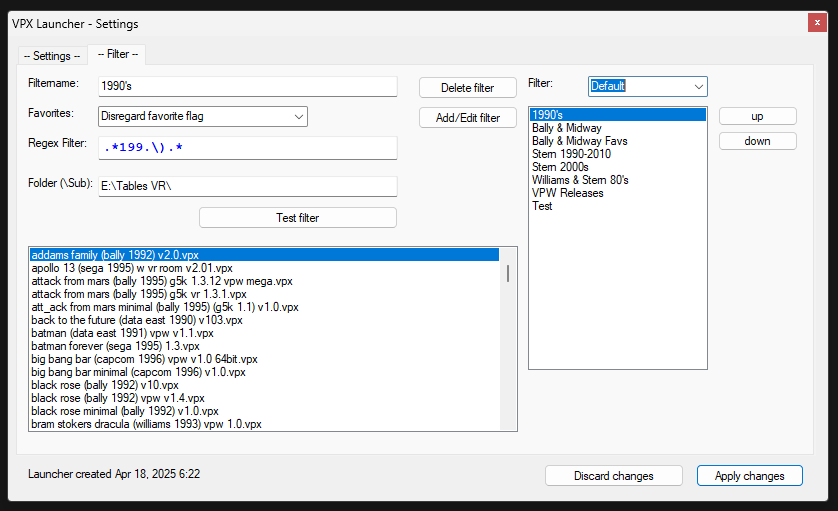
Version 1.12 (autoupdate),
newest updates of 10.8.0 of May 5th 2025: update to latest SDL2, fix: Endless loop in bulb_heat_up, backport harmless UI tweaks,
while launcher overlay is active, you can move table with numpad keys:
9 up
8 forward
4 left
6 right
2 back
3 down

- recenter
Version 1.13 (autoupdate)
newest updates of 10.8.0 (2025/06/09):
- update to latest SDL2
- backport potential issue with IEditable::SetName
Version 1.14 (autoupdate)
- include Nudge manipulation by <@1243251208152678452> :
https://github.com/vpinball/vpinball/commit/1fca6c77737fb21a3fb778fd1dd0ce8c15ec2490
Improved so that the visual effect of nudge in VR does not move the VR ROOM too much.
Also improved so that the visual effect can be obtained with analog nudge.
> Analog Nudge visual sensitivity settings
> AnalogNudgeGainX = <num>
> AnalogNudgeGainY = <num>
> default 100
> A negative value will reverse the direction of table movement.
If you have strange experiance with nudging, you should check the Visual Nudge Strength value in Video/Graphics Options!
Around 0.001 is good !!!
Version 1.15 (autoupdate)
you can set sorting of custom filters:
just add <sorting>2</sorting> to your xml
sorting == 0 -> compareByName
sorting == 1 -> compareByNameDesc
sorting == 2 -> compareByYear
sorting == 3 -> compareByYearDesc
-----------------------------------------------------------------
Support:
If you don't want to wait days ...
.. ask them in our VR Pinball Discord Channel:
https://discord.com/channels/668971468557647923/1237836314670399490
-----------------------------------------------------------------
Disclaimer
This software is provided "as is," without warranty of any kind, express or implied, including but not limited to the warranties of merchantability, fitness for a particular purpose, and noninfringement. In no event shall the author(s) be liable for any claim, damages, or other liability, whether in an action of contract, tort, or otherwise, arising from, out of, or in connection with the software or the use or other dealings in the software.
By using this software, you acknowledge that you have read this disclaimer, understand it, and agree to be bound by its terms.
-----------------------------------------------------------------
have fun!
b4ast1
Edited by b4ast1
Changes for version 1.31

User Feedback
Create an account or sign in to leave a review
You need to be a member in order to leave a review
Create an account
Sign up for a new account in our community. It's easy!
Register a new accountSign in
Already have an account? Sign in here.
Sign In NowThere are no reviews to display.