
Jump to content

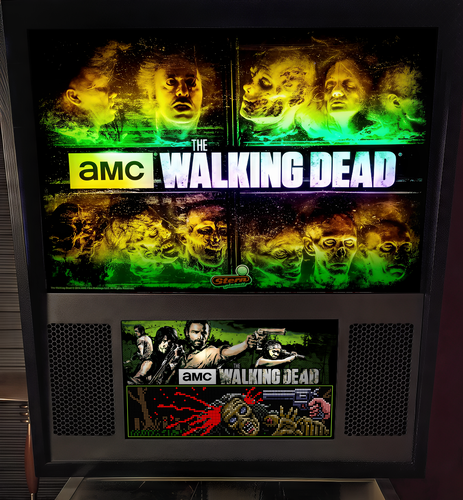
The Walking Dead (Premium) (Stern 2015) b2s + full dmd

    Create an account or sign in to download this
download_no_perm
8891 Views
2423 Downloads
5 From 8 reviews
31.39 MB File Size
HauntFreaks Created by
HauntFreaks Artwork by
Stern Manufacturer
2015 Year

2 Screenshots

About This File

The Walking Dead (Premium) (Stern 2015) b2s + full dmd
2.0  complete rebuild

  • NEW high-res, high-detail, 3k image
  • NEW stern style single fluorescent tube lighting
  • NEW remastered high-res grill (for two screen setups)
  • NEW larger dmd area on the full dmd
     

need help?  download Full DMD Read Me.txt

I'm now including DT-res-files.zip file (this is collection of .res files for DT mode players to use my b2s files on there single screens) these were created by @Cliffy
I don't ask or beg for donations... if you feel overwhelmingly compelled to do so, PLEASE donate to the charity of your own choice... this is a hobby NOT a business 


Allow file to be included on a VPUniverse downloader app?

Yes

What's New in Version v2.0   See changelog

Released

2.0  complete rebuild

NEW high-res, high-detail, 3k image

NEW stern style single fluorescent tube lighting

NEW remastered high-res grill (for two screen setups)

NEW larger dmd area on the full dmd

User Feedback

Recommended Comments


nagaidevil

Posted

I think this means we may have a new table MOD coming soon.... 😏

hauntfreaks

Posted

22 minutes ago, nagaidevil said:

I think this means we may have a new table MOD coming soon.... 😏


I wish this was true.... but not that I know of....

galooch

Posted

Thanks for another great backglass!

Cliffy

Posted

love the damn near holograph look of this haunt. you are beyond "good" 

brefreez

Posted

will the real walking dead b2s please stand up. I can not wait till I get done my widebody and am able to use the full dmd mode.  Thank you hauntfreaks!

trans600

Posted

Hi, I can't find the premium table, where is it?

hauntfreaks

Posted

40 minutes ago, trans600 said:

Hi, I can't find the premium table, where is it?


uumm.... dont know if it was built yet.... 

stefanaustria

Posted

there was a DL Source in the Past, anywhere (or still is ?)... the Edition with the Crossbow, yes.

stefanaustria

Posted

ok i use the "Author" Version by Dozer, ICPJuggla, Fren, ...

Cliffy

Posted

I use the @SG1bsoN mod of the Dozer, ICPJuggla table. Fantastic version and again just mo' betta with @hauntfreaks b2s/fulldmd

twd-le-sg1bson-dt.jpg

robertms

Posted

3 hours ago, Cliffy said:

I use the @SG1bsoN mod of the Dozer, ICPJuggla table


Hmm, that looks different than the one published here on VPU? Did SG1bsoN make more than one mod of TWD?

Cliffy

Posted

1 hour ago, robertms said:


Hmm, that looks different than the one published here on VPU? Did SG1bsoN make more than one mod of TWD?

My apologies :) Its actually  a mod of sg1bsons graphic novel mod with reverted playfield. Getting hard to keep track. TWD has mods on mods on mods :)

nagaidevil

Posted

10 hours ago, Cliffy said:

My apologies :) Its actually  a mod of sg1bsons graphic novel mod with reverted playfield. Getting hard to keep track. TWD has mods on mods on mods :)

😆

bombaj344

Posted

On 8/27/2023 at 9:43 PM, robertms said:


Hmm, that looks different than the one published here on VPU? Did SG1bsoN make more than one mod of TWD?

This is rather my mod :) Only a few of my friends have it :)

Cliffy

Posted

I didn't wanna spill the beans @bombaj344 and was trying to dance around it- ooops :)

bombaj344

Posted

2 minutes ago, Cliffy said:

I didn't wanna spill the beans @bombaj344 and was trying to dance around it- ooops :)

I think everyone has the right to make their version of the table. They are not published so there is nothing to be afraid of :)

Cliffy

Posted

Just now, bombaj344 said:

I think everyone has the right to make their version of the table. They are not published so there is nothing to be afraid of :)

No no, I just didn't want a pile-on of people asking you for it if you weren't ready to post as your own mod

bombaj344

Posted

5 minutes ago, Cliffy said:

No no, I just didn't want a pile-on of people asking you for it if you weren't ready to post as your own mod

He doesn't publish tables anymore for various reasons. I don't want to look for all the authors asking for permission etc. I think there is nothing wrong with it if I do it only for myself and my friends :)

TeslaDave

Posted

I'm embarrassed to ask this but I have been failing to get the FullDMD to display despite many hours trying my best to follow the Full DMD Read Me.txt and Nailbuster's page and every other forum entry I can find. Playfield and Backglass display correctly and FullDMD works if using a video though Pinup Popper but not for these B2S files.


I have three screens all running at HD 1920x1080 with playfield left, backglass middle and fullDMD right. That feels like every co-ordinate should therefore be a multiple of 1920 or a 0 but I've obviously misunderstood something.


I ended up merging all the info from all the different sources I found to create this ScreenRes.txt.


# 1: Playfield screen X resolution (width but remember this is as if in landscape i.e. it is the larger number for the playfield screen resolution)
1920
# 2: Playfield screen Y resolution (height but remember this is as if in landscape i.e. it is the smaller number for the playfield screen resolution)
1080
# 3: Backglass screen X resolution (width)
1920
# 4: Backglass screen Y resolution (height)
1080
# 5: Display index for the Playfield (Normally left at 1) - Instead of #1 You may need to use windows Playfield ID Number. Define Backglass screen using Display Devicename screen number (\\.\DISPLAY)x or screen coordinates (@x) or screen index (=x)
1
# 6: X position for the backglass relative to the upper left corner of the Playfield screen
1920
# 7: Y position for the backglass relative to the upper left corner of the Playfield screen
0
# 8: Width of the Full DMD area in pixels - For 3 screen setup
1920
# 9: Height of the Full DMD area in pixels - For 3 screen setup
1080
# 10: X position of the Full DMD area relative to the upper left corner of the backglass screen - For 3 screen setup
3840
# 11: Y position of the Full DMD area relative to the upper left corner of the backglass screen - For 3 screen setup
0
# 12: Y-flip, flips the LED display upside down
0
# 13: "X pos Small display (Small Button Option) Relative upper left corner of Playfield" according to NailBuster but "Background x/y position - relative to the backglass screen - has to be activated in the settings" according to default comments
0
# 14: "Y pos Small display (Small Button Option) Relative upper left corner of Playfield" according to NailBuster but "Background x/y position - relative to the backglass screen - has to be activated in the settings" according to default comments
1080
# 15: width of the small display (Small Button Option)
1920
# 16: height of the small display (Small Button Option)
1080
# 17: path to the background image (C:\path\Frame) or blank if none selected

# 18: This line would turn off B2SWindowPunch if activated
#B2SWindowPunch=off


I am using Windows 11 with the Baller Installer updates to 64bit. I just updated B2SServer to 2.0.3 which made no difference.


Multiball for whoever can humiliate me first with the obvious fix that I cannot find.


Cheers.


Screenshot 2023-09-08 152839.png

Cliffy

Posted

15 minutes ago, TeslaDave said:

I'm embarrassed to ask this but I have been failing to get the FullDMD to display despite many hours trying my best to follow the Full DMD Read Me.txt and Nailbuster's page and every other forum entry I can find. Playfield and Backglass display correctly and FullDMD works if using a video though Pinup Popper but not for these B2S files.


I have three screens all running at HD 1920x1080 with playfield left, backglass middle and fullDMD right. That feels like every co-ordinate should therefore be a multiple of 1920 or a 0 but I've obviously misunderstood something.


I ended up merging all the info from all the different sources I found to create this ScreenRes.txt.


# 1: Playfield screen X resolution (width but remember this is as if in landscape i.e. it is the larger number for the playfield screen resolution)
1920
# 2: Playfield screen Y resolution (height but remember this is as if in landscape i.e. it is the smaller number for the playfield screen resolution)
1080
# 3: Backglass screen X resolution (width)
1920
# 4: Backglass screen Y resolution (height)
1080
# 5: Display index for the Playfield (Normally left at 1) - Instead of #1 You may need to use windows Playfield ID Number. Define Backglass screen using Display Devicename screen number (\\.\DISPLAY)x or screen coordinates (@x) or screen index (=x)
1
# 6: X position for the backglass relative to the upper left corner of the Playfield screen
1920
# 7: Y position for the backglass relative to the upper left corner of the Playfield screen
0
# 8: Width of the Full DMD area in pixels - For 3 screen setup
1920
# 9: Height of the Full DMD area in pixels - For 3 screen setup
1080
# 10: X position of the Full DMD area relative to the upper left corner of the backglass screen - For 3 screen setup
3840
# 11: Y position of the Full DMD area relative to the upper left corner of the backglass screen - For 3 screen setup
0
# 12: Y-flip, flips the LED display upside down
0
# 13: "X pos Small display (Small Button Option) Relative upper left corner of Playfield" according to NailBuster but "Background x/y position - relative to the backglass screen - has to be activated in the settings" according to default comments
0
# 14: "Y pos Small display (Small Button Option) Relative upper left corner of Playfield" according to NailBuster but "Background x/y position - relative to the backglass screen - has to be activated in the settings" according to default comments
1080
# 15: width of the small display (Small Button Option)
1920
# 16: height of the small display (Small Button Option)
1080
# 17: path to the background image (C:\path\Frame) or blank if none selected

# 18: This line would turn off B2SWindowPunch if activated
#B2SWindowPunch=off


I am using Windows 11 with the Baller Installer updates to 64bit. I just updated B2SServer to 2.0.3 which made no difference.


Multiball for whoever can humiliate me first with the obvious fix that I cannot find.


Cheers.


Screenshot 2023-09-08 152839.png

Ok so far looks good but have you run b2sscreenresidentifier.exe? You can run it direct from the b2s folder or right click on the backglass and click at the bottom button Edit Screenres... This is what you use to create a specific tablename res for all your screen locations

https://github.com/vpinball/b2s-backglass/wiki

TeslaDave

Posted

19 hours ago, Cliffy said:

Ok so far looks good but have you run b2sscreenresidentifier.exe? You can run it direct from the b2s folder or right click on the backglass and click at the bottom button Edit Screenres... This is what you use to create a specific tablename res for all your screen locations

https://github.com/vpinball/b2s-backglass/wiki

Thanks @Cliffy


I hadn't realised that I needed a table specific.res and so had missed that. It is still not working even though I have now done that though.


When I run b2s_ScreenResIdentifier.exe, the screen positions look right. It creates a slightly different text file. Despite the dedicated .res and the slightly different config contained in it, everything looks exactly the same on load afresh.


1920
1080
1920
1080
@1920
0
0
1920
1080
1920
0
0
-1920
1080
1920
1080

# V2.0.3-a1b7e6d This is needed from B2S Server 2.0 even if comments are deactivated to mark the version 2 file format. It is ignored on older releases, but your bg forms might be switched.


Any other thoughts?


20230909_122754.jpg

20230909_123737.jpg

TeslaDave

Posted

Played some other tables that I did not realise had FullDMD integrated with B2S like Diner and Metropolis and they are working from the main ScreenRes.txt!


So re-downloaded this Walking Dead B2S with FullDMD thinking I must have corrupted my version somehow. Still doesn't work. 😞


Create an account or sign in to comment

You need to be a member in order to leave a comment

Create an account

Sign up for a new account in our community. It's easy!

Register a new account

Sign in

Already have an account? Sign in here.

Sign In Now
×
  • Create New...