
Jump to content

B2S Backglass Server

    Create an account or sign in to download this
download_no_perm
41380 Views
5150 Downloads
5 From 4 reviews
14.47 MB File Size

2 Screenshots

About This File

System files to run 'directB2S' backglasses, usually in combination with Visual Pinball tables.


What Stefan Wuehr ('Herweh') started in 2012 continues here.


Full documentation is available in the Wiki at https://github.com/vpinball/b2s-backglass/wiki


Please do not forget to like and review..., what is important for content creators (tables, backglasses, DMD colorization?)...
... is as important for us writing the tool-set


Thanks to all testers!


Retsamikit & Cliffy on 1 screen setup
Kalman & Mike DA Spike on 3 screen setup
Rajo Joey for testing the B2SScreenresIdentifier
wiesshund for general support on every setup


And especially to @toxie and @jsm174 , without them the B2S Backglass Server move to github would not have happened!

Edited by jarr3
added statement of original author

What's New in Version 2.1.6   See changelog

Released

B2S Server v2.1.6 compatible with VPX 10.8.1


  • B2SWindowPunch punched to big, now fixed.
  • B2SWindowPunch can punch rounded edges. Third parameter control radius (cutterradius).
  • B2SInit timeout can be controlled through res file (cuttertimeout)
  • B2SScreenResIdentifier crash when changing checkboxes #132
  • B2SBackglassServerRegisterApp unblock files while registering #64
  • B2SBackglassServerRegisterApp clean up unused registry keys #169
  • B2SServer should not produce unused registry keys #169
  • Corrected Fuzzy matching #157, Thanks bthlonewolf
  • Add back right click context menu on VPX #127
  • ScreenRes files should searched first for the backglass and then VPX file name #163
  • Stop searching window title for tablename when VPX feeds this through COM. This is a error prone way of getting the name of the table. #167
    From VPX 10.8.0-2079 (vpinball #5057) and VPX 10.8.1-4620 this is now solved in VPX script Controller.vbs
    The B2S Server is now compatible with VPX 10.8.1 BGFX!

User Feedback

Recommended Comments


jarr3

Posted

36 minutes ago, Retsamikit said:

found some time for a first run:

Server 2.x Test on Desktop

FuLL DMD (mostly from hauntfreak)
Totan - same problem as with the last version - DMD is behind the b2sDMD, I can do what I want with hauntfreaks last backglass - DMD starts behind. tried different versions of b2s server, different versions of lucky´s and all posible settings.
Getaway - working.
Theater of magic - working.
Black Rose - like Totan. DMD starts behind b2sDMD, alt-tab needed. (same settings like Getaway and Theater)
Game of Thrones: working.
Medieval Madness: working.
Bride of Pinbot: working. (alphanumeric on b2sDMD)
X-Men: working.
Metallica: working.

Normal Backglass with freezy on top:
Tommy - working

Combination PupPack-B2s
Wizard of Oz - working.

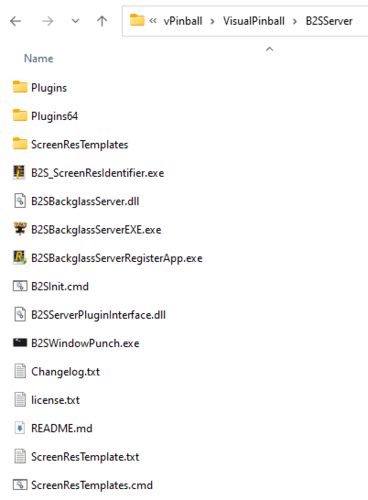
Ok, you will have to update the B2SInit.cmd file to make it cut in the needed windows.
If you have a command line open, you can try different options. Come back if you need help

Tikimaster

Posted (edited)

Ok Jarr3. Here is it:
 

@echo off
echo %0 %* > "%~dp0\B2SWindowPunch.log"
timeout /t 10 /nobreak > NUL
REM Cut holes in the "B2S Backglass Server" form using "Virtual DMD" and all "PUPSCREEN" forms as regular expressions
"%~dp0\B2SWindowPunch.exe" "^B2S Backglass Server$" "^Virtual DMD$|^PUPSCREEN[0-9]+$" >> "%~dp0\B2SWindowPunch.log"

Please, I am a noob with coding. What do I have to edit to make it running? You say "command line", that means a cmd window, right? I will check back later, have to go to work..

Edit: My log file shows that something is working. But it does not cut something out.

"D:\Visual Pinball\B2SServer\B2SInit.cmd" "Black Rose (Bally 1992) VPW v1.4fx" "br_l4" 
Current destination: ^B2S Backglass Server$
Destination 1312766: B2S Backglass Server
   cutout 656684: Virtual DMD


Edited by Retsamikit
Cliffy

Posted (edited)

I concur with Tiki- Totan just will not allow the dmd to pop through requiring alt tab every time. 

Also not working;

Checkpoint

Junkyard

Kiss 2015

Maverick

Star Wars Trilogy

World Cup Soccer '94

World Poker Tour


Adding to his working list I found;

Fishtales

Big Bang Bar

Dr Who

Godzilla mash-up

Last Action Hero

Lethal Weapon 3

No Good Gofers

Popeye


BK2K alphanumeric works. In fact all alphanumeric fulldmd's work since the segments are built into the dmd frame.

Thats all I've had time to test so far today

edit- added a couple more to the not working list, whether it's useful or not :)

Edited by Cliffy
Tikimaster

Posted

5 minutes ago, Cliffy said:

In fact all alphanumeric fulldmd's work

My Bride of Pinbot has dmdext alphanumerics in front of the backglass-alphas. They are starting in front.

Cliffy

Posted

1 hour ago, Retsamikit said:

My Bride of Pinbot has dmdext alphanumerics in front of the backglass-alphas. They are starting in front.

Yes I've found that as well although I prefer to keep the AN segments that are built in and change the style and color in b2s designer.

jarr3

Posted

We will make it work, I do not expect a huge list of working or not, to help us here.

Since I do not use a single screen installation, I haven't tested that yet. I will do some tests and come back.

We will either have two versions of the B2SInit file or maybe a configuration of the preferred name.


We'll see were we land... 

jarr3

Posted

Thanks to @Retsamikit we now a new build coming, so the new B2SWindowPunch command looks like this:


B2SWindowPunch.exe "^B2S Backglass Server$|^B2S DMD$" "^Virtual DMD$|^PUPSCREEN[0-9]+$"


Cut out all "Virtual DMD" OR "PUPSCREEN[0-9]" forms out of "B2S Backglass Server" OR "B2S DMD" forms


Thanks again ;)


https://github.com/vpinball/b2s-backglass/actions/runs/3950926445 


(again github account is needed. And please don't mind designer failing to build)

Tikimaster

Posted (edited)

singing "there is a hole in the backglass, dear henry, a hole"
I spend hours with some of the b2s DMDs to get my lucky/freezy virtual DMD on top of it.
What a frustration. At the end some of the b2s dmds where not working. I guess there is a little guy build in in windows with dices who tells my windows which is loaded first and which is on top.
This ingenious guy presents a solution that simply cuts a hole in the windows that are above the virtual DMD and it works. I still can not believe it and think of the many attempts of mine to solve the on-top problem. 

Unbenannt-1.jpg


This picture shows the cutout using a Frame with Lucky..
Unbenannt-1.thumb.jpg.128f3b3084e72ed185c2aa8c6fb4c528.jpg

Edited by Retsamikit
jarr3

Posted

Yes!, finally we have it! And with the latest build you can always go in to check the logfile, if there is anything else to cut.


So, I think the problem "DMD is below the backglass" issues should now be history.

If you see the hole in the wrong place, you need to move the window to the new position and restart the table.

jarr3

Posted

The only thing missing, is to be able to control this per table...?


Then I would add the configuration option in the B2STableSettings.xml?

But I really would like to be able to control this from the res file...


Any ideas?

Tikimaster

Posted

No problems with a line in res file.
I'm not sure how many users are using a res file by now 😉 But - I think my first idea to save these settings in the ini is bad, because there is already enough stuff in the ini.
Save in the res file is better in the end, because each table gets its own config, with which everything can be controlled. For Users of old Versions without res file it is very easy to get one.
I vote for the res file solution.

Cliffy

Posted

I agree. I vote adding to the res file would be easiest to manage on per game basis.

jarr3

Posted

Are you both using the right click selecting a pre-defined res file?

Tikimaster

Posted

Sure. I made two fitting res files for my system. One for 5:4 Backglasses and one for 16:9 - which I copy with right click using the "basic" res as a start to individually config the table. On desktop we are free to arrange what ever we like, so using a res is wonderful. I am not sure how often a cab user with predefined sizes and screens needs to do that. So I guess many cab users do only need a fitting screenres.txt to run the cab. I often read "what is a res file" questions from cab users who never used that.


jarr3

Posted

3 minutes ago, Retsamikit said:

Sure. I made two fitting res files for my system. One for 5:4 Backglasses and one for 16:9 - which I copy with right click using the "basic" res as a start to individually config the table. On desktop we are free to arrange what ever we like, so using a res is wonderful. I am not sure how often a cab user with predefined sizes and screens needs to do that. So I guess many cab users do only need a fitting screenres.txt to run the cab. I often read "what is a res file" questions from cab users who never used that.


I have a two screen setup and I use it a lot as well:

For EM tables I want the Backglass full screen (no grill)

for 90's I want the old DMD grill

and the modern get a nice looking FULL DMD speaker grill

Cliffy

Posted

48 minutes ago, jarr3 said:

Are you both using the right click selecting a pre-defined res file?

absolutely. I LOVE that right click menu

lukpcn

Posted

I have problem when playing at night that backglass reflects too much on the playfield. Would it.be possible to add to the backglass additional black layer with possibility to change opacity % of it? It would darken nice that way. Would it be possible to be added?

RacerRecords

Posted

After install all of my Pup packs have stopped working I have no idea how that could be related but some help would be appreciated guys. I shouldn't say all Iron maiden and batman 66 and GOTG are good (good ones that i could find)  but stuff like barbwire Flintstones (which was working just before I did as i was using it earlier)  WWF again just some that aren't. they are however playing in Editor. 


Again thoughts and suggestions would be appreciated. Thank s,🙂

jarr3

Posted

Next to the B2S files, you need a Plugins folder with links to the Pup plugin. When that is done, you can check in the settings of B2S that the bottom part isn't greyed out and that the plugin is active. I am not at my machine right now, so can not take a screenshot.

RacerRecords

Posted

I fixed it 🙂 (Well what you told me fixed it!)


  I always had my B2S files in Tables and with baller installer it was always there, added plugins folder and whallla I got it now 🙂 THANKS!!!  


Thank you for all you do!!

jarr3

Posted

19 hours ago, lukpcn said:

I have problem when playing at night that backglass reflects too much on the playfield. Would it.be possible to add to the backglass additional black layer with possibility to change opacity % of it? It would darken nice that way. Would it be possible to be added?

I intend to look into transparency in general going forward with the server.

If this would fit into the of the concept in general, then it could be solved then because the concept is general and open enough.


Please post a feature request on github. Please consider the bigger scope. I would not invest my personal time for „only“ this.  I hope you understand what I mean…

BallStuck

Posted (edited)

I'm still using 1.3.1.1 but I want to mention something I noticed.


when "bring to front" is unchecked AND "Small" is enabled, the b2s seems to have a lower layer priority than when "Small" is disabled.


Ideally, when "bring to front" is unchecked and "Small" is enabled, I'd like the backglass to not have its layer priority lowered.


My front end shows a background image on my backglass monitor. For some FullDMD b2s I uncheck "bring to front" to have the dmd scores be on top of the DMD image. If I do this and "small" is disabled, it all works fine. However I noticed if I also enable "small" I lose seeing the backglass b2s as well as the b2s dmd image. So it seems to me enabling small somehow lowers the layer priority (when "bring to front" is unchecked).


Example b2s linked below:


Edited by BallStuck
Tikimaster

Posted (edited)

22 hours ago, lukpcn said:

backglass reflects too much

If you are on a cab, you may be able to turn down brightness of the backglass-screen at night.
 

Edited by Retsamikit
jarr3

Posted

2 hours ago, BallStuck said:

I'm still using 1.3.1.1 but I want to mention something I noticed.


when "bring to front" is unchecked AND "Small" is enabled, the b2s seems to have a lower layer priority than when "Small" is disabled.


Ideally, when "bring to front" is unchecked and "Small" is enabled, I'd like the backglass to not have its layer priority lowered.


My front end shows a background image on my backglass monitor. For some FullDMD b2s I uncheck "bring to front" to have the dmd scores be on top of the DMD image. If I do this and "small" is disabled, it all works fine. However I noticed if I also enable "small" I lose seeing the backglass b2s as well as the b2s dmd image. So it seems to me enabling small somehow lowers the layer priority (when "bring to front" is unchecked).


Any chance you can add two pictures here one with and one without, so that we see what is the problem?

Could the latest version be the solution?

BallStuck

Posted (edited)

55 minutes ago, jarr3 said:


Any chance you can add two pictures here one with and one without, so that we see what is the problem?

Could the latest version be the solution?

i created a workaround. i unchecked "bring to front" and left "small" disabled. then i created a .res file with "small" settings. so it looks like i'm using the "small" option but i'm really not. and everything else is working as i want.


for anyone else doing this, when you create the .res file you also have to change the dmd position on line 10. you'll have to subtract an amount to have it line up properly on the left side.

Edited by BallStuck

Create an account or sign in to comment

You need to be a member in order to leave a comment

Create an account

Sign up for a new account in our community. It's easy!

Register a new account

Sign in

Already have an account? Sign in here.

Sign In Now
×
  • Create New...