-
SYSTEM SEARCH
System Scanners Online:
Username: Guest
>> System Scan?
>> The Universe >
Incoming Message:
Due to system limitations searching with words of 3 or less characters will not return results. For instance; Doctor Who. This will not return results as the system is trying to search for both Doctor AND Who in which Who will not be found as it's a 3 character word. To find Doctor Who; you'd search for either Doctor or "Doctor Who".
Search Tips:
For specific searches; enclose your search with quotes. Example: "Doctor Who" or "Addams Family".
Search the Community
Showing results for tags 'vpe'.
Found 3 results
-
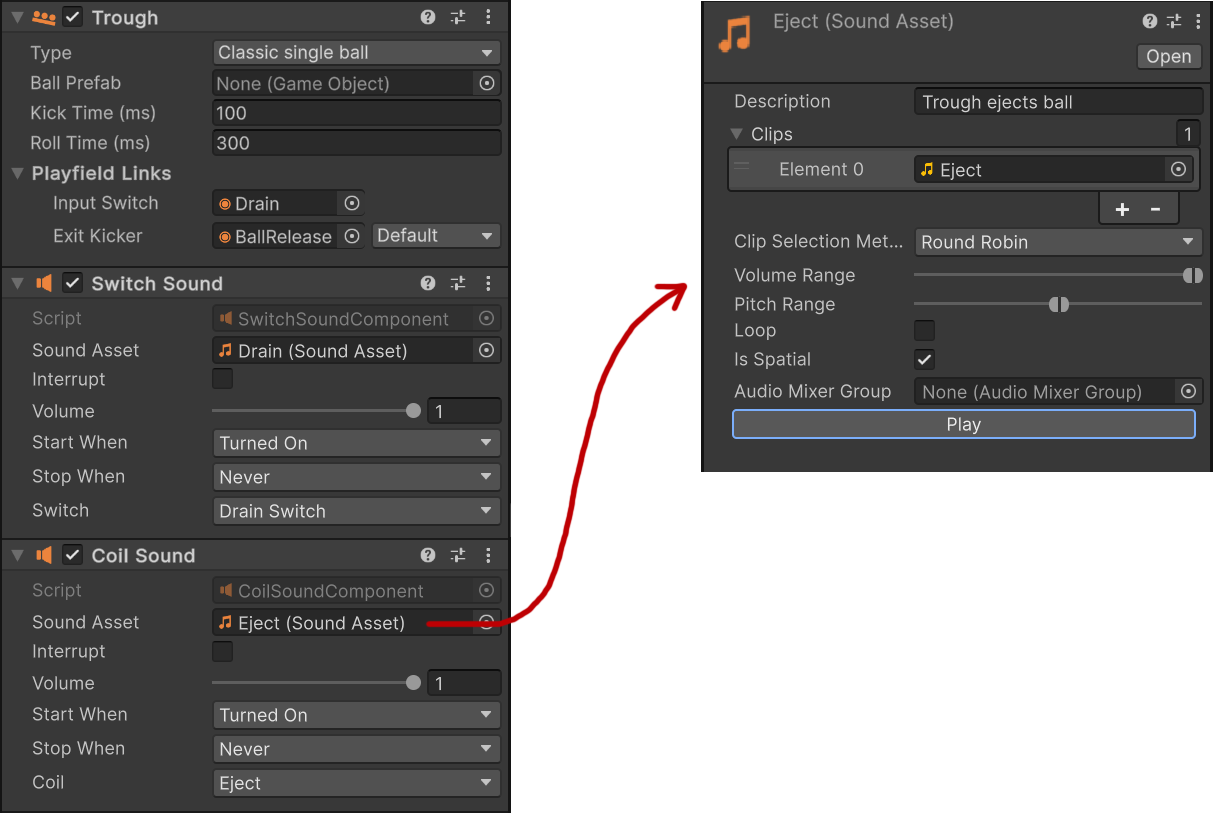
 Hi folks! It's finally time for an update. You may have noticed that my last significant update was over a year ago. There were a few reasons for the delay - my new job turned out to be a CTO gig, which meant a ton of responsibilities, and balancing both work and VPE was nearly impossible for most of 2024. However, things have calmed down since autumn, and I'm happy to say that it's more balanced again. As a result, I've been making good progress on VPE. I initially planned to create a few demos for this post, but I realized that would take a lot of time I'd rather spend moving the project forward. So, without further ado, here's where we stand! Physics Finishing the physics improvements has been the most challenging part for me. Moving from a proof of concept a year ago to a solid implementation that covers all use cases, runs on all components, and doesn't break performance or backward compatibility was no small feat. So, what has changed? Last time, we were discussing parenting and unconstrained transformations. Now, two key improvements are merged and functional: Freely transformable objects: You can move, rotate, and scale any element with complete freedom. In VPX, only primitives have this flexibility. Runtime transformations: You can mark an element as transformable at runtime, allowing movement, scaling, or rotation while the table is running. Note that velocity isn't yet calculated for these movements. If you'd like more details, check out our documentation on transformations. Sound Before diving into the new sound features, let me introduce our new contributor, @arkehr (Arthur). He's part of a team working on a hybrid pinball machine that uses VPE. Over the last few months, he's been an invaluable resource providing bug fixes, new features, and, most notably, completing the sound system code that had previously stalled with multiple other contributors. These new sound features cover mechanical sounds. They let you assign sounds to elements directly through the editor, so there's no coding required. For instance, consider the trough component: The trough component exposes a switch and a coil. This allows us to add sounds components that trigger when either of those activates. The sound component links to a reusable sound asset, which contains one or even multiple sound clips that are then played. We can configure how different clips are selected, whether there should be volume or pitch changes applied, and whether the sound is looping. What's cool about this approach is that sounds are closely coupled with the game item, meaning that per default, they will also be part of the items of our asset library. So, as a table author, you'll immediately get mechanical sound support with any item imported from the asset library. But what about other sounds? Collision sounds, ball rolling, music, and callouts for original games? Arthur just submitted a PR for music and callouts - I still need to review and test it. Collision sounds will come later, once the necessary data is exposed. Ball rolling sounds are still up in the air - either we'll port how VPX tables handle them or explore procedural sound design. Some experimental work has been done, but nothing conclusive yet. Packaging Another major piece on the engine side is packaging: We need a file format to ship tables with the following requirements: It must be loadable during runtime (well, duh!) It must be importable into the editor, so others can modify and build on it. It must be loadable on any platform, so it can be shipped as a single file. It must not depend on Unity or any version of Unity, so old table files still work without having to be updated. It must be optimized for online transfer, i.e. as small as possible in size. It must be somewhat efficient to load, so tables load quickly. I also feel it's important to use common, well-documented technologies. VPX uses a storage format that doesn't even have a proper name, sometimes it's called Compound Binary File, sometimes Structured Storage, but it's most famous for being the underlying container format for Word (.doc), Excel (.xls) and PowerPoint (.ppt) files. Within this storage format, VPX uses what's called a BIFF structure, which is basically struct data serialized as binary. This makes it very hard to read for humans, and even if you want to read it in a program, you need a bunch of libraries that might not exist for your language or platform. Long story short, our .vpe file format uses: The storage container is a ZIP file, making it easy for anyone to extract or even modify the data. The mesh and texture data are stored as a glTF binary. This is a standard by the Khronos Group, and as standard as it gets, for storing 3D data. Other binary data is just stored as files, within the ZIP container. Non-binary data is serialized as JSON. If you're curious about the internal file structure, check out the documentation here. VPX Export Speaking of the file format: We'll be fading out support for .vpx file export. You'll of course always be able to import .vpx files, but the more VPE improves, the less it makes sense to offer export for an engine that doesn't keep up with VPE's changes. For example, VPE now supports free transformations. The .vpx format doesn't, so we'd have to either extend the format (which VPX wouldn't understand anyway) or impose limits in VPE to keep everything "export-compatible". That would be a lot of work with no real benefit - nobody I know is using VPE to build VPX tables. So, expect VPX export functionality to disappear in the future. Other Changes We're back on Unity's latest version, Unity 6.0 at the time of writing. We've also made a few editor tweaks and removed a lot of code constraints related to VPX transformations, which simplified things significantly. Additionally, the project now compiles for production again, which wasn't the case for a while. Arthur also rewrote our MPF integration. It's more stable, and it's more accessible thanks to shipping MPF with the Unity package itself. What's Next Hah, where to start. I think I'm mainly going to get all our table projects up to date, and T2 playable. I know, I said this years ago already, hehe. But now we have the physics to it properly. After that, there are two big items on my radar: Finish packaging so it works with our plugins, PinMAME, Visual Scripting, and MPF. Build the player. Now that the file format is defined, we can finally start writing the player. There are of course a zillion of other things to do. In the next few weeks, I'll go through our GitHub issues, confirm they're still valid, add any missing tasks, and tag them for community help where needed. Retrospective On a project of this size and duration, it's important to critically examine past decisions, and to see whether they still hold up, or whether they should be reversed or adapted. One recurring question is whether Unreal Engine 5 would have been a better choice, especially given Unity's recent struggles and Epic's success in securing AAA studios for UE5 titles. For some context, UE5 didn't exist when I started VPE (we only had UE4, and there was no Nanite or Lumen). I still have limited experience with UE, so my viewpoint about UE is mainly based on what I've read. But what we can all agree on, I think, is that a game engine is just a tool. What matters is whether it's the right tool for your project. Here's why Unity works well for VPE: C# is awesome. I wouldn't want to use Blueprint or dive into C++ for porting a physics engine. Unity's visual scripting is a great compromise for game logic (but I wouldn't want to do anything else with it). The editor is user-friendly and highly extensible, and compilation times are relatively quick. Rendering is more than sufficient for a pinball table's typical polygon budget and mostly static camera. Nanite's advantages would be minimal here. The Unity community is huge. Indie game devs still widely use Unity, and I've gotten many competent responses from its forums. On the flip side, Unity has its downsides: Unity is still suffering from their previous incompetent leadership. If they had put their focus on game development instead of buying ad companies and VFX shops, then maybe Unity would have its own Lumen and Nanite by now. Dynamic global illumination remains a pain point. UE5 has a big advantage with systems like Lumen. Compared to Godot, Unity isn't open source (but neither is UE). But all in all, I'm still happy with Unity. Even if I were to start over today, I'd pick it again. And finally... Thanks! Thanks for bearing with me. I know I said this last time, but expect more frequent updates going forward. They may not appear monthly (lesson learned!), but I'll try to post them in more regular bursts. Also, thanks to Arthur for his contributions and availability. It's much more fun to code in a group than all alone. Cheers! -freezy.
- 67 replies
-
- 46
-

-
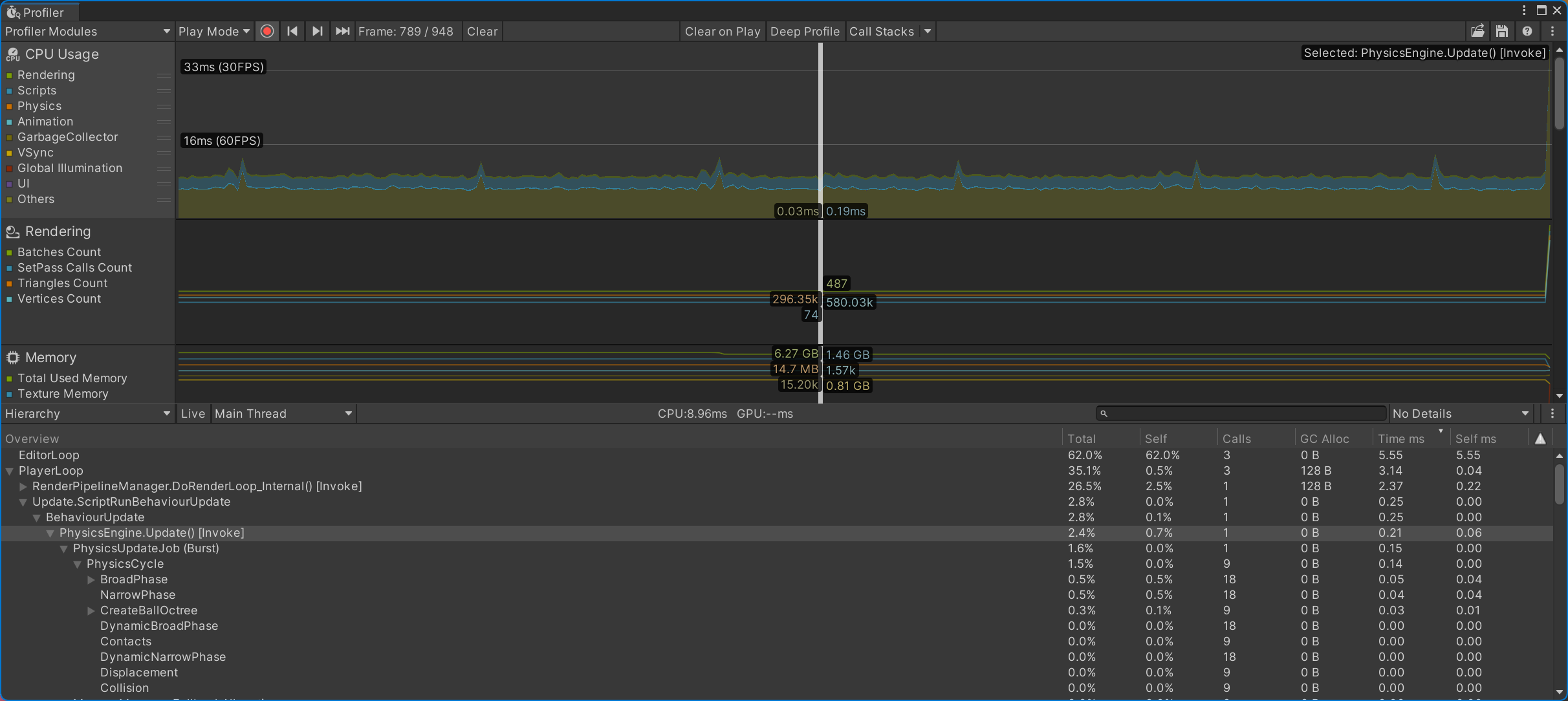
Hi folks! 2023 was a bit of a slow year for VPE. I'll go into more details in a minute, but in general, side-project fatigue happens, and in order not to burn out, taking things slowly for a while is necessary. I've also changed jobs, so naturally, I'm a little bit more invested in my professional life. That's not to say I'm distancing myself from the project; on the contrary. There's lots of cool stuff to be done, and working with a supporting community motivates a lot. It's a genuine pleasure to share ideas and progress with you guys, discuss potential features and limitations of the engine, or post random stuff I've been working on, like this spinner. vpe-spinner-anim.mp4 So, let's have a look at 2023. DOTS v1.0 came out at the end of 2022, and quite a few things changed. A quick primer about DOTS: It's Unity's ECS implementation, meaning instead of the classic object-oriented approach, data is packed in a way that is much more accessible by the CPU, avoiding cache misses. Together with Unity's Jobs system and Burst, it offers an insane amount of performance if you're dealing with many objects (tens of thousands). VPE's physics port from VPX was based on DOTS, and with v1.0 coming out, much refactoring was ahead, since v1.0 broke most of the APIs of the previous beta versions. I started this in January, but there were a few things that had changed significantly: DOTS worlds must be contained in a sub-scene, i.e., a different file. This sounded great at first (it would be easier to integrate sub-scenes / tables into existing rooms/surroundings), but it didn't play well because we didn't use the DOTS renderer: Nothing was rendered on screen during runtime. Conversion is now taking place at build time through bakers. This is a problem because we want to load tables during runtime and need another way to bake. It's probably possible to work around those issues, but I had a hunch since I started with DOTS: Since every system (the code that simulates the physics world) is launched from the main thread, a lot of scheduling is going on. Every piece of logic (there were around forty systems) needs to be scheduled, even if not executed, on a different thread, for every tick of the physics simulation. This overhead is okay when dealing with thousands of objects that can be distributed over multiple cores, but here, we can't really do that, and even if we could, we would probably parallelize the ball simulation, and there aren't as many balls. Thus, removing DOTS might result in actually better performance. So, I started rewriting the physics without DOTS. To at least keep the current performance, all data should be tightly aligned in memory, and there should be no managed allocations, which would make the garbage collector kick in (and introduce frame drops). I somewhat finished refactoring all of this at the end of February, but then DMDext became more urgent, and I switched projects. It still didn't work, though. I only refactored it for two collider types, and one of them didn't work at all. I did some fixes in March, but DMDext consumed most of my free time until the end of August. In September, I slowly started to pick it up again, but there were still a lot of bugs, and physics in general are a nightmare to debug (imagine debugging through data at 1000 fps), so progress was tough. Then came the Unity debacle. Basically, Unity was demanding an "install fee" retroactively from the studios using the engine. Although this was a tremendously stupid idea (how would you track "installations"?), breaking users' trust by changing the rules retroactively was the main reason the whole game industry was in an uproar. It ended with Unity's CEO stepping down and most of the new terms being rolled back, but like many other Unity developers, it made me spend over a week looking at Godot and rethinking my life choices. I won't get into too much detail, but the main reason I finally decided to continue VPE in Unity was simple: I really like working with it, and it's still the best tool for the job, even compared to UE5. But back to DOTS. At the beginning of October, I finally got it running again with just Burst and Jobs. Here's a scene with 60k colliders: vpe-collisions.mp4 Using DOTS, this takes about 12ms per frame to simulate. After the refactoring, we got this: That's 0.2ms per frame for the entire physics simulation! That's a 60x boost of performance, which is crazy. This immediately raises the question: Why don't we make the colliders dynamic? You move, scale, or rotate an object during gameplay, and the physics simulation updates accordingly. That's something VPX can't do. So, let me introduce kinematic objects. You can now tick a checkbox, and objects marked as kinematic will do that. One catch, though: Kinematic objects don't have a velocity. So, if your object moves and collides with a ball during movement, its velocity isn't applied. It's like the object teleports, frame by frame, to its new position. I'll address this soon, but for now, it still offers a massive benefit for features like diverters, whose movement is less important than having them on multiple positions without manually creating numerous objects and toggling them, as we have to do in VPX. For example, here I'm transforming a ramp, live during gameplay, and the physics update in real-time. vpe-kinematic-ramps.mp4 The present While discussing these changes on Discord, a strongly related topic emerged: Freedom of how objects can be transformed. See, modern game engines build their 3D scenes through a hierarchy. That means you can parent objects; if you transform the parent, its children are transformed along. This is essential for many use cases. Imagine a player character holding an object. You don't want to have to transform the object and the character separately when your character moves in your scene. You parent the object to the character and let the engine do the rest. Unity is also built like this, but because our physics engine doesn't support full transformations, we had to add many hacks to the editor to not let the user transform all objects freely. For example, VPX's physics doesn't support flippers rotating on any axis other than the Z axis. Or, walls cannot be rotated at all. Not being able to transform freely also restricted parenting. While we can somewhat control how an object can be transformed, applying those constraints to its parent is difficult, especially if there are siblings with different constraints. Long story short, having complete freedom regarding transformation would solve many problems. So, I'm currently working on adding this to the physics engine. Here's an example of a flipper rotated to match a different playfield slope, something currently not possible in VPX: vpe-transformed-flipper.mp4 The future As mentioned above, kinematic colliders don't have velocities, so they can only be used for a few use cases. The next logical step is adding support for this to the physics engine and a set of components that can be linked to ROM outputs. We'll probably call those dynamic colliders. After that, the goal is to get the first SS game fully working. T2 is a good candidate, but we've since started a few other projects, so it might be a different table. In general, two major features still need to be implemented: A player app to load and play tables and an export format that can be loaded by the player app and allows importing a table back into the editor. Let me know if anyone with a C# or Unity background feels like tackling this! That's it for now I hope that every one of you is having a peaceful holiday. Personally, I'm excited about what's to come. If you're a developer and you are too, and you've got some time to help, let me know! Happy New Year, everybody! -freezy.
- 49 replies
-
- 38
-
-
Hi folks, It's been over 1.5 years and 700+ posts at VPF, so I thought why not start a new thread to summarize things. Visual Pinball Engine, or VPE, is a port of Visual Pinball to C# and Unity. It's open source and compiles for Windows, macOS and Linux. We've had it running on Android and iOS as well, but that's currently not our focus. There are three main reasons why we've started such an endeavor: Tooling. By extending the Unity editor, creators can work in a full 3D environment while creating tables. Scripting. A lot of code that authors paste into their tables could be included in the engine, making the need of custom scripts minimal. Rendering. Unity's HDRP delivers fantastic visuals and is continuously maintained and updated to work with new hardware features. So here we go. It's still work in progress, but let's dive into it. Physics We've decided to port Visual Pinball's physics to VPE. It works, but there are few performance bottlenecks that need to be fixed, and of course, a few bugs. So far we have implemented native support for nFozzy's flipper physics, and we are working on adding his other improvements as well (rubber dampening, flipper tricks). Using VP physics means backwards compatibility and realistic flipper behavior, but also a few drawbacks, mainly: Static environment - Moving colliders need to be duplicated. This is fixable but has a performance cost. More optimization work is needed here before addressing this. Incompatibility with other engines - We can't easily use let's say PhysX for Junk Yard's wrecking ball or any other simulations on the playfield. File Format VPE can read and write the VPX file format. This is nice, because you can use the Unity editor for your VPX table, work on it, export it, load it back into VPX, and it works. We don't know yet what the final file format will be. My best guess is a new .vpe format based on .vpx that keeps VPX-compatible data within the VPX structure. There will also be an authoring format. Rather than a file format, this is a version control friendly file structure used during table creation, that allows quick import and saving. I'm fairly certain that the authoring format is going to be Unity's project structure, since it's made for exactly that. So importing a binary would create that structure automatically which would be the "source of truth", so to say, for exporting. Having an VCS-compatible format is a big deal in my opinion. It allows working much more transparently. "Small" table tweaks could end up in pull requests in the original table repository instead of new mod releases, and this might result in the community working closer together with less friction and conflicts. Graphics VPE uses Unity's new Scriptable Render Pipelines, which consists of URP and HDRP. While we try to keep URP "working", we're currently focused on HDRP. @Pandeli is the boss here, and he's working on a HDRP project with good defaults (today we propose to use the default scene, which isn't ideal). Currently he's looking into how to deal with transparency. Here a shot of CFTBL, which is particularly hard to deal with, due to the numerous plastic ramps. There's still many things to do, namely inserts and GI, but it's already looking pretty awesome. Here a video showing how the indirect reflection and planar reflection all contribute to the scene. This took quite some time to set up, and Pandeli is working on automating most of it, and document parts that are difficult to automate. Here another video from @Rowlan who put two tables into a nice environment: Note that this is an unmodified import from VPX, and the quality of materials will significantly improve once creators start spending time with Unity and get the hang of how HDRP works. Final note concerning graphics: Right after posting these kind of shots, people usually ask what about specs and framerates. For us, the goal is to get 4k at 60Hz on previous-gen hardware (currently Nvidia Pascal), and we consider that doable. This is of course with all the bells and whistles turned on. Unity supports multiple quality settings, so apart from reducing resolution, you'll be also able to turn off specially power-hungry features. Personally I have a GTX 1080 in my cab which runs at 1080p, so there you have it, the current recommended requirements. Scripting Scripting in VPX is somewhat unpleasant, to put it mildly. In VPE, scripting is split into two parts: game logic and physics. For game logic, VPE provides multiple game logic engines (we call them GLEs), but you can also write your own in C#. This game logic is really what would be running on the CPU of your real pinball machine. It: Takes in switch changes Toggles lights and coils Drives displays and sound effects That's really it. And because it's so simple and standardized, we provide graphical tools to set it up easily. Examples of GLEs that VPE provides are PinMAME (doc in progress) and MPF. Physics scripting is more difficult. This is about simulating the various mechs and toys, like a spinning wheel on the playfield, or more complex stuff like JY's wrecking ball, or CV's ring master. The idea here is to provide a few of those mechanisms as re-usable components, and work with table creators dealing with more exotic requirements whether to include them as well, split them into smaller re-usable components, or ship them as table-specific code. Tooling We've spent a lot of time on tooling. In fact, most of the work spent so far were efforts to make the creation process as good as possible. First of all, we replicated most of the editor features of Visual Pinball. That means you have editors for materials, images, layers, collections, and sounds. Properties of all the playfield elements are editable in the inspector. This should enable creators to virtually replace Visual Pinball for (.vpx) editing work. Secondly, since VPE has a standardized way how the game logic interacts with the playfield, we have written tools that facilitate linking playfield items to the game logic. So far we have: A Switch Manager A Coil Manager A Lamp Manager A Wire Manager As mentioned above, these interfaces replace the game logic part that creators need to script today. Mechanisms There are around a dozen mechanisms coming from Visual Pinball that you can put on the playfield and configure through a UI (flippers, bumpers, gates, etc). However, these are very basic and most games use additional mechanisms which creators today implement via scripting. For example, nearly all games use a trough. In VP, this is implemented in core.vbs, and I don't know how creators do it, but for me, a lot of trial and error was involved in order to getting one to function. VPE provides a trough component out of the box. You drop it on the playfield, set the size and the type, link up the switches and coil(s) in the inspector, and that's it. No coding required. The trough is the first of hopefully many more mechanisms that VPE will ship with. In terms of scripting, they fall under physics scripting. Displays All pinball games have either score reels, segment displays, DMDs, or some sort of high resolution LCD. VPE currently supports segment displays and DMDs. That means you put a display into the scene, and VPE handles the rest. You can of course customize the look, but you don't need to script anything. More infos here. To give you an idea how easy it is to setup displays, check this lengthy video. Note that the ROM selection is being worked on and will be much more comfortable, since we can query infos about all supported games from PinMAME directly. Plugins We've internally talked a lot about plugins and how we can keep VPE open to third parties without having to know about them. So here's how this is going to work: Per definition, a plugin is optional software VPE loads during runtime. It might be required by a certain table, but it's not required to create a table. Plugins need an interface, also called "API", so VPE knows how to talk to them. And there are different subjects to talk about. One plugin might be interested in looking at (or even manipulating) DMD data because it adds colors. Another plugin might needs to receive coil changes in order to trigger some hardware in the cabinet. So we're going to have a bunch of different APIs where third parties can hook into VPE. The first of these APIs is called IGamelogicEngine, and you guessed it: Game logic engines are plugins in VPE. Documentation And lastly, as you've surely noticed by now, VPE has... documentation! The goal is really to have high quality, up-to-date documentation that is delightful to read. So whenever we merge a feature into mainline, documentation is part of it. It's part of our source code, and anybody can easily suggest changes via GitHub directly. What's next? I'm currently working on the import and export process, make editor tooling more stable, and finally see what we can do about physics performance. Order may vary and I'll probably get interrupted by other things, but those are the main points. @jsm174 is currently working on getting PinMAME more easily set up . @Pandeli is working on the render pipeline. Thanks! Finally, this is not a one man show. While I'm somewhat the main developer/coordinator of the project, there are many others, so thank you @ravarcade for your shader assistance and many other things, @shaderbytes for sharing your Unity know-how, @hoopybox, @ecurtz, @VroOnsh and @Rowlan for all kind of editor- and runtime code, @jsm174 for his work on PinMAME and cross platforms, and of course @Pandeli for his rendering contributions and overall VFX expertise. Additionally, we wouldn't be near anywhere we are today without the collaboration of @toxie on both PinMAME and VPX side. Also, there are many table creators now giving feedback and insights about how they work, specially @bord and @rothbauerw and other VPW folks, so thanks a lot for that! Lastly, there is one new contributor some of you might remember: @BilboX, creator of Unit3D Pinball, a Unity based pinball simulation coming from the Future Pinball ecosystem, has availability again, and started contributing to VPE. This is specially awesome because he started working on v2 of Unit3D Pinball (named UP2) several months ago, before he learned about VPE. Turns out we've had many very similar ideas, and unfortunately, some of UP2's new features were already completed in VPE by the time he noticed. But many others are not, and it's still my hope that these features will make it into VPE eventually. Bienvenue mec! If you've made it this far, thanks for reading. I'm sure you're wondering how long until you can play a demo. Subscribe to this thread and you'll know! Cheers, -freezy.
- 367 replies
-
- 79
-