I recently upgraded my DMD screen and now my DMD size for all future pinball tables is wrong.
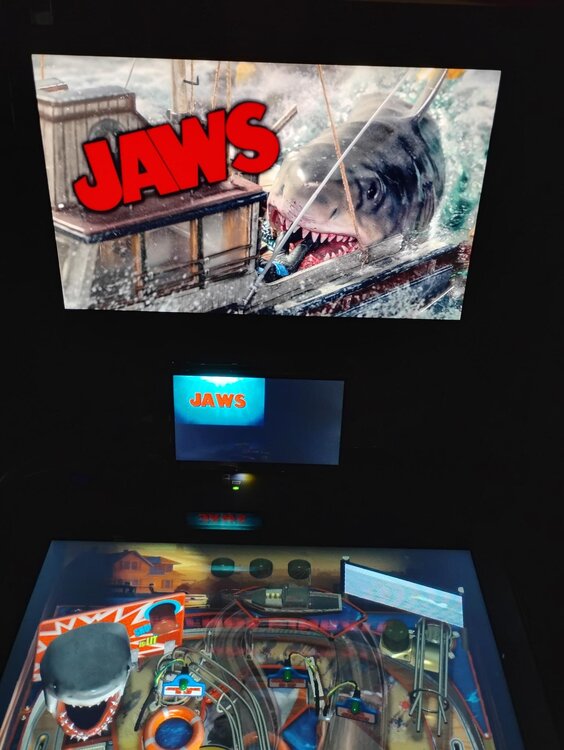
I was using a tablet with the spacedesk app to run my DMD screen, however I recently upgraded to an actual 7" LCD screen. Now when I run a future pinball table, my DMD scoring does not fill the whole screen. See attached picture as I may not be describing it the best.
Is there a simple setting I can change to have it back to fullscreen? I am assuming it is something to do with the screen size/resolution settings however I haven't been able to figure it out.
Any help appreciated!
Thanks
EDIT: I unchecked "fullscreen" in my FPloader video options for my backbox and it seemed to fix the problem.



Question
xdoolyx
I recently upgraded my DMD screen and now my DMD size for all future pinball tables is wrong.
I was using a tablet with the spacedesk app to run my DMD screen, however I recently upgraded to an actual 7" LCD screen. Now when I run a future pinball table, my DMD scoring does not fill the whole screen. See attached picture as I may not be describing it the best.
Is there a simple setting I can change to have it back to fullscreen? I am assuming it is something to do with the screen size/resolution settings however I haven't been able to figure it out.
Any help appreciated!
Thanks
EDIT: I unchecked "fullscreen" in my FPloader video options for my backbox and it seemed to fix the problem.
Edited by xdoolyx2 answers to this question
Recommended Posts
Create an account or sign in to comment
You need to be a member in order to leave a comment
Create an account
Sign up for a new account in our community. It's easy!
Register a new accountSign in
Already have an account? Sign in here.
Sign In Now