
About This File
Guess who's back... back again
After some time away I am picking this hobby back up again and the first on the list was something that was regularly requested and that I never got round to previously - a template for people to create their own versions of the APNG Glass Orb wheels that I created previously.
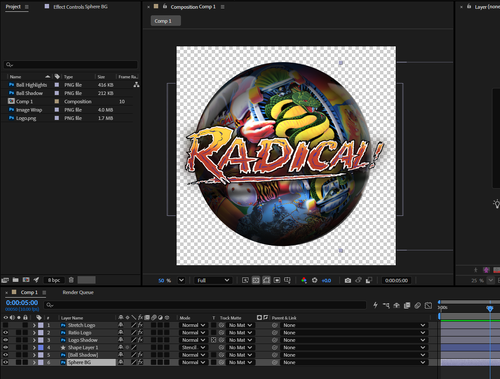
In order to create these wheels you will need Adobe After Effects and a good graphic editor (photoshop is recommended). I have included both the .ae file which should hopefully be pretty self explanatory to anyone who has used After Effects previously and I have also included the sample files from the Radical wheel I created.
You can use the Radical Image Wrap as a template for your own wheels, as you will see it is the same image repeated twice and staggered on the canvas. It is then stitched and smoothed at the join to create a seamless transition when spinning.
In order to use this to create a new wheel all you should need to do is right-click the Image Wrap file in the project resource list and choose to Replace Footage... File and select the file you have created for the table you wish to create a wheel for. Do the same with the logo project resource. You will then need to render it as a png sequence with framerate set to 10 and dimensions 1000x1000 and render quality best. The png files it then creates you can upload to EZgif.com apng maker or similar tools to create your APNG wheel.
I look forward to seeing what you all come up with!

User Feedback
Create an account or sign in to leave a review
You need to be a member in order to leave a review
Create an account
Sign up for a new account in our community. It's easy!
Register a new accountSign in
Already have an account? Sign in here.
Sign In Now