


About This File
Recorded live in front of a studio audience, here's another round of
Let's Put Things On Cabinets That Were Never Meant To Be On Cabinets!
We've arrived at Mad Daedalus, the final game by Japanese studio LittleWing, released in 2010 for Windows and Macintosh. The game is a sequel to 1994's Loony Labyrinth and the story is basically a prequel to the earlier game. As usual, the presentation is flawless, gameplay is engaging, ball physics are great, and considering LittleWing has been a two-person studio, this is an amazing effort.
Sadly, this was to be the last computer pinball game LittleWing would ever release. They followed up Mad Daedalus with a port of Tristan and a sequel to Crystal Caliburn for Apple mobile devices, but sadly, those two don't seem to run on today's iPhones and iPads anymore. (I can confirm that the Apple App store doesn't even show them on my devices when I search for them.)
As far as I could gather, Yoshikatsu Fujita and Reiko F. Nojima seem to have relocated from Toyama to California, where he works at Google and she's still doing art, but it seems they have closed the pinball chapter of their lives.
But let's not mourn what could've been, let's celebrate what we have:
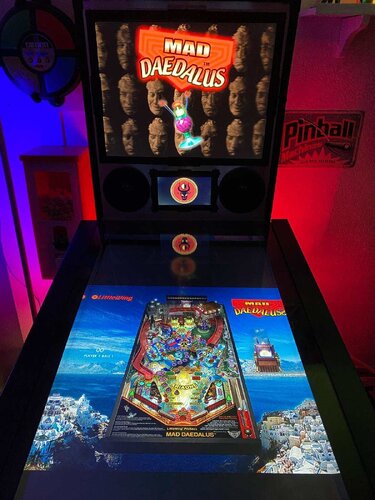
The included AutoHotKey script rotates the playfield to portrait mode, fills the backglass and DMD screens with decorative images, launches the game and maps the keys to standard cabinet buttons.
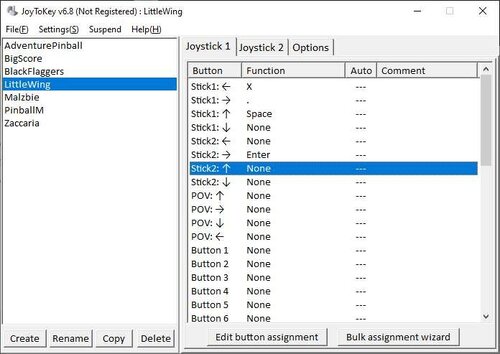
This time, I also added optional support for JoyToKey in the script. Pressing buttons to nudge the ball doesn't feel right on my cabinet - I'm used to slapping the sides. This way I can do that and even use my analog plunger to launch the ball. (You can find a screenshot of my own JoyToKey setup in the images for this post to get you started.)
I've included
- the AutoHotKey launch script, fully annotated (please go through it and adapt the variables to your system before running it!)
- a DMD filler image (repurposed from Loony Labyrinth, since this is the sequel)
- a backglass image (also usable for your frontend of choice), in both 4:3 and 16:9 formats
Also, tons of frontend media:
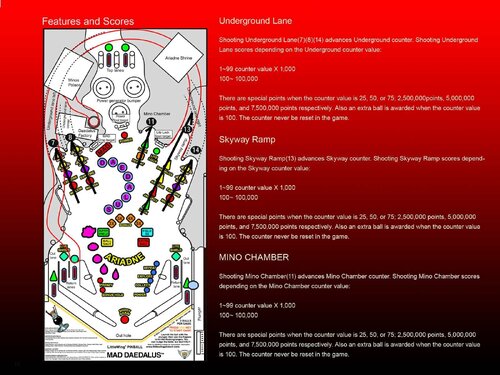
- 17 instruction cards (taken from the official Player's Guide)
- table audio (recorded directly from the game)
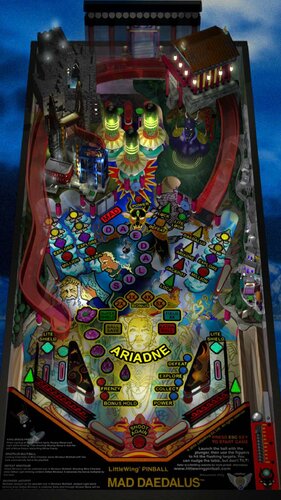
- table image (an upscale of the playfield)
- company logo (taken from Crystal Caliburn's official PDF guide)
- a wheel logo (in two sizes)
- a promo video (taken from Reiko F. Nojima's YouTube channel, featuring game animation and behind-the-scenes photos)
- 5 flyer images, taken from promotional material on the website (a credits page with photos of the team, a printable CD and cover, a concept art drawing of Ariadne) and from Reiko F. Nojima's Facebook page (an art installation featuring face casts of Daedalus that were also used in the game)
Share and enjoy!
SOME MORE NOTES:
Where to get it:
The company's website at www.littlewingpinball.com is still up as of 2026, and you can download the demo version of the game there. It needs to be be unlocked to full version with a code you could once buy at the website store, but that store has been "out of service due to a maintenance" since 2013. Never fear though, just browse any Archive that's reasonably well Organized, and may both Angel and Man help you 😉
How to run it:
Mad Daedalus should run out of the box on a modern system - no extra DLLs required, as has been the case with some earlier games.
The menu system in this game is a bit counter-intuitive, as you have to press Esc to start. I mapped the Start button to Esc, just because I'm used to pressing it whenever I start a game. The script also remaps the flipper keys so they can be used to navigate the menu. Press the Launch button (Enter) to select.
The controls in the script will not work if you mapped different keys in-game. Go to "Options", "Controls" and "Reset to Default" and you should be fine.
What didn't work:
I've been informed that mapping a key to send Esc might kill Pinup Popper. Since I don't use it, I didn't run into that problem, but I'm working on figuring it out. Please let me know if you find a workaround!
Highscore workaround:
Unfortunately, when it comes to the highscore table, LittleWing moved away from the "select letters with flippers" method of their earlier games and opted for keyboard typing input. I solved this by mapping three letters plus Enter to the Coin button (5). They're set to "N-E-W" in the script - feel free to change them to your preference.
AI use disclaimer:
- The wheel image was taken from an in-game screenshot, upscaled with Freepik and tweaked further in Photoshop.
- For the backglass, I used an image of Reiko F. Nojima's "Days of Knossos" art installation I found on Facebook, edited it in Photoshop and pasted the logo and an image of the time travel device from the Player's Guide on top of it. It's far from the prettiest thing I've ever done, but honoring Ms. Nojima's art this way felt at least more appropriate than AI-generating something new from scratch.
And that's it.
That's all there is on the subject of LittleWing Studios.
What?
What's that you say, little wise old swamp creature?

Oh yeah, that's right, there was another. Two, actually.
If you look at LittleWing's game list on their website, you'll see that I left out Eight Ball Deluxe for MS-DOS, and Psychedelic"O" Pinball for Windows and Mac.
I dismissed Eight Ball Deluxe deliberately, since the MS-DOS version a) most importantly wasn't coded by the LittleWing team, but also b) isn't very good, c) takes ages to load, d) needs a mouse to navigate the menu, and e) we already have excellent Visual Pinball versions, so there's literally no point to play the port.
But Psychedelic"O" Pinball looks interesting. Apparently it's a sound mod of Jinni Zeala, created in 2006 by LittleWing for Japanese band Love Psychedelico and was only ever included as a bonus disc on one of their CD releases. I haven't been able to find a download anywhere, so if some kind soul should stumble across it, I'd appreciate a pointer. I'd love to create another media pack for it someday.
Edited by SixOfTwelve
You guessed it... typos

User Feedback
Create an account or sign in to leave a review
You need to be a member in order to leave a review
Create an account
Sign up for a new account in our community. It's easy!
Register a new accountSign in
Already have an account? Sign in here.
Sign In NowThere are no reviews to display.