

About This File
On tonight's spoooky episode of
Let's Put Things On Cabinets That Were Never Meant To Be On Cabinets!
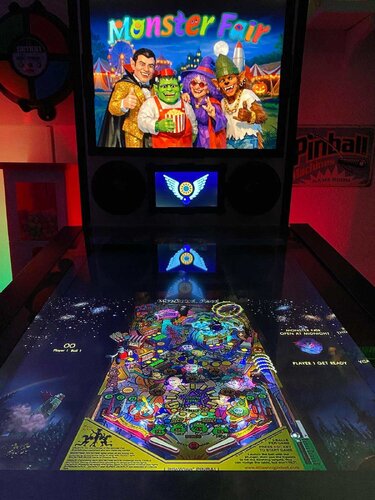
we're visiting Monster Fair, another game by Japanese studio LittleWing, released in 2004 for Windows and Macintosh. It's a carnival run by monsters, who are really aliens, who crashed their spaceship on Earth hundreds of years ago, and are now trying to earn enough money to return home. Seriously, that's the background story. Just like LittleWing's previous Jinni Zeala, this one is a lot of fun, and the wacky factor has even been turned up a few notches.
The included AutoHotKey script rotates the playfield to portrait mode, lowers the resolution to 1024x1080, fills the backglass and DMD screens with decorative images, launches the game and maps the keys to standard cabinet buttons.
I've included
- the AutoHotKey launch script, fully annotated (please go through it and adapt the variables to your system before running it!)
- a DDrawCompat INI file for the resolution - see further below under "How to run it"
- a DMD filler image for in-game purposes
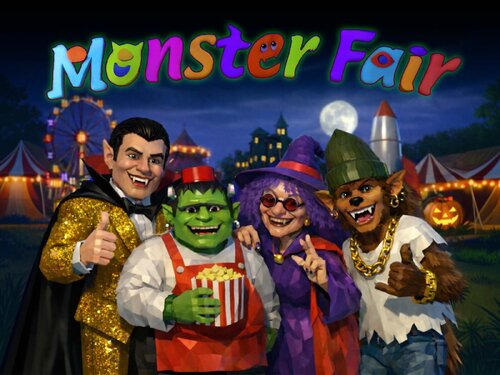
- a backglass image (also usable for your frontend of choice), in both 4:3 and 16:9 formats
Also, tons of frontend media:
- 36 instruction cards (taken from the official player's guide)
- table audio (recorded directly from the game)
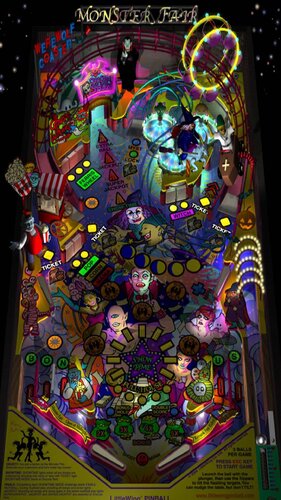
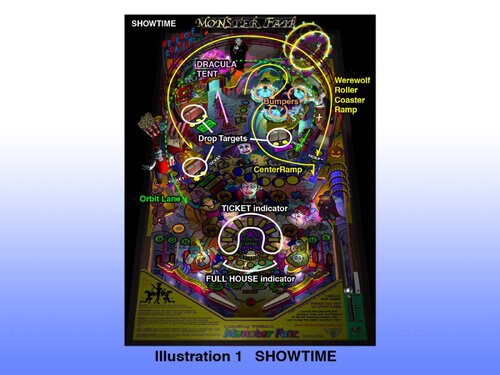
- table image (an upscale of the playfield)
- company logo (taken from Crystal Caliburn's official PDF guide)
- two wheel logos
Sadly, no flyer images this time, since from Monster Fair onward, LittleWing sold their games exclusively as downloads, so there are no box covers or any other large-scale artwork I could find.
Share and enjoy!
SOME MORE NOTES:
Where to get it:
The company's website at www.littlewingpinball.com is still up as of 2026, and you can download the demo version of the game there. It needs to be be unlocked to full version with a code you could once buy at the website store, but that store has been "out of service due to a maintenance" since 2013. Never fear though, just browse any Archive that's reasonably well Organized, and you should find it before you can count to 1.2.0 😉
How to run it:
Monster Fair will run terribly choppy or even crash on most modern systems since it uses an obsolete DirectX version, and also cut parts of the image off when played in portrait mode. Go to https://github.com/narzoul/DDrawCompat/releases and download the latest version of DDrawCompat (expand the "Assets" tab under the latest post and get the ZIP file). Unzip and put the ddraw.dll file into your Monster Fair game directory. This Media Pack includes a file called DDrawCompatOverlay-MonsterFair.ini that needs to be dropped into the same folder, as it will tell DDrawCompat what resolution to use.
The menu system in this game is a bit counter-intuitive, as you have to press Esc to start. I mapped the Start button to Esc, just because I'm used to pressing it whenever I start a game. The script also remaps the flipper keys so they can be used to navigate the menu. Press the Launch button (Enter) to select.
The controls in the script will not work if you mapped different keys in-game. Go to "Options", "Controls" and "Reset to Default" and you should be fine.
Highscore workaround:
Unfortunately, when it comes to the highscore table, LittleWing moved away from the "select letters with flippers" method of their earlier games and opted for keyboard typing input. I solved this by mapping three letters plus Enter to the Coin button (5). They're set to "N-E-W" in the script - feel free to change them to your preference.
AI use disclaimer:
As I already mentioned, there is no high-resolution artwork available for Monster Fair, and the in-game graphics don't really lend themselves to backglass images (unlike earlier LittleWing games up to Angel Egg, which had large images next to the playfield). So it was with a heavy heart that I decided to use AI to generate a title screen that looked vaguely like it could have been created at the time of release: Low-polygon 3D rendered characters with glossy surfaces that have a touch of the uncanny valley about them. I picked the game's four most prominent characters: The golden-suited Dracula (from the game's "Showtime" mode), the Frankenstein's monster popcorn seller, the old hippie witch from the "Goat Rodeo" attraction and the young hip-hop werewolf who rides the rollercoaster. I hope you find the result somewhat acceptable.
- The backglass image was created by accident in ChatGPT after about 60 failed tries in FreePik, when I asked ChatGPT how to better refine my prompts 😅 I then used Freepik to upscale and expand the image, and finally tweaked it further in Photoshop.
- The wheel logo was taken from a screenshot of the game's intro, upscaled with Freepik and further edited in Photoshop.
Edited by SixOfTwelve
typos, as usual...
User Feedback
Create an account or sign in to leave a review
You need to be a member in order to leave a review
Create an account
Sign up for a new account in our community. It's easy!
Register a new accountSign in
Already have an account? Sign in here.
Sign In NowThere are no reviews to display.