Jump to content

The Wizard of Oz table mods

  • Get Support
  • Create an account or sign in to download this
download_no_perm
2015 Views
322 Downloads
5 From 5 reviews
2.68 GB File Size
None ROM Name
ckpin, MachWon Created by
ckpin, MachWon, ryguy417, cheese3075, jcsk8 Artwork by
ckpin, JPSalas, Nailbuster Scripting by
Original Manufacturer
2026 Year

3 Screenshots

I’m uploading these tables for the community because I’m having a lot of fun with the mods I’ve made for myself.

I loved the table so much that I started modding small things here and there, based on videos, as I’ve never played a real one. So, please keep that in mind.

First, a big thanks to ckpin for the original table, MachWon for the Yellow Brick Road version (which my mods are based on), ryguy417 for the DMD template he made, and cheese3075 for the Ruby Shoes mod, which I’ve used as well.

## Mods

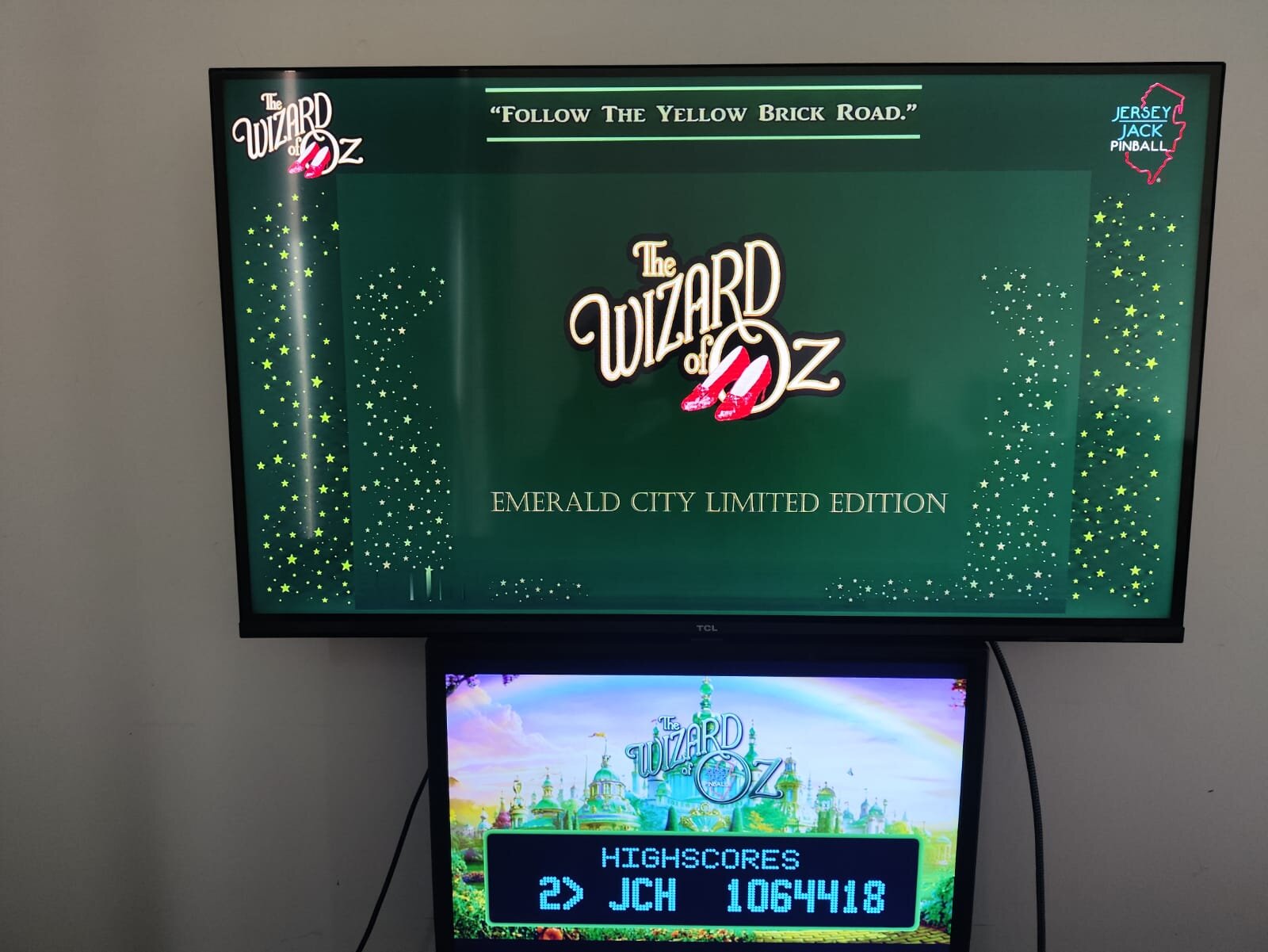
Created three versions: Standard, Emerald City LE, and a 75th Anniversary versions with additional mods.

**Flippers:** Ruby Shoes and adjusted elasticity.

**There’s No Place Like Home bumper:** Changed the power to better match videos and reduce the tendency to always hit the same targets.

**Lights tweaks:** Removed the OZ lane lights, as they’re not present on the real table. Increased the Rainbow lights.

Removed the counter from the upper-right playfield, as well as the spinning tornado. (There’s no tornado on the Standard version.)

Removed the center and outlane physical blockers that made the TNPLH task easier to complete.

Made more realistic lollipop decals for the Rainbow targets.

Added a plastic apron to the 75th Anniversary and Standard versions. (Not that good, but the best I could do.)

Custom sidewall art for the tables, except for the Standard version.

Adjusted rubber and insert colors to better match the real tables.

Separated PUP Packs, so each table runs the correct content.

I’ve also made custom backglasses for personal use. You can use them, or set the standard ones from one of the other tables.

I used the MachWon version as a base, made some videos for some of the mods, and resized them to my liking. My setup is a 4K playfield, Full HD backglass, and a 1366 × 768 Full DMD. All are 16:9.

You may need to resize and/or reposition some elements for better placement. As setups vary a lot, I can’t really help you with that.

## Physics

I’ve tried many variations, but this table plays better and matches most of the videos with a 6-degree slope.

Other settings made it too brutal and virtually impossible to complete many of the tasks.

The real table is 6.5 degrees, but trust me: keep the 6-degree angle for this VPX version.

Hope you enjoy them!

## Instalation

You need to download the original MachWon table and use de patching system to create each table. After rename the table to match the exact name from the backglasses, .res files, etc. Place all inside tables folder.


https://vpuniverse.com/files/file/22851-woz-original-2019-yellow-brick-road-le-mod/

https://vpuniverse.com/files/file/2581-vpuremix-system-vppatching-system-vpx-only/


Place the WoZYBR.UltraDMD inside your tables folder and PupPacks inside PinUPSystem/PUPVideos folder

I suggest the x64 (directx) version instead the Open GL fot this table. The OGL version plays like a slow motion game in my system. Try it at yours. The x64 plays flawless.


For those unfamiliar with the original table, theres a options menu pressing F6, so you can turn off the apron points, the jewels lights uper the castle (not realistic), and others. Just save and reload the table.


Uploaded some pics from the backglass/DMD so you can have a better view.
 

WhatsApp Image 2026-09-14 at 11.59.33 (1).jpeg

WhatsApp Image 2026-09-14 at 11.59.33 (2).jpeg

WhatsApp Image 2026-09-14 at 11.59.33 (3).jpeg

WhatsApp Image 2026-09-14 at 11.59.33 (4).jpeg

WhatsApp Image 2026-09-14 at 11.59.33.jpeg

Edited by jcsk8
Grammar, bg pics.

Yes
jcsk8
ckpin, MachWon
1.2

What's New in Version 1.1.0   See changelog

Released

Removed the YBR version.

Standard, Emerald city and 75th Anny remains.


User Feedback

Recommended Comments


Autobott

Posted

earlier today I went and moved it all to the FullDMD and made a backglass...DOH I had no idea the B2S was doing all the screen heavy lifting lmao


wozB2S.png

barneyrfd

Posted

hmm, very strange, no playfield showing, just the green wording down on where the apron would be, pup videos and ultradmd come to life, they are all over the place but I can probably work on getting to proper locations.  Followed the instructions to the letter - to the letter.  Even removed the pup, b2s, ini and res files and still no playfield.  Anyone else have this problem?  All my other existing WOZ versions work just fine.

jcsk8

Posted

7 minutes ago, barneyrfd said:

hmm, very strange, no playfield showing, just the green wording down on where the apron would be, pup videos and ultradmd come to life, they are all over the place but I can probably work on getting to proper locations.  Followed the instructions to the letter - to the letter.  Even removed the pup, b2s, ini and res files and still no playfield.  Anyone else have this problem?  All my other existing WOZ versions work just fine.

Try to copy the table and paste in the desktop main screen and try to run from there. Some config is hiding or placing the PF into another screen. Never had that happening.

barneyrfd

Posted

Thanks for the response but what the problem is is that I was using BAM headtracking last time I used the machine a few days ago and forgot to uncheck the box on the video setting screem in VPX...my bad...now the table shows up but i still have to adjust all the screen locations for my setup...

rvaughn

Posted

I'm trying to get everything in aspect but I can't find the layer or setting that drives/sets the video size on the backglass. I just want it to fit in the middle window with everything else. PUP/B2S gurus - HELP!!!

20260914_214141.jpg

stevegooner123

Posted

11 hours ago, jcsk8 said:

What are your screens res? They´re calculated in the .res file. Mine are 4k PF, Full HD BG and a HD full DMD. If some is different the settings needs tbe adjusted. As is a blend of BG and Pup Pack it´s impossible to create files for everyone, as the are many variations, but it can be done. I basically made some custom backglasses tempalte so the videos and the real BG runs bigger, closer to the real thing.

2560
1440
1920
1080
2
0
0
1936
1079
1920
0
0
0
0
0
0
 

jcsk8

Posted

7 hours ago, rvaughn said:

I'm trying to get everything in aspect but I can't find the layer or setting that drives/sets the video size on the backglass. I just want it to fit in the middle window with everything else. PUP/B2S gurus - HELP!!!

20260914_214141.jpg

the screens.txt in the pupack is the ones who sets the video postions. Seems that you´re using the og table pupack, have you tried the one I´ve provided? They should play in the same place (maybe not the wanted one, lol, but should)

jcsk8

Posted (edited)

4 hours ago, stevegooner123 said:

2560
1440
1920
1080
2
0
0
1936
1079
1920
0
0
0
0
0
0
 

Rename the file exactly the same as your table name and place inside the tables folder and please give it a try. Backup any others first.

2k test.res

Edited by jcsk8
stevegooner123

Posted

1 hour ago, jcsk8 said:

Rename the file exactly the same as your table name and place inside the tables folder ang please give it a try. Backup any others first.

2k test.res 929 B · 2 downloads

Thanks very much 👏 the table pup pack works great now, I tested it with the 75th Anniversary table.

coolball

Posted

I didn't give up, and thanks to your help, I finally made it.itworks.thumb.jpg.3e3ad690133f40417aa03033d45817f7.jpg

barneyrfd

Posted

So after correcting my forgetfullness to uncheck BAM Headtracking in VPX Video settings I ran the tables and other than editing the .res file from monitor 3 for the backglass to monitor 2 to match my setup, I really had no other changes to make, the tables played perfectly.  Oh, I did hit F6 and turn off the green text on the apron as well.


Cliffy

Posted (edited)

I decided to add the emerald city edition alongside the YBR edition. It took a bit of fiddling with the pinupplayer.ini and mostly the tablename.res. As for the table itself I had to export the right siderail and flip it 180 degrees as it's really the left one duplicated on the right - which ain't right :) Looks better now!

Here's my res file and pinupplayer.ini for desktop. You may need to scooch the table to the left a little to clear the pup frame like I did.

You will need to rename my res file to exactly match whatever your table and b2s name is.

woz-EC-2026-desktop.jpg

Wizard of Oz EC 2026.res PinUpPlayer.ini

Edited by Cliffy
ddwall

Posted

Very nice upgrade. Thank you 


Create an account or sign in to comment

You need to be a member in order to leave a comment

Create an account

Sign up for a new account in our community. It's easy!

Register a new account

Sign in

Already have an account? Sign in here.

Sign In Now
×
  • Create New...