Jump to content

The Wizard of Oz table mods

  • Get Support
  • Create an account or sign in to download this
download_no_perm
2015 Views
322 Downloads
5 From 5 reviews
2.68 GB File Size
None ROM Name
ckpin, MachWon Created by
ckpin, MachWon, ryguy417, cheese3075, jcsk8 Artwork by
ckpin, JPSalas, Nailbuster Scripting by
Original Manufacturer
2026 Year

3 Screenshots

I’m uploading these tables for the community because I’m having a lot of fun with the mods I’ve made for myself.

I loved the table so much that I started modding small things here and there, based on videos, as I’ve never played a real one. So, please keep that in mind.

First, a big thanks to ckpin for the original table, MachWon for the Yellow Brick Road version (which my mods are based on), ryguy417 for the DMD template he made, and cheese3075 for the Ruby Shoes mod, which I’ve used as well.

## Mods

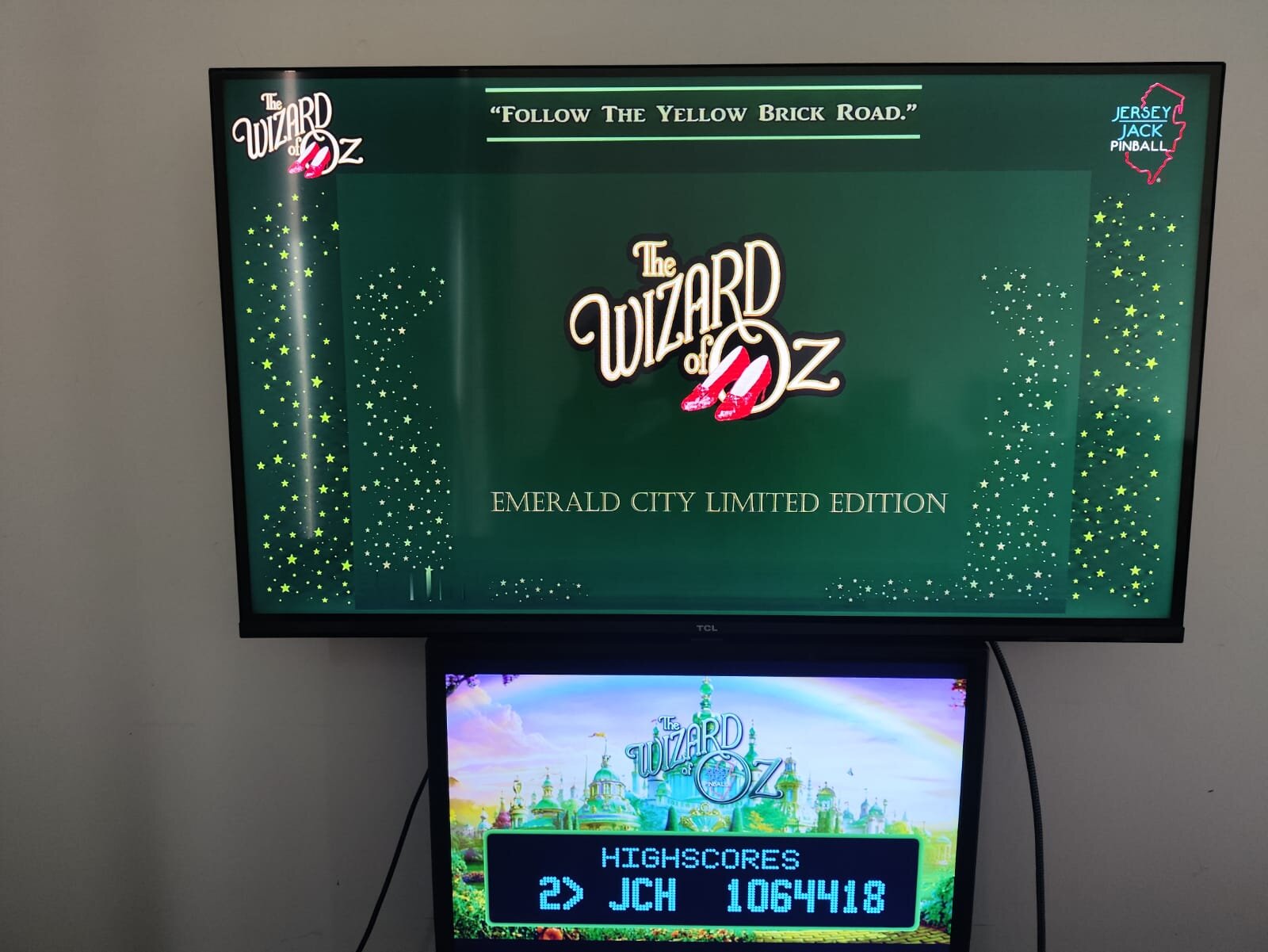
Created three versions: Standard, Emerald City LE, and a 75th Anniversary versions with additional mods.

**Flippers:** Ruby Shoes and adjusted elasticity.

**There’s No Place Like Home bumper:** Changed the power to better match videos and reduce the tendency to always hit the same targets.

**Lights tweaks:** Removed the OZ lane lights, as they’re not present on the real table. Increased the Rainbow lights.

Removed the counter from the upper-right playfield, as well as the spinning tornado. (There’s no tornado on the Standard version.)

Removed the center and outlane physical blockers that made the TNPLH task easier to complete.

Made more realistic lollipop decals for the Rainbow targets.

Added a plastic apron to the 75th Anniversary and Standard versions. (Not that good, but the best I could do.)

Custom sidewall art for the tables, except for the Standard version.

Adjusted rubber and insert colors to better match the real tables.

Separated PUP Packs, so each table runs the correct content.

I’ve also made custom backglasses for personal use. You can use them, or set the standard ones from one of the other tables.

I used the MachWon version as a base, made some videos for some of the mods, and resized them to my liking. My setup is a 4K playfield, Full HD backglass, and a 1366 × 768 Full DMD. All are 16:9.

You may need to resize and/or reposition some elements for better placement. As setups vary a lot, I can’t really help you with that.

## Physics

I’ve tried many variations, but this table plays better and matches most of the videos with a 6-degree slope.

Other settings made it too brutal and virtually impossible to complete many of the tasks.

The real table is 6.5 degrees, but trust me: keep the 6-degree angle for this VPX version.

Hope you enjoy them!

## Instalation

You need to download the original MachWon table and use de patching system to create each table. After rename the table to match the exact name from the backglasses, .res files, etc. Place all inside tables folder.


https://vpuniverse.com/files/file/22851-woz-original-2019-yellow-brick-road-le-mod/

https://vpuniverse.com/files/file/2581-vpuremix-system-vppatching-system-vpx-only/


Place the WoZYBR.UltraDMD inside your tables folder and PupPacks inside PinUPSystem/PUPVideos folder

I suggest the x64 (directx) version instead the Open GL fot this table. The OGL version plays like a slow motion game in my system. Try it at yours. The x64 plays flawless.


For those unfamiliar with the original table, theres a options menu pressing F6, so you can turn off the apron points, the jewels lights uper the castle (not realistic), and others. Just save and reload the table.


Uploaded some pics from the backglass/DMD so you can have a better view.
 

WhatsApp Image 2026-09-14 at 11.59.33 (1).jpeg

WhatsApp Image 2026-09-14 at 11.59.33 (2).jpeg

WhatsApp Image 2026-09-14 at 11.59.33 (3).jpeg

WhatsApp Image 2026-09-14 at 11.59.33 (4).jpeg

WhatsApp Image 2026-09-14 at 11.59.33.jpeg

Edited by jcsk8
Grammar, bg pics.

Yes
jcsk8
ckpin, MachWon
1.2

What's New in Version 1.1.0   See changelog

Released

Removed the YBR version.

Standard, Emerald city and 75th Anny remains.


User Feedback

Recommended Comments


coolball

Posted

Thanks for your nice work.

I'am play the table in the desktop view.


On the right, within the frame, I only see my desktop background and the videos as they appear. Once the videos finish, only my desktop is visible again. The four windows with the images are missing for me. I’ve spent hours trying, but I haven't found a way to get it to display correctly yet. Please help.

WOZ.jpg

Cliffy

Posted

What a nice update! It plays so much better and looks great. I chose the YBR table and it's just splendid- thanks!

woz-ybr-2026.jpg

jcsk8

Posted

3 hours ago, coolball said:

Thanks for your nice work.

I'am play the table in the desktop view.


On the right, within the frame, I only see my desktop background and the videos as they appear. Once the videos finish, only my desktop is visible again. The four windows with the images are missing for me. I’ve spent hours trying, but I haven't found a way to get it to display correctly yet. Please help.

WOZ.jpg

You need to fix the position with the .res file. It´s the one who determins where the backglass will appears ant it´s size. Looks Like Cliffy was able to fix his, just see his comment. Maybe he can help you as his setup looks like yours. 

Cliffy

Posted

4 minutes ago, jcsk8 said:

You need to fix the position with the .res file. It´s the one who determins where the backglass will appears ant it´s size. Looks Like Cliffy was able to fix his, just see his comment. Maybe he can help you as his setup looks like yours. 

@coolball at the bottom of your .res file make sure this is in there;

B2SWindowPunch=on


As long as you have pupdesktoppunch.exe and pupinit.bat in the pupfolder it should all just work

coolball

Posted

Thanks for the tips. I have the `res` file in the `table` folder and the `PuPDesktopPunch` files in the `Pup WOZ` folder. Unfortunately, I'm too stupid to create the `res`The Wizard of Oz - 75th Anniversary LE.res files correctly.

Tikimaster

Posted

Please Dr. @Cliffy, can you share your res and ini with us?  - thankyou. 😗

qwerter18

Posted (edited)

Very Very cool mod! 
Very nice!

Thank you! 👏


I never spend so much time on a PupPack and B2S to work together seamlessly, 😂

-> but it paid out. It looks beautiful (to me). 👍


Is there a way to get rid of the darker fields with the numbers on the apron?

I have never seen something like this before?! 
I am on a 3 screen cabinet...


I would like to get rid of those altogether, or

at least match the darker squares with the green numbers?!

PHOTO-2026-09-14-13-32-10.jpg

Edited by qwerter18
jcsk8

Posted

12 minutes ago, qwerter18 said:

Very Very cool mod! 
Very nice!

Thank you! 👏


I never spend so much time on a PupPack and B2S to work together seamlessly, 😂

-> but it paid out. It looks beautiful (to me). 👍


Is there a way to get rid of the darker fields with the numbers on the apron?

I have never seen something like this before?! 
I am on a 3 screen cabinet...


I would like to get rid of those altogether, or

at least match the darker squares with the green numbers?!

PHOTO-2026-09-14-13-32-10.jpg

Press F6 to open menu options  and than turn off the apron scoring. You can also turn off the jewel stuff over the castle wich is unralistic in the real table, if you wish. All the settings are from the original table. I did most cosmetic changes with a bit of tuning in the physics.

woedge

Posted

I got ride of this by starting the table, pressing F6 and setting the 2nd point in the list to no.

Go down in the list and press save and exit. Restart the table and it should be gone.

qwerter18

Posted

Ah! F6! 
I totally forgot about this Menu!!! 
Thank you for your quick help! 👍
And again: Thank you jcsk8 for your work!  👍

Tikimaster

Posted (edited)

HD 1920x1080 Desktop Pinupplayer.ini and tablename.res
Hope it fits
Put the Pinupplayer.ini inside the \PinUPSystem\PUPVideos\wozPupPack folder - NOT in your \PinUpSystem\ Folder. 
rename the *.res file to fit to your table-backglass-name and put it beside the backlass in your table folder.
You will need pupinit.bat and PuPDesktopPunch.exe also, if you are on Desktop. You can download these files here:
https://www.nailbuster.com/wikipinup/doku.php?id=pup_desktop


woz.jpg


wozpreview.jpg

Desktophd.zip

Edited by Tikimaster
UHATEIT

Posted

I remember spending more time trying to get everything for the WOZ table and pup to line up and work properly than any other table I have. I'm almost afraid to give this one a shot and mess up what I have if the names conflict and offset the one that works.

Cliffy

Posted

@Tikimaster @coolball ok here's my res and pinupplayer.ini files

Keep in mind my desktop screen is 1920 x 1200 (16:10 wxga) so things will be a little more compressed on 1920 x 1080 screens but will get you very close. Also note you will need to change my res filename to match your own.

Wizard of Oz YBR 2026.res PinUpPlayer.ini

jcsk8

Posted

22 minutes ago, UHATEIT said:

I remember spending more time trying to get everything for the WOZ table and pup to line up and work properly than any other table I have. I'm almost afraid to give this one a shot and mess up what I have if the names conflict and offset the one that works.

The YBR shares the same original name, but the other versions have different game names and separate Pup Packs so you shouldn´t have a problem. Whenever I try any mod, I just create another table and files with a different name and they work without problems. But it´s safer to backup what you have and test. Or you can just try a table without the pupack. The Backglass and res files won´t damage your other instalation. If tou like you can try the Pups. I´ll upload some Pics from the backglasses.

coolball

Posted

Okay, thanks for your help, but I'm giving up. I tried the new .ini and the new .res files. The videos play, but then disappear immediately, leaving me looking at the desktop background. The four small task windows never appear. Fortunately, the other tables work fine with PUP.

qwerter18

Posted (edited)

2 hours ago, UHATEIT said:

I remember spending more time trying to get everything for the WOZ table and pup to line up and work properly than any other table I have. I'm almost afraid to give this one a shot and mess up what I have if the names conflict and offset the one that works.

Yeah... 😂

I used markers and nail-polish remover for the first time on my screen, to get everything aligned properly...😂

Like Tip-Ex instead of delete....😂


If anything, I would wish for an easier install of PupPacks in general! 

I would like to see a possibility to drag windows/overlays to their right screen and postion, resize them on the fly, instead of messing around with those terrible numbers (coordinate system) in editor mode.

Just drag around videos and overlays to match with DMD windows etc...
Crazy utopian idea, I know. 👏

Edited by qwerter18
Cliffy

Posted (edited)

It's been awhile since I last really got into and tweaked this for my own desktop preferences. I do remember doing it way back but had to learn some stuff over again. I wanted a fulldmd for the ultradmd frame and it took a minute but I figured it out (again)

There are a couple of choices out there IIRC the one I used is from @MachWon but I could be wrong. @MasonStorm makes one as well I may try out too. Either way it came out nice

EDIT- Ok I believe is have @ryguy417 fulldmd shown here

woz-ybr-2026-desktop.jpg

Edited by Cliffy
stevegooner123

Posted

Great table update thanks, Can`t get the Pup pack working properly on my 3 screen Cabinet but had trouble with the original version which seems to be the same for lots of people!

Works great using a Full dmd backglass , Hopefully someone can provide a fix so people can enjoy using the Pup Pack.

MasonStorm

Posted

I put together what I think is a pretty sweet PuP Overlay and Full DMD.  I'm biased though, HAHA!


jcsk8

Posted

1 hour ago, stevegooner123 said:

Great table update thanks, Can`t get the Pup pack working properly on my 3 screen Cabinet but had trouble with the original version which seems to be the same for lots of people!

Works great using a Full dmd backglass , Hopefully someone can provide a fix so people can enjoy using the Pup Pack.

What are your screens res? They´re calculated in the .res file. Mine are 4k PF, Full HD BG and a HD full DMD. If some is different the settings needs tbe adjusted. As is a blend of BG and Pup Pack it´s impossible to create files for everyone, as the are many variations, but it can be done. I basically made some custom backglasses tempalte so the videos and the real BG runs bigger, closer to the real thing.

Autobott

Posted

I forgot Mason had made that...in the meantime I edited what was in jcsk8's overlays to make one that didnt have black bars or the sides too wide.  The pop up videos do get some text cutoff at the bottom...it would be nice it those could be redone to have the text moved up an inch or so.

wozb2s.png

PXL_20260914_204058857.jpg

jcsk8

Posted

4 hours ago, coolball said:

Okay, thanks for your help, but I'm giving up. I tried the new .ini and the new .res files. The videos play, but then disappear immediately, leaving me looking at the desktop background. The four small task windows never appear. Fortunately, the other tables work fine with PUP.

It´s because of the way it was created. It´s a mix from pups and backglasses working together. The 4 windows task that you´ve mentioned are the real backglass. I would sugest to disable the pupfiles (remane) and try to fix the backglass position first, as ir runs inside the templete. The trickies is that the pup pack videos and tne backglass should run in tha same place, and the settings for placing them is different. I used a lot of AI so they made de calculations for my setup. As there are many different setups is virtually impossible to fix all.  I´ve answered yout PM. If I can help  reach me there. Good luck.

Autobott

Posted

what we REALLY need is a Pup redo lol...I want it on the FullDMD.  It's too far up to see when its on the backglass!  Great job on this @jcsk8

jcsk8

Posted

3 minutes ago, Autobott said:

I forgot Mason had made that...in the meantime I edited what was in jcsk8's overlays to make one that didnt have black bars or the sides too wide.  The pop up videos do get some text cutoff at the bottom...it would be nice it those could be redone to have the text moved up an inch or so.

wozb2s.png

PXL_20260914_204058857.jpg

I tried that too, to get rid of the bottom black bar, witch I think the OG creator leave it to the points sectionin some future, but the videos were cut, than I had to leave it that way. And is possible to make the videos run in the Full DMD and leave the BG in the second screen. Just mess with the puppack screen files. I leave all together because is the way the real table was created. 

Autobott

Posted (edited)

5 minutes ago, jcsk8 said:

I tried that too, to get rid of the bottom black bar, witch I think the OG creator leave it to the points sectionin some future, but the videos were cut, than I had to leave it that way. And is possible to make the videos run in the Full DMD and leave the BG in the second screen. Just mess with the puppack screen files. I leave all together because is the way the real table was created. 

Oh that's a good idea, have the vids show below!  I was going to just move them up a lil bit but DMD may be even better.

Edited by Autobott

Create an account or sign in to comment

You need to be a member in order to leave a comment

Create an account

Sign up for a new account in our community. It's easy!

Register a new account

Sign in

Already have an account? Sign in here.

Sign In Now
×
  • Create New...