
Jump to content

Mary Shelley's Frankenstein SERUM

    Create an account or sign in to download this
download_no_perm
8851 Views
2753 Downloads
5 From 29 reviews
2.77 MB File Size
frankst ROM Name
FrankT Created by
Sega Manufacturer
1995 Year

1 Screenshot

About This File

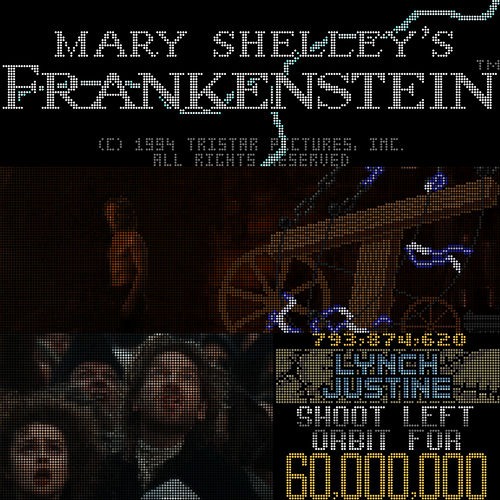
After over a year in the making, I finally present version 1 of the first 192x64 SERUM colorization!


This is presented with much thanks to @KRAKEN and @PastorLUL, without whom I'd still be stuck trying to figure out how to mask the Stoning animation.

What's New in Version 1.11   See changelog

Released

Finally a cROMc version!

User Feedback

Recommended Comments


Matteo

Posted

thank's.

susoarkangel18

Posted

Can someone tell me how to do this? I've downloaded the files and put them where they say, but I can't get the colorization to work.

stevemontuno

Posted

31 minutes ago, susoarkangel18 said:

Can someone tell me how to do this? I've downloaded the files and put them where they say, but I can't get the colorization to work.

Have you pressed f1 and checked the color dmd box? 

Cliffy

Posted

Unfortunately this one crashes the table after the new freezy 2.4.0 dll converts the cRZ to cromc.  @FrankRT maybe you can look into this?

For now I've reverted to the old pal/fsq dmd which still works. Would love to see this beautiful crz working again with the new dmdext dll's.

msf-fsq.jpg

Cliffy

Posted

Update to my post above- @PastorLUL has advised there is a new version of the serum dll's, 2.5.2, that fixes this. So for now we need to grab the new libserum from here https://github.com/PPUC/libserum/releases

and unzip the serum64 and serum dll's into your vpinmame folder until Freezy can incorporate the fix into his dmddevice dll's. 

So happy to have this gorgeous cromc working. See how awesome it looks with scalermode=scale2x in dmddevice.ini

msf-color-cromc.jpg

Devir

Posted (edited)

The above solution does not work for me because i am using 'FlexDMD' and serum dlls do nothing in my setup, so the solution i found is to create an empty.txt in altcolor\frankst\ folder called 'frankst.cROMc' and setting it as 'read only' right clicking the file and going into properties menu.


This way, finding a 0 bytes file, it tries to create a new cROMc file but it fails so you don't need to delete the faulty file every time you start the table.

Edited by Devir
jdsabin1

Posted

On 5/14/2026 at 2:29 PM, Devir said:

The above solution does not work for me because i am using 'FlexDMD' and serum dlls do nothing in my setup, so the solution i found is to create an empty.txt in altcolor\frankst\ folder called 'frankst.cROMc' and setting it as 'read only' right clicking the file and going into properties menu.


This way, finding a 0 bytes file, it tries to create a new cROMc file but it fails so you don't need to delete the faulty file every time you start the table.

Thanks for posting this. I have a lot of tables on the cabinet but don't always get around to play them. Tried this tonight and it was blowing up. Came here first, saw this and problem was fixed. If you lived closer I'd buy you a drink. Cheers! 

Lotso

Posted

NICE!  Thanks for update!💯

coolball

Posted

Great work, thanks.

ddwall

Posted

thank you for the update.

Thalamus

Posted

cROMc - you don't have to tell me more than that ❤️

Thanks a bunch !

Lroy

Posted

Many thanks. Appreciate the past crz altcolor still being available for download.


Create an account or sign in to comment

You need to be a member in order to leave a comment

Create an account

Sign up for a new account in our community. It's easy!

Register a new account

Sign in

Already have an account? Sign in here.

Sign In Now
×
  • Create New...